

Managing how an API evolves while preserving compatibility can be tricky. Every developer that builds and maintains APIs eventually reaches a point where new features or data fields need to be added, yet older clients still depend on the earlier version. Without some kind of structure to keep track of those changes, unexpected mismatches start to appear between what the service sends and what clients expect. With Spring Boot, it’s possible to create a consistent process that automatically generates versioned API schemas as part of your build, stores them for reference, and compares new versions against older ones to detect any breaking differences before deployment.
How to Define API Schema Version Tracking
Tracking an API schema version is more than tagging releases. It’s about keeping a clear record of how your service contract changes over time so you can compare what exists now with what shipped before. As new endpoints or data fields appear, that history prevents confusion between clients and services and keeps every change traceable.
What Is Meant by API Schema Version Tracking
An API schema is a blueprint that describes how requests and responses are structured. Tracking its version means storing those blueprints in a way that connects each change to the source code it represents. The goal is to record every contract version that clients might depend on, so you can compare and validate future modifications against it. In practice, this is usually done with OpenAPI (formerly Swagger) files that describe endpoints, parameters, and object models.
To see this idea in context, let’s imagine a basic Spring Boot controller returning user data:
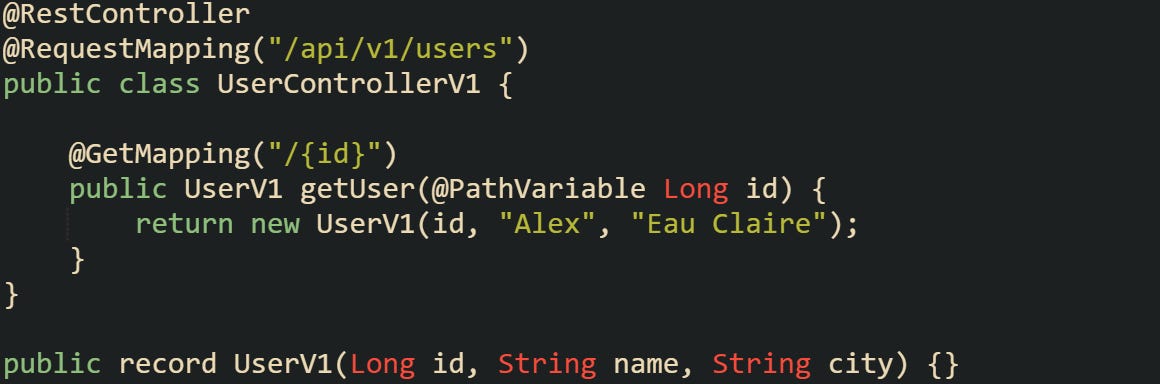
This controller represents version 1 of the schema. As the application evolves, more information might be added, such as an email address or a registration timestamp.
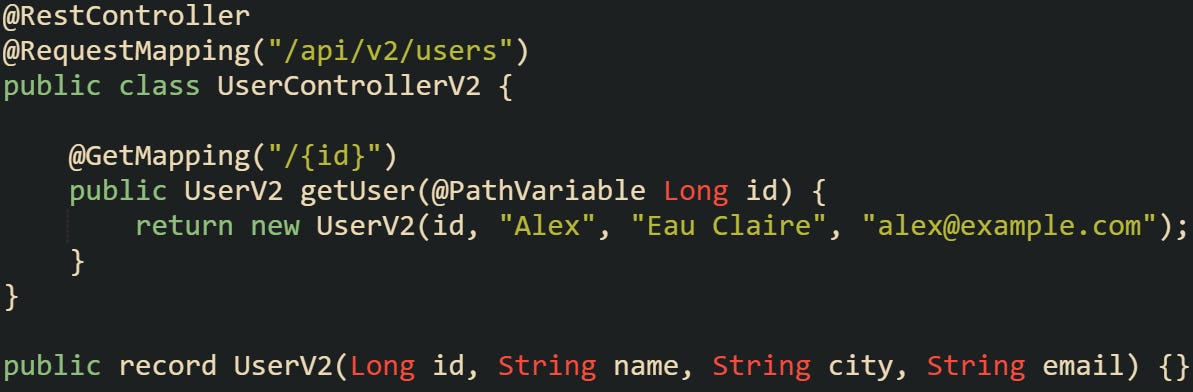
When both versions exist, your API schema tracking process keeps a record of each one. Each schema version can be automatically generated and stored in a versioned directory or database entry, giving you a stable reference point. This becomes valuable when older clients still call /api/v1/users, while newer ones depend on /api/v2/users. The stored schemas explain exactly what each client sees without confusion.
How Spring Boot Supports Versioning
Spring Boot builds on the Spring MVC framework, which provides several ways to manage versioned endpoints. Version information can be expressed in different ways: through the request path, headers, or media types. Path-based versioning remains the most readable option for REST APIs, though header and content-type versioning give more flexibility when URL stability is important.
Below is an example of using a request header for version control:
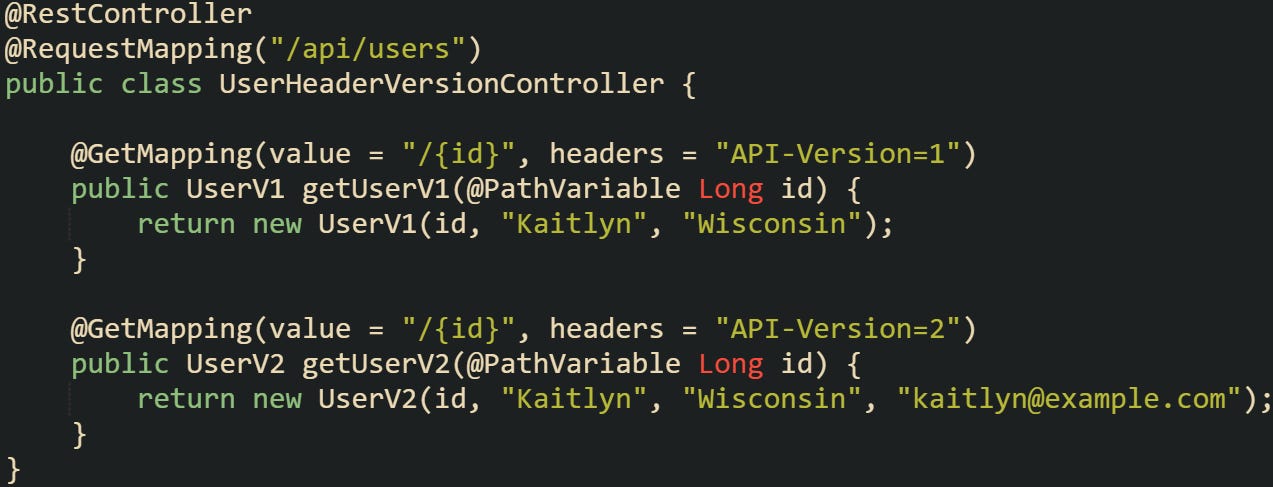
This method keeps the URL structure consistent while allowing clients to specify which version they want by setting a header like API-Version: 2. When the schema is generated, header-based versions end up in one OpenAPI file by default. To split them into separate documents, use GroupedOpenApi and organize controllers by package, path, or a custom filter.
springdoc-openapi supports grouping by package or custom selectors, which is helpful when generating multiple schemas. Most developers generate OpenAPI files at build time with the springdoc Maven or Gradle plugin. At runtime, springdoc serves them through the /v3/api-docs endpoint, and exporting that output to a file needs an extra step or small custom helper. During the integration test phase, the springdoc-openapi-maven-plugin runs while the application is already started by the spring-boot-maven-plugin, then generates the OpenAPI document as YAML or JSON for your controllers and models. These schema files can then be saved under versioned names, like openapi-v1.yaml or openapi-v2.yaml, for easy reference later.
Why Storing Schema Versions Matters
APIs evolve quickly, and without storing older schemas, it’s easy to lose sight of what previous releases looked like. When a new deployment happens and something breaks, it helps to compare what changed between versions instead of scanning source code for differences. Storing versioned schemas provides that comparison anchor.
We can imagine that a service removes a response field or changes its type. If the schema for version 1.0.0 is stored, and version 2.0.0 is generated later, those files can be compared before the release even goes live. A schema diff tool can catch that a previously optional field became required or that an integer changed to a string. This check can run automatically in the build pipeline and block incompatible updates before they reach production.
How to Automatically Generate and Compare Versioned API Schemas
Automating how schemas are produced and compared is what makes version tracking practical instead of manual work. When an API grows across multiple releases, manual inspection isn’t sustainable. The good news is that Spring Boot and modern OpenAPI tools can be tied into your build process to generate schema files automatically, store them under versioned names, and compare them with earlier versions before a deployment happens. This setup catches compatibility problems early while also giving developers a predictable structure for managing change across environments.
Generating the Schema Artifact
Schema generation can happen during build time or when the application starts. Springdoc OpenAPI is the most common library used with Spring Boot for this purpose. It scans controllers, request mappings, and model classes, then produces an OpenAPI document describing them. That document becomes the schema artifact that represents your current API contract.
A common Maven configuration for Springdoc can be defined like this:
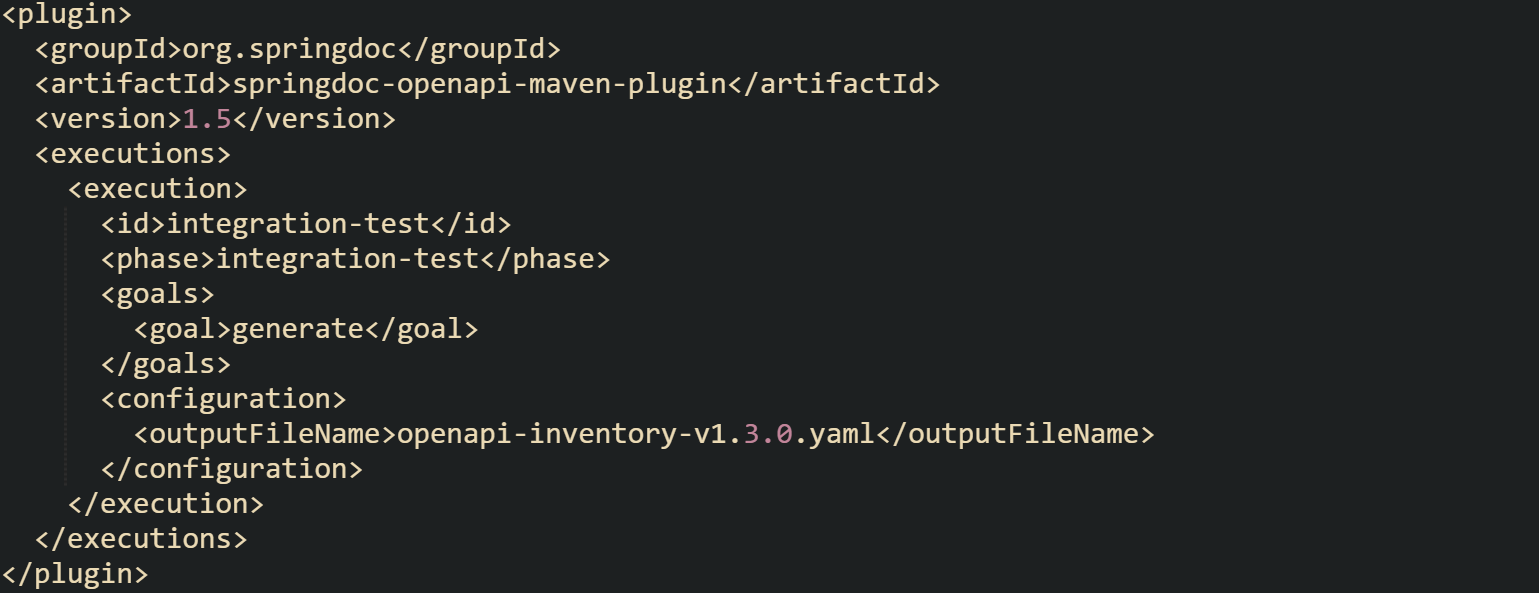
The spring-boot-maven-plugin handles starting and stopping the app during that phase so the schema generator has a running endpoint to read from.
This gives you a reproducible schema file each time a build runs. You can then attach that artifact to your version control system or package registry. If you have multiple microservices, this same process can run independently for each one, keeping schema tracking local to the service that owns it.
Storing Versioned Schema Files
Having the schema generated isn’t enough, it needs to be stored in a way that makes retrieval easy when comparisons are run later. Some projects keep them under a schemas/ directory within the repository, while others upload them to a remote artifact store such as S3, Nexus, or Artifactory. The idea is to keep every schema alongside the version of the code that produced it.
Each directory becomes a snapshot of a historical schema. A structure can look like this:
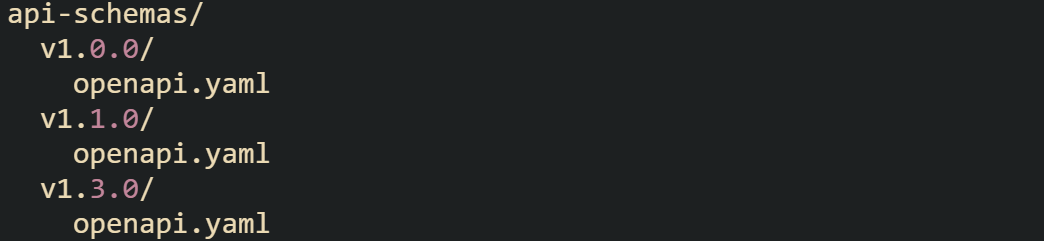
Some projects extend this by saving additional metadata alongside the schema. A small JSON file can record the build number, commit hash, or build timestamp, giving context to when and how that version was created.

Those small details help trace a schema back to the exact build that produced it. When stored consistently, they also make it easier for pipelines or automated tools to locate prior versions for comparison later on.
Running Schema Comparison
Once schema versions accumulate, comparing them becomes an automated guardrail before releases. The purpose isn’t just to check for differences but to detect changes that could cause clients to break, such as renaming or removing fields.
One method is to build a small utility that compares two JSON or YAML files and flags removed or changed fields.
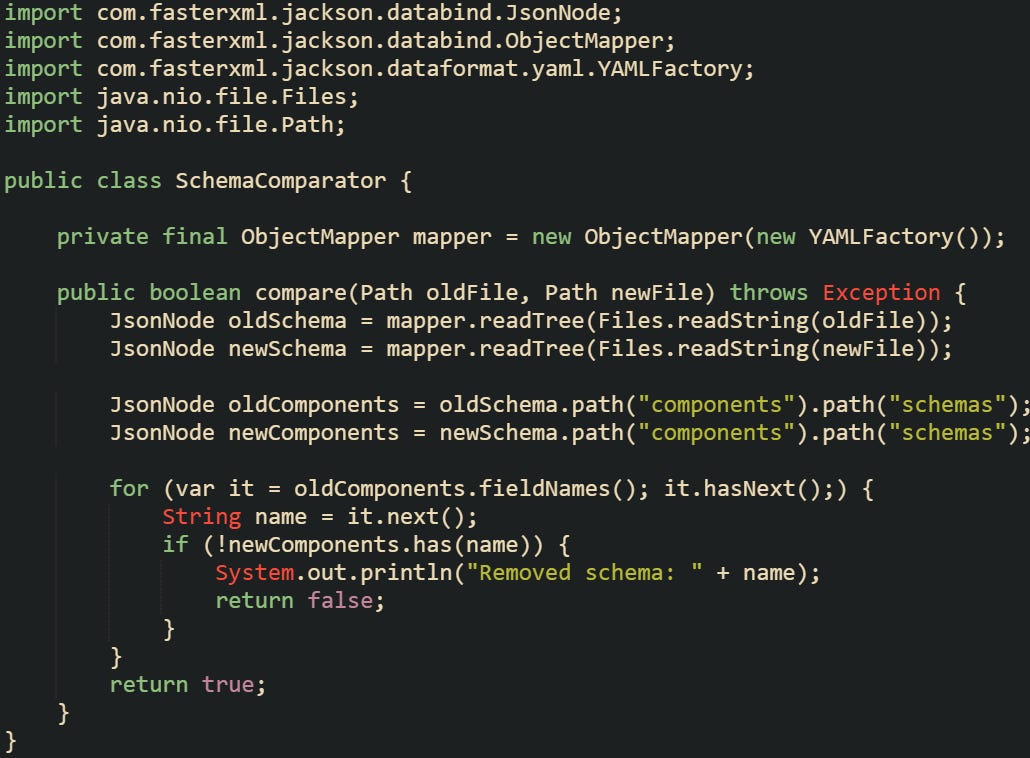
That code checks the structure at a high level but can be expanded to verify property types, required fields, and endpoint definitions. Some open-source libraries can handle this comparison for you, but having your own implementation means it can be tailored to project conventions.
You might also want to surface the results within a build report. For example, a CI system could run the comparison script, print out changed fields, and mark the build unstable if a breaking change is detected. This workflow keeps schema compatibility a first-class concern throughout development.
Automating Storage Through the Pipeline
After schema generation and comparison are both dependable, the next natural step is to let automation take control. The full cycle of generating the schema, running comparisons, and storing the results should happen automatically as part of your continuous integration process. This keeps version tracking consistent and removes the need for anyone to run checks manually before a release. Continuous integration tools such as Jenkins, GitHub Actions, or GitLab CI can handle this flow from start to finish. During a build, the system compiles the project, generates the OpenAPI schema file, retrieves the last published schema, compares it with the new one, and then decides what happens next. If the comparison passes, the pipeline stores the new schema and updates the reference version. If it fails, the build stops before any deployment takes place.
This can be configured entirely within your CI pipeline so no manual steps are needed. Each stage handles a specific responsibility, the build compiles the code, the generator produces the schema file, the comparison script checks for breaking changes, and the artifact store holds versioned copies.
To keep the process repeatable, the pipeline can fetch the previous schema directly from a repository or an artifact store such as Nexus or S3. That makes sure the comparison always runs against the latest released version. A short automation script can look up the most recent schema directory, compare it with the one just generated, and either store it as the next version or stop the build if incompatibilities are detected.
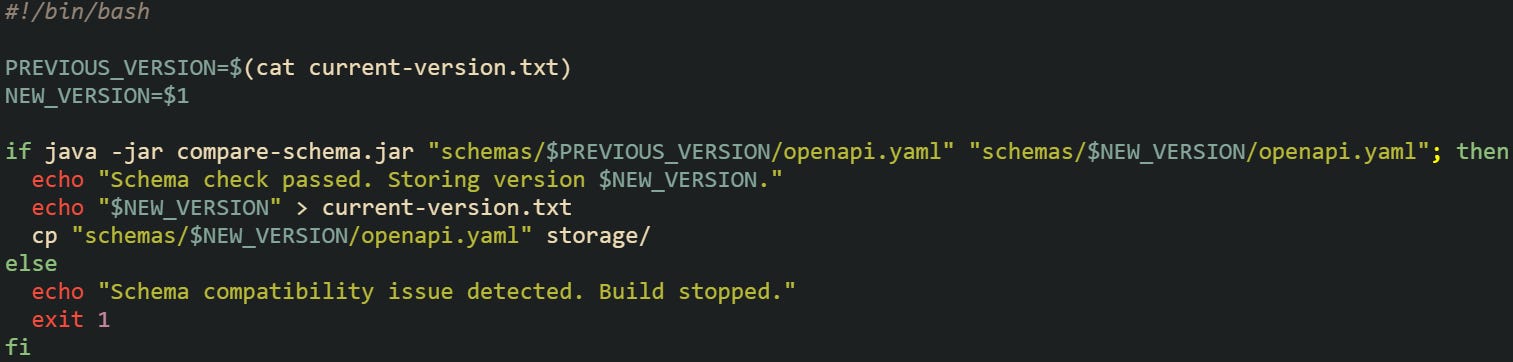
This script represents the kind of logic that can be built into a CI pipeline. It retrieves the previous version, compares it with the new schema, and updates storage when compatibility is confirmed. When integrated into the release process, it makes sure that every build preserves a consistent record of schema versions without depending on manual steps.
Contract First vs Code First
Spring Boot projects usually fall into one of two camps for schema management. Contract-first projects start with an OpenAPI definition that acts as the source of truth. Code is generated from that file, making sure everything aligns with the schema from the start. Code-first projects, on the other hand, generate schemas from annotations in the codebase. Both styles benefit from version tracking but handle it at different stages.
In a contract-first model, version tracking happens by tagging the contract files themselves. When version 2.0.0 of a contract is created, that file is committed or stored as its own schema version. Code-first models rely more heavily on automation because the schema is a build artifact.
An example of contract-first workflow can look like this YAML schema:
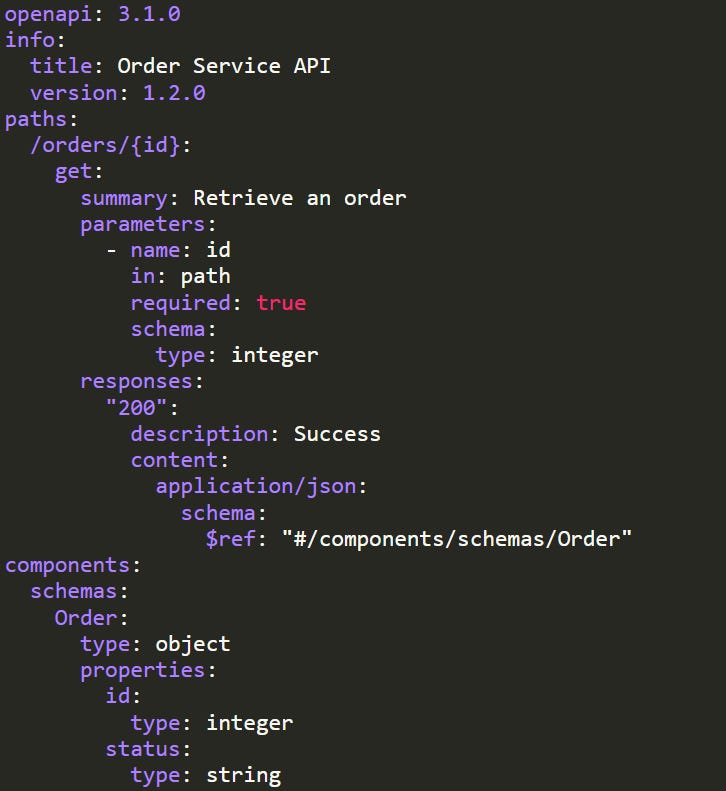
That contract file would be the versioned artifact stored in your schema history. Developers generate stubs or interfaces from it, and the same versioned structure is maintained across releases.
Conclusion
Schema version tracking in Spring Boot contracts works best when it’s treated as part of the build process, not an afterthought. The mechanics behind it come down to generating OpenAPI files from your controllers, storing them under versioned paths, and running automated comparisons before deployment. Each step connects the code that defines your API to the schema that represents it, creating a consistent history of changes. When this flow is tied into a CI pipeline, every release carries a self-documented record of what changed and how it affects compatibility. It’s a practical system that keeps API growth traceable, measurable, and aligned with the code that produced it.

Hi Alexander, thanks for this post, it put me on the right track. I get an Exception (Connection Refusef) when the app is not running. Numerous discussions on the web state that the app has to be started, then mvn verify executes properly. How did you integrate the generation into your build pipeline? Did you use ant?