

Almost all relational databases end up with large tables full of rows that no longer drive day to day traffic but still matter for audits, reports, and legal retention rules. If every historical row stays in the main tables forever, queries slow down, storage bills grow, and routine maintenance turns into heavier work than it needs to be. Archiving steps in here by moving aging rows into separate tables or partitions so current activity stays fast while past data stays easy to query. Good archiving plans focus on table structure, how data moves from live tables to archives, how constraints behave before and after the move, and how storage needs will grow over the next few years.
Core Mechanics Of SQL Data Archiving
Archiving with SQL rests on two big ideas that work together in practice. Tables need a structure that makes room for history without slowing daily traffic, and rows need a predictable path as they age out of primary tables. Main and archive tables, or partitioned layouts, give that structure. Batch moves, time based cutoffs, and careful use of transactions handle the movement side. With those in place, current queries stay focused on recent data while older rows still sit in tables that are easy to reach when audits or long range reports come up.
Choosing Archive Structures
Archive layout usually falls into two broad families in real systems. One family keeps a main table that holds current data and a separate archive table that holds history. The other keeps one logical table that is physically partitioned, with older partitions treated as the archive portion. Both families rely on standard SQL features, and database vendors still invest in them for current releases.
Main plus archive layouts keep things concrete. The archive table usually has the same columns, data types, and primary key as the live table. That way an orders row has the same shape whether it lives in orders or orders_archive. Queries and reports then reuse the same projections and filters, with only the table name swapped. Many teams also keep the same primary key and a smaller set of secondary indexes on the archive side, aligned with history queries that filter on dates or account identifiers rather than transactional workloads.
One very common DDL pattern for this style reuses an existing table definition and makes a copy for archive storage. In MySQL that often looks like this:

That single statement clones column definitions and indexes from orders into orders_archive. Some teams follow it with extra DDL that removes secondary indexes that only matter for live traffic or adds archive specific indexes for typical reporting ranges.
PostgreSQL users tend to rely on CREATE TABLE with a LIKE clause to reach the same goal. It copies the table shape at creation time, but the new table is separate after that, so later schema changes need to be applied to both tables through migrations.

This copies column definitions and NOT NULL constraints, plus CHECK constraints, default expressions, and indexes including PRIMARY KEY and UNIQUE into the new table at creation time. After that point, the two tables evolve independently, so migrations need to touch both tables when new fields appear, which keeps archiving scripts and reporting queries aligned.
Archive tables do not have to live in the same schema or even the same database instance. Many production setups place archive tables in a separate schema such as archive, which helps DBAs reason about which tables hold live data. Very large systems sometimes go further and host archives on a different cluster or on storage tiers tuned for cost instead of latency. Managed database services commonly support read only replicas or cheaper storage classes that work well for history.
Partitioned tables bring a different structure. Instead of two tables, there is one logical table split into many partitions, usually by time. PostgreSQL, SQL Server, and MySQL all support partitioned layouts that map a date or timestamp column to a partition that holds a particular range. Queries that target recent dates hit the newest partitions, while archive queries can reach older partitions directly. Because the logical table name stays the same, application code that runs SELECT statements can continue to reference that name even as partitions age in and out.
MySQL offers an ARCHIVE storage engine for special cases, but current MySQL documentation still recommends InnoDB for most tables. For modern MySQL, new archive layouts usually rely on InnoDB tables with partitioning or separate archive schemas, so features such as row level locking, replication support, and modern backup tools apply to archived rows as well.
Moving Rows Into Archive Tables
Row movement is the practical side of archiving. Data starts in the main table, ages based on a time column or status column, and eventually moves into the archive table or into an older partition. Cutoff rules vary by system, but many shops pick a time based rule such as completed orders older than one or two years. Some systems drive archiving from status fields such as status = 'CLOSED' combined with a completion date.
For a main plus archive layout, the archive move starts as an INSERT that pulls rows out of the primary table and writes them into the archive table. That INSERT usually mirrors the columns one by one, tying the move to a clear cutoff.
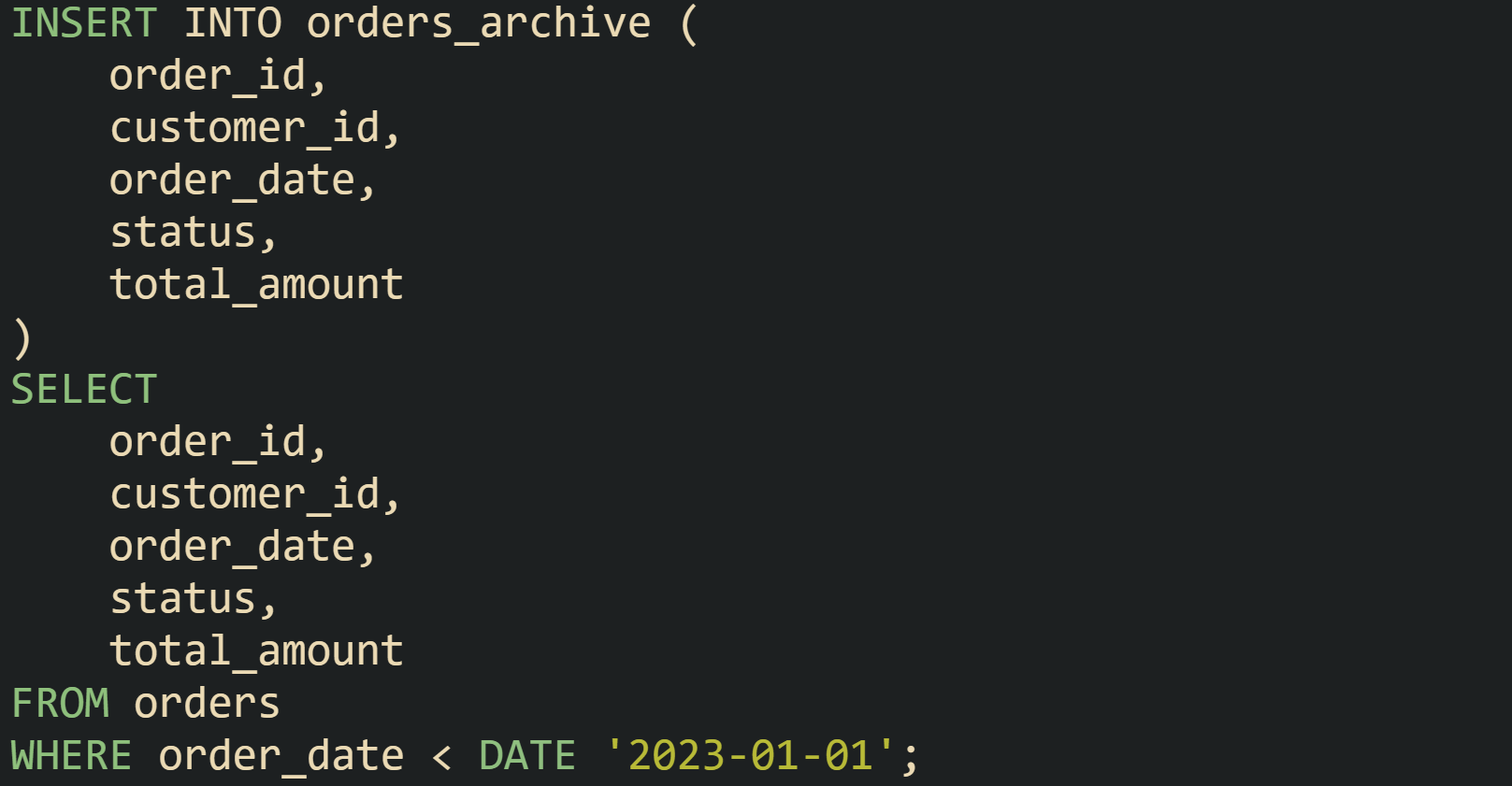
Application owners often run a SELECT COUNT(*) on both tables around the same time to confirm that expected rows arrived in the archive and still exist in the main table. After that, a deletion step trims the live table to remove the archived rows.

Very large datasets call for smaller bites. Long running INSERT and DELETE statements chew through transaction logs and can hold locks for longer than anyone wants. To manage that pressure, many teams batch the work. A common method takes a fixed number of rows per run, staggered across the night or low traffic periods. Here is one way to pull batches by ordering on the date field and limiting the number of rows per pass in a database that supports LIMIT:
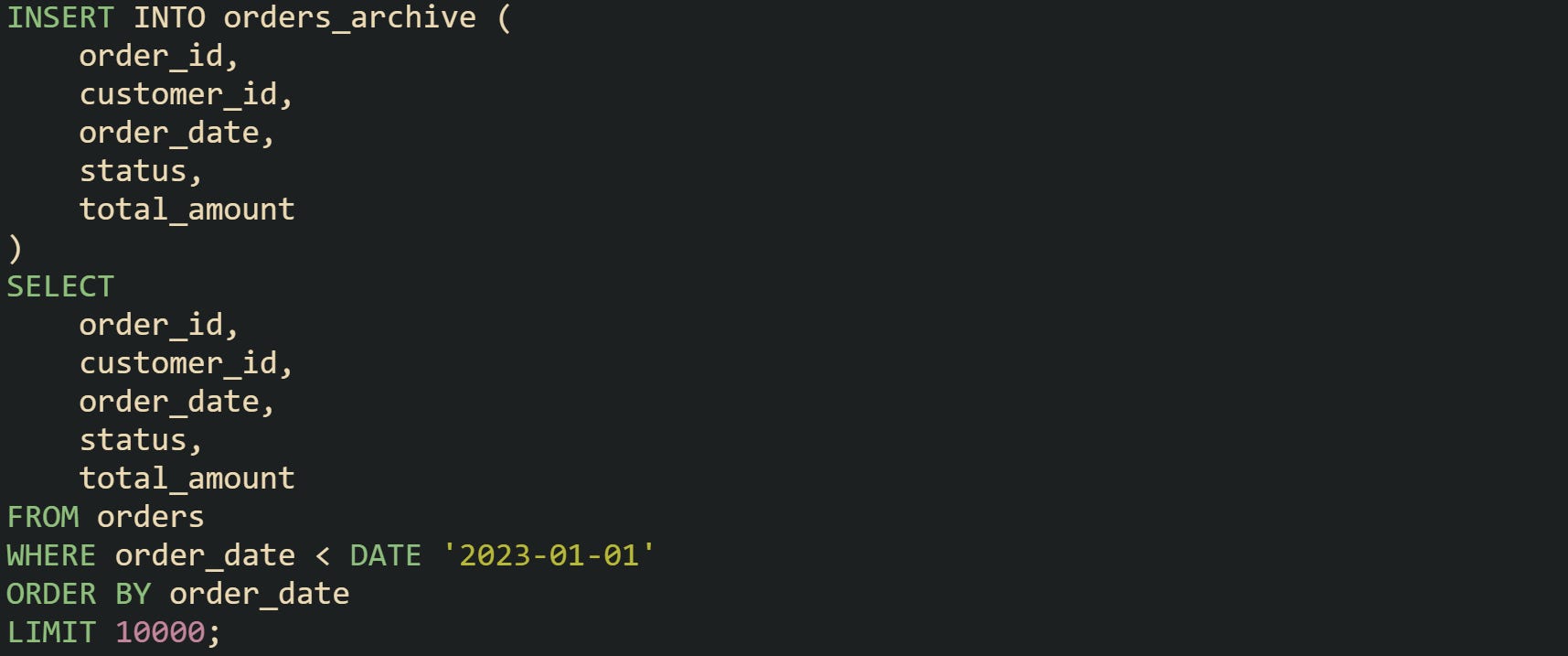
A companion delete step then trims the source table by order_id for the same batch selection, so each pass removes the same rows that were just copied:
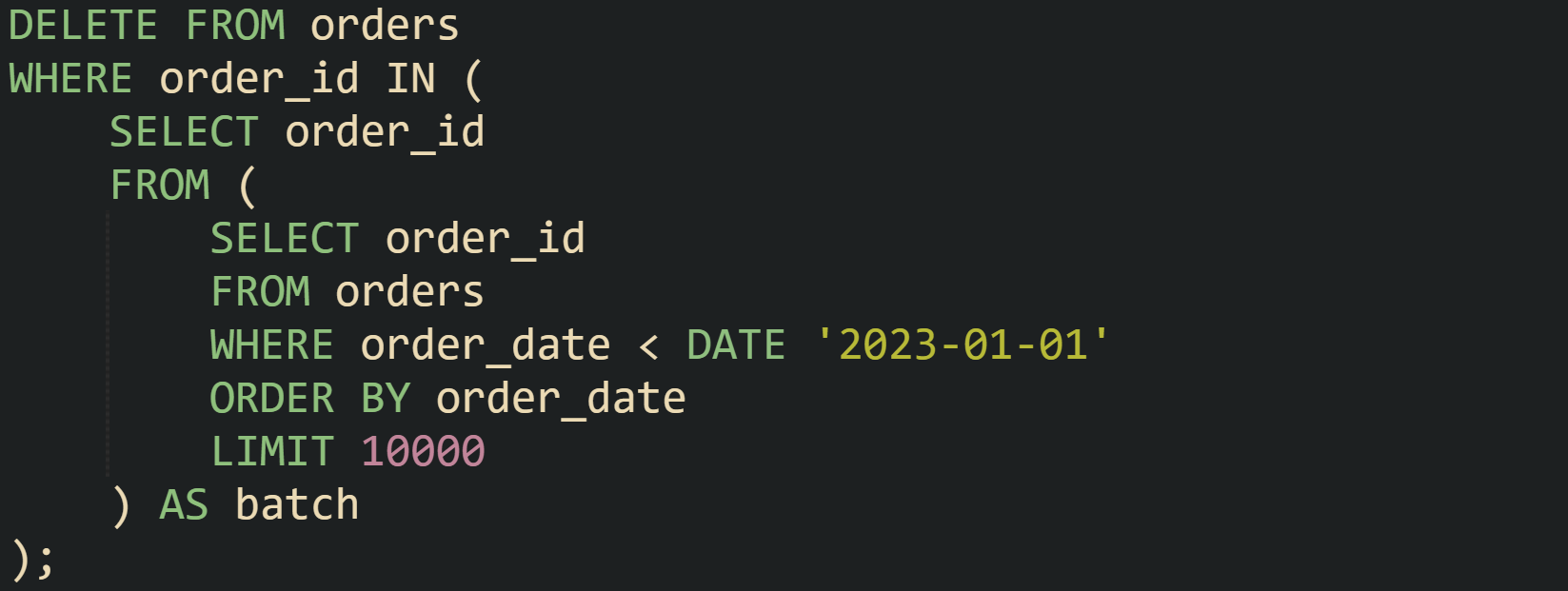
Production systems often wrap those two statements inside a stored procedure or application job that runs on a schedule, repeats until no rows match the cutoff, and logs how many rows moved for monitoring.
Partitioned tables change the mechanics. Data still lands in the main table, but new rows go into the newest partition based on the partitioning rule. Archiving no longer means copying rows; instead, older partitions can be detached or switched out in a single step. PostgreSQL offers the ALTER TABLE table_name DETACH PARTITION partition_name command for this purpose:

After that statement, orders_2022 turns into a regular table that holds all rows from 2022. DBAs can move that table into an archive schema, take a separate backup, or move it to a different server through dump and restore tools.
SQL Server supports a related model with partition switching. A target table with the same structure as the partitioned table can receive an entire partition in one atomic operation:

That switch moves all rows that fall into partition 3 into orders_2022 without scanning individual rows. Tuning the partition function so that partition 3 lines up with a full year such as 2022 keeps the process predictable.
Some systems also keep a small staging table to help with safety checks. Data for a retiring month or quarter can move from the main partitioned table into a staging table first, where checks on counts and simple consistency rules run. After that staging step, DBAs either move the table into archive storage or attach it again in case a problem surfaced. This flow creates a gentle on ramp for teams that are new to partition switches and want a little extra assurance around history moves.
Protecting Historical Data Integrity
Careful archive planning reaches past storage and table layouts. Historical rows still sit inside a relational model, and that model ties tables together with foreign keys, constraints, and indexes. Moving data without care for those ties can leave orphan rows, broken references, and archives that give the wrong answers when someone runs a report. Good plans keep link structure in mind, keep archived rows readable, and keep growth from surprising anyone who maintains backups or retention rules.
Referential Integrity During Archiving
Foreign keys link parent and child tables so that a row in one place always points to a row that exists in another. Archiving changes where data lives, but those relationships still matter. Many problems start when parent rows move into archive tables while child rows stay in primary tables, or when child rows move while parents stay put. Queries that rely on joins then lose rows or return partial data that does not match reality.
Many teams walk through their schema by dependency depth before they write any archive script. Tables that do not act as parents in foreign key chains move first. After that, parent tables that only point to already archived children can move in turn. That sequence means foreign key checks pass at every step, rather than being fixed later with manual updates.
Table definitions in archive schemas can keep foreign keys as well. That choice keeps link structure intact inside the archive and gives confidence that history tables still follow relational rules. For example, a payments_archive table can retain its foreign key to customers_archive so that archived payments always point at archived customers. DDL for that layout can look like this in PostgreSQL:
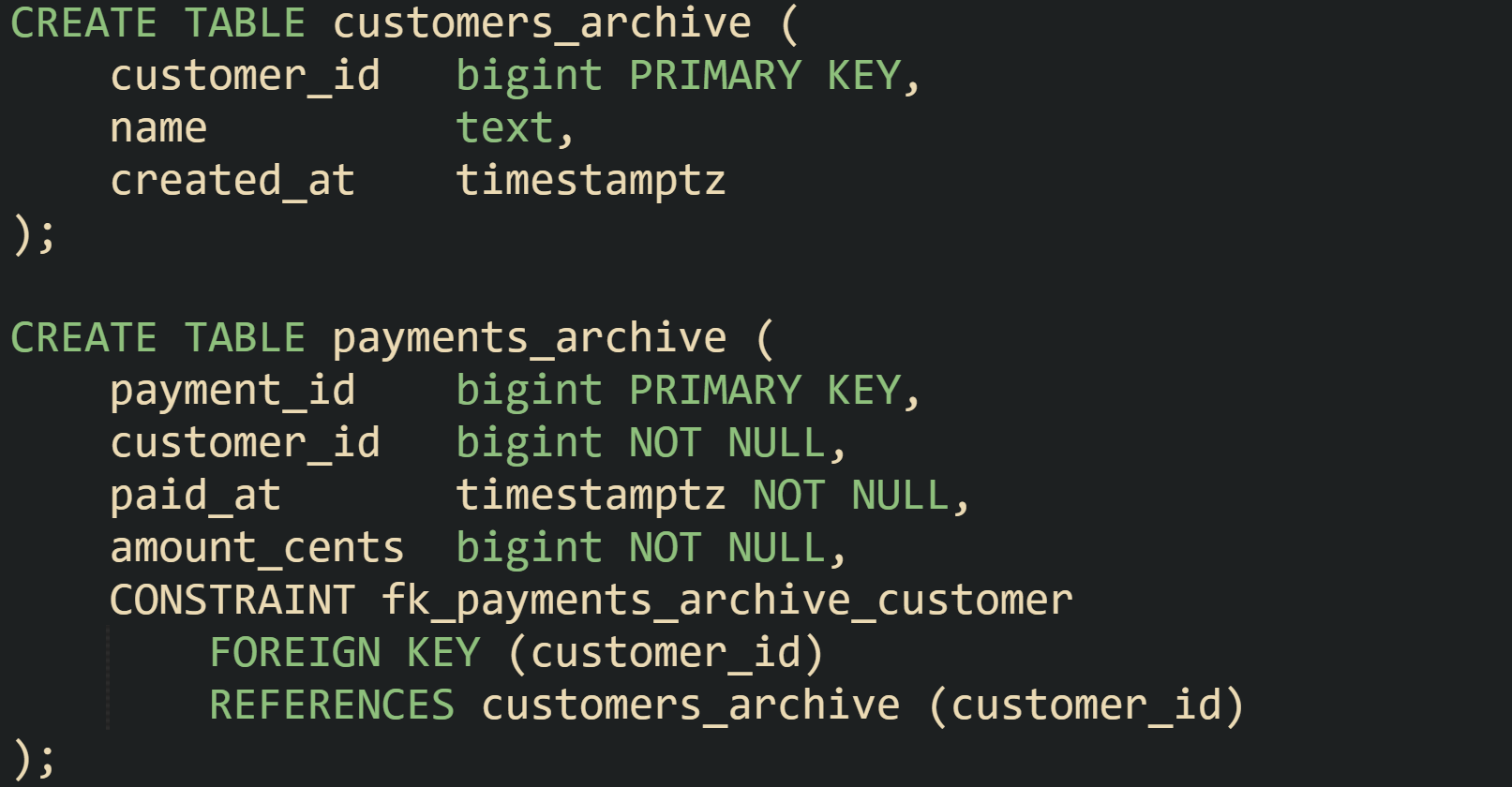
There are some systems that relax archive constraints to reduce friction when history arrives from many sources or from older versions of the schema. When that happens, data pipelines and reporting code need extra checks, because the database no longer blocks missing parent rows. That tradeoff needs to be deliberate rather than accidental.
Partitioned tables bring their own details. In older engine versions, foreign keys that reference partitioned tables had more limits. Current PostgreSQL releases allow foreign keys that point at a partitioned table, with checks applied to relevant partitions internally. That setup keeps transactional integrity for live data while giving room for archive partitions to detach later.
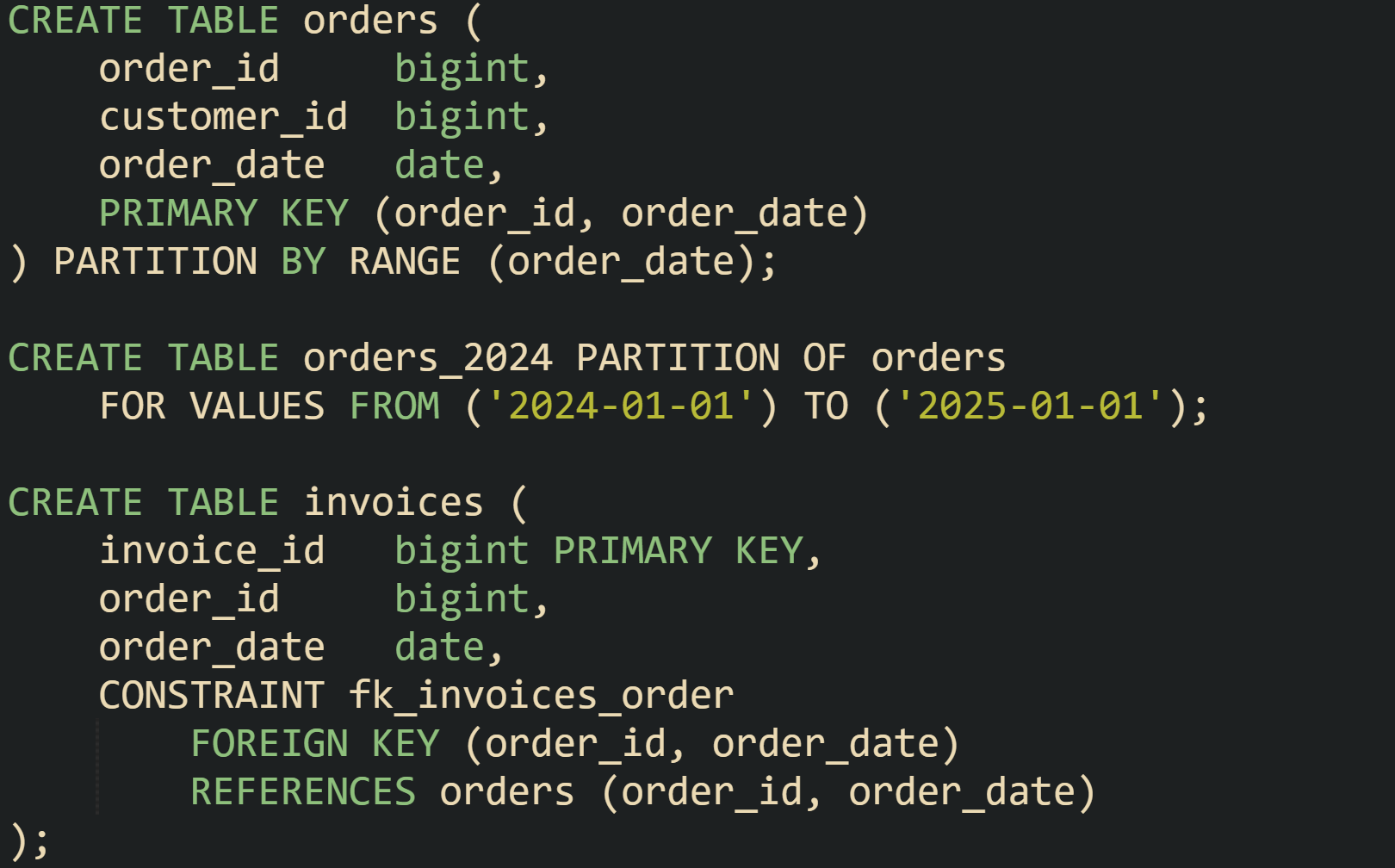
When a partition such as orders_2024 later detaches and moves into archive storage, any foreign keys that still point at the parent orders table continue to apply to newer partitions that remain attached. Detached partitions turn into regular tables that can be moved, backed up, or queried with archive specific tools. Careful planning of which tables act as parents and which act as children keeps these transitions smooth.
Keeping Archived Data Queryable
History that nobody can reach does not help audits, investigations, or long range reporting. Archive layouts work best when analysts and support staff can still run queries that span current and historical rows without re-learning the schema for every query. That balance comes from a mix of views, partitions, and access control.
Separate main and archive tables pair well with read only views that union both sides. Such a view gives one logical name that front end applications and reporting tools can target while the database does the work of reading from more than one table. With UNION ALL, performance stays more predictable because the engine skips duplicate checks.
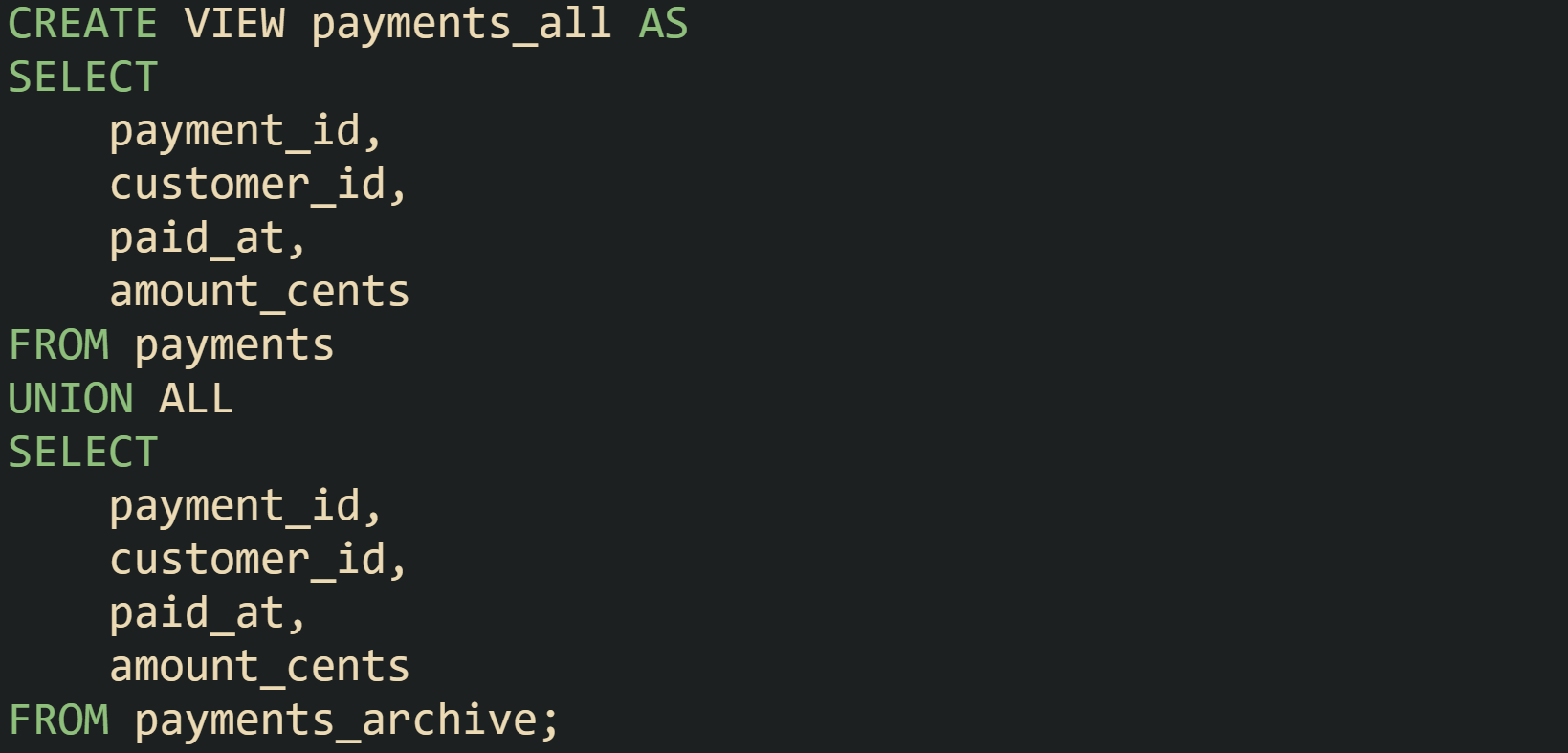
Client code that only needs to read data can point at payments_all and still benefit from indexes on payments and payments_archive. Queries with filters on ranges or customer identifiers push down into the base tables, and the planner merges results afterward.
Some teams prefer views that favor current data while still giving access to history when needed. Reporting views can filter out very old rows for most users, while dedicated history views present the entire time range to analysts who need it.

Systems built on partitioned tables handle part of this work through partition pruning. When a query filters on the partitioning column, such as a date, the planner can skip partitions that sit outside the requested range. A report that only needs the last three months of activity can run against a table with years of data, and the engine reads only the partitions that match that time window.
Detached partitions used for archiving can feed into foreign table features or external schemas in some engines. PostgreSQL, for example, can attach archive tables from another server through foreign data wrappers, letting central reporting queries read from remote archives through standard SQL. That design lets daily transactional traffic stay local while archive reads go out to a different cluster.
Access control finishes the picture. Production code that backs user facing screens rarely needs to touch every archive table directly. Many shops give application roles permission to read current tables and selected views, while archive schemas remain restricted to BI tools, ETL jobs, or senior engineers. That separation prevents accidental joins that pull millions of historical rows into latency sensitive queries.
Growth Planning For Archive Storage
Growth planning keeps archives from turning into an unbounded sink for every old row. Volumes keep rising, backup windows stretch out, and queries against very large archives can strain hardware if nobody revisits retention rules. Storage choices then line up archive schemas, partitions, and backup strategies with the time spans that need to stay online, so history stays useful without flooding the system.
Retention rules usually come from business, legal, or regulatory requirements, and databases mirror those rules with different storage tiers. Recent data sits in primary tables, medium term data lands in archive tables on cheaper storage, and very old records live only in backups. One common layout keeps about twelve months of operational history in current tables, several more years in archive tables, and pushes anything older into cold storage that only comes out for rare investigations. That mix keeps day to day work fast while still leaving a long memory trail when someone needs to look back.
Partitioning lines up naturally with that idea. A range partitioned table can hold a fixed window of active partitions, such as monthly or yearly partitions for the most recent few years. New partitions receive fresh data while old partitions leave the main table on a schedule, matching the retention window. This kind of sliding window keeps table sizes under control without constant heavy delete operations.
Storage growth also connects directly to index planning. Current tables gain from indexes that support many query paths, including those used by user interfaces and API endpoints. Archive tables tend to rely on a smaller set of indexes centered on date ranges, customer IDs, or business identifiers that analysts use for history work. Dropping write heavy indexes on archives saves space and trims maintenance work for index rebuilds, while keeping the indexes that support the main reporting use cases for old data.
Compression strategies push disk use down further. Some engines let archive partitions or archive tables use stronger compression settings than live tables. Lower query frequency on archives makes that tradeoff attractive, because extra CPU time for decompression matters less than shrinking storage. In columnar systems and in row stores with page level compression, archive segments can pack dense historical data, while current segments stay tuned for frequent writes and updates that come from daily traffic.
Properly monitoring keeps all of this from drifting. Regular checks on archive table sizes, index sizes, and backup durations help DBAs match real growth against expectations that came from retention policies. When those metrics move away from the plan, retention windows, partition ranges, or compression settings can be adjusted so storage usage, performance, and compliance stay in line with what the organization needs.
Conclusion
Good archiving in SQL comes down to structure, movement, integrity rules, and growth plans working side by side. Tables and partitions give old rows a stable home, batch jobs and partition switches move data along a predictable path, foreign keys and constraints keep relationships honest, and retention plus storage choices keep archives from overwhelming live workloads. With those mechanics in place, databases can serve fast day to day queries while still holding a long, reliable history for audits and analysis.


Super thorough breakdown. The distinction between DETACH PARTITION vs the old INSERT-then-DELETE pattern is somethin that trips up a lot of teams I've worked with. One thing worth noting is that detached partitions can sometimes cause query plan regressions if existing prepared statements have cached plans that assumed the partition existed. Learned that the hard way after a midnight archive job silently broke some reporting quries.