
Markdown shows up in many writing tools, from blog engines to personal note apps. Projects often accept Markdown from a client, turn it into HTML on the server, sanitize the result so it is safe to render, then store or serve that HTML. With a Spring Boot REST API, this flow maps nicely onto a controller that takes Markdown in, calls a Java Markdown library, and returns sanitized HTML to whatever blog, notes app, or CMS is talking to it.
Project Setup For The Markdown Service
Project structure for a Markdown to HTML API rests on a few basic choices. The stack needs a current Java version, a Spring Boot web starter for HTTP handling, and a small group of libraries that know how to parse Markdown and scrub HTML. All of that lives inside a standard Spring Boot project, so routing, configuration, and deployment behave the same way as any other REST API built on the same framework. The goal at this stage is to decide where responsibilities sit. Spring Boot takes care of HTTP, JSON mapping, lifecycle management, and dependency injection. Markdown libraries like commonmark-java and flexmark-java focus on translating text into HTML. On top of that, a sanitizer such as the OWASP Java HTML Sanitizer or Jsoup filters the HTML so only safe tags and attributes reach the client. With those three concerns mapped out, the project layout becomes more predictable and easier to extend later.
Spring Boot Dependencies For Markdown
Project creation usually starts from a standard Spring Boot starter with web support. Current releases work well with Java 17 or newer, and the spring-boot-starter-web dependency brings in Spring MVC, Jackson, and embedded Tomcat for HTTP traffic. On top of that base, the build file brings in the Markdown libraries and a sanitizer.
For example, a typical Maven pom.xml section can look like this:
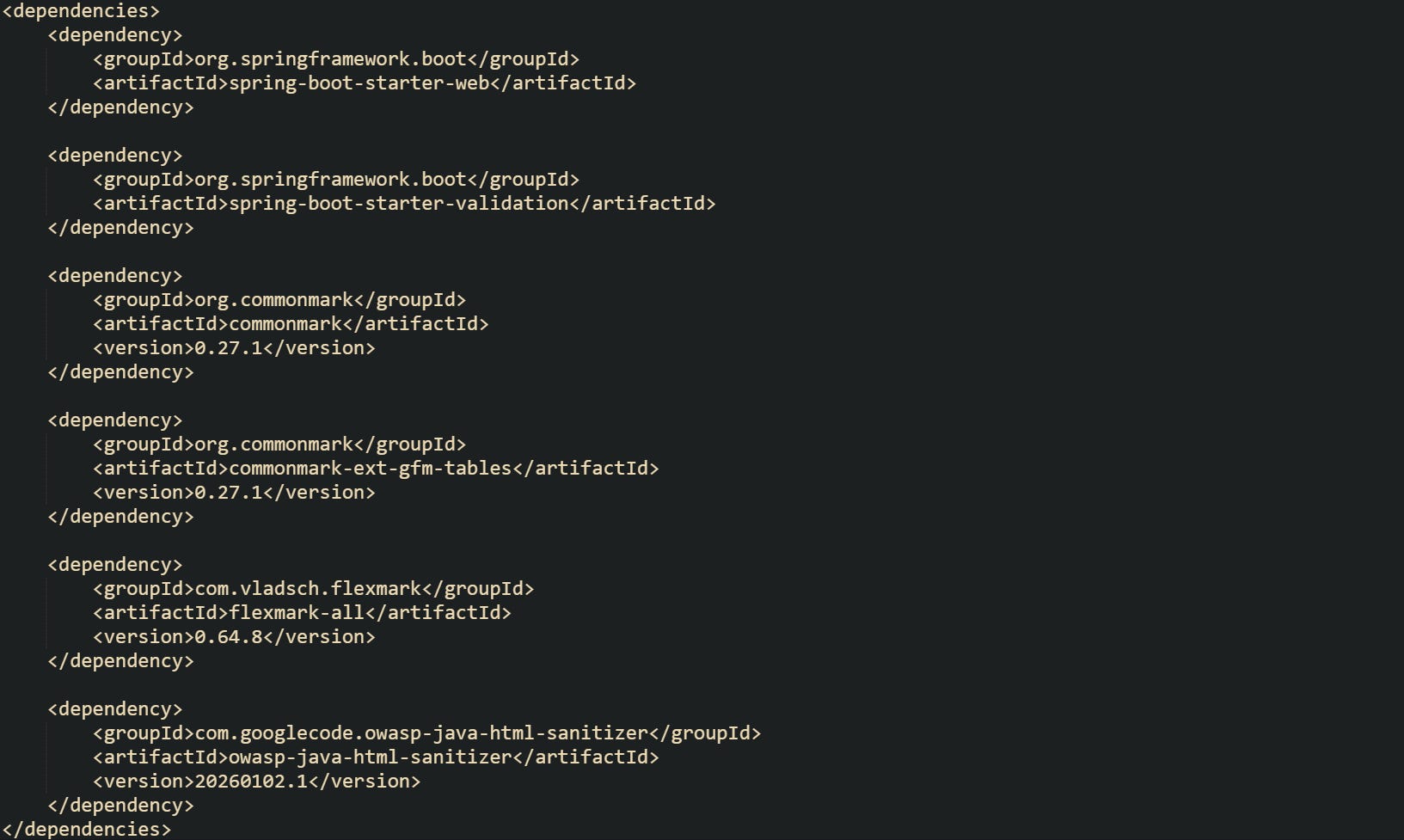
This set of dependencies gives Spring Boot web support, CommonMark parsing, Flexmark parsing with a broad extension set, and a sanitizer that can strip scripts and unsafe attributes. Flexmark can stand in for CommonMark, but having both in the same project helps when a group of developers wants to compare their behavior or support different feature sets behind different endpoints.
Some projects are built with Gradle instead of Maven, and the same idea carries over with a different syntax. The build.gradle file with the Kotlin DSL can carry the same libraries in a compact form:

Both build styles place the Markdown libraries at the same level as any other dependency. Spring itself does not need any special configuration to work with them, because they are plain Java libraries without Spring specific starters.
Projects commonly rely on a small Spring Boot entry point that ties the project into a runnable application and gives the REST controller a place to live. One common layout keeps a single top level application class in the root package:
![@SpringBootApplication public class MarkdownApiApplication { public static void main(String[] args) { SpringApplication.run(MarkdownApiApplication.class, args); } }](https://substackcdn.com/image/fetch/$s_!zLex!,f_auto,q_auto:good,fl_progressive:steep/https%3A%2F%2Fsubstack-post-media.s3.amazonaws.com%2Fpublic%2Fimages%2Fc6b2c58b-86b5-433c-93c7-1f983a3a4d2a_1769x298.png "@SpringBootApplication public class MarkdownApiApplication { public static void main(String[] args) { SpringApplication.run(MarkdownApiApplication.class, args); } }")
That class triggers component scanning for controllers and services in the same package tree. After the dependencies are in place and this main class exists, Spring Boot can start an embedded server, load the Markdown components, and begin handling HTTP requests.
Controller Structure For The Api
Controllers bridge the HTTP layer and the Markdown service. They accept JSON input, turn that into Java objects, call a service method, then wrap the result back into JSON. For a Markdown to HTML API, the input is usually a block of Markdown text plus optional flags, and the output is HTML text that has already passed through a sanitizer.
Input that carries only raw Markdown can be represented with a compact record:

This record pairs a field name with the Markdown text, which keeps the request body small while still working well with JSON mapping.
Many APIs also send structured HTML back instead of a bare string, which keeps the response structure flexible if extra metadata needs to appear later:

This response wrapper keeps the door open for future fields such as a content id, warnings about stripped tags, or a separate plain text preview.
The controller can then accept MarkdownRequest and return HtmlResponse while delegating all conversion details to a service bean. Routing can keep endpoints separate for CommonMark and Flexmark so clients can pick the behavior they prefer.
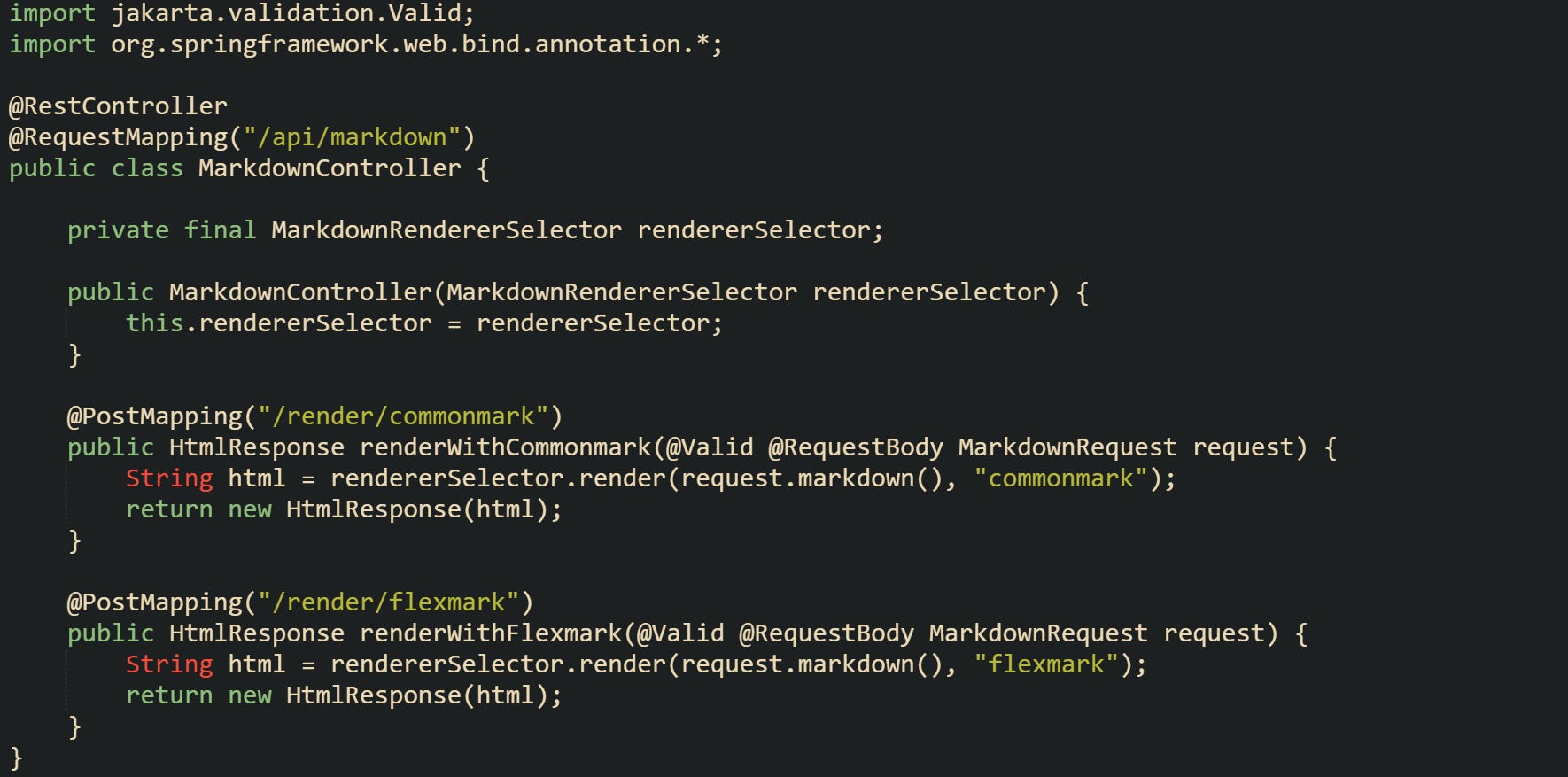
In this, the controller keeps HTTP concerns narrow. Parsing and sanitization stay inside MarkdownRendererSelector, while validation happens at the request edge through Bean Validation. That separation helps beginners see the boundary between the web layer and the Markdown logic.
Some projects add a small amount of validation at the controller edge, either with Bean Validation annotations or manual checks, so empty Markdown payloads do not move further into the system. Bean Validation works well in this context and stays close to the REST boundary.

With annotations like @NotBlank, Spring Boot can respond with a 400 status code when a client sends an empty string. That keeps the Markdown service from handling invalid input and keeps error handling localized near the HTTP layer.
Markdown Parsing In The API Layer
Controllers pass raw Markdown into a service, and that service turns the text into HTML before it ever reaches a template or front-end component. Parsing and rendering live in that service layer, while HTTP details stay in the controller. CommonMark Java and Flexmark Java both produce HTML from Markdown strings, and a sanitizer runs afterward so the final output is safe to embed in a browser page.
CommonMark Java Parser Flow
CommonMark defines a shared Markdown specification that many tools follow. The commonmark-java library takes a Markdown string, builds an internal node tree, and then renders that tree into HTML. Spring only needs a small service bean that holds a Parser and an HtmlRenderer and exposes a method that the controller can call.
Take this service example focused on CommonMark:
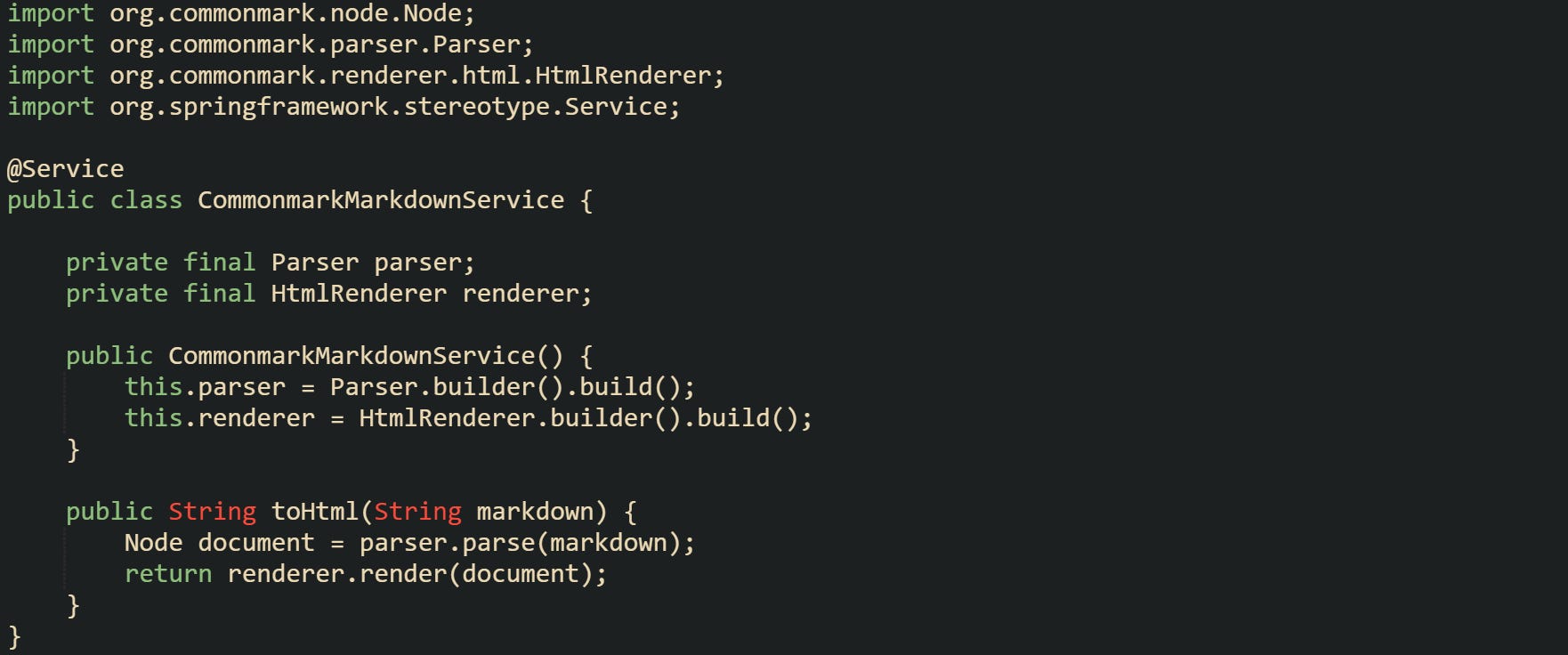
Here, the class keeps two long lived objects, the parser and the renderer, and calls them on every request that needs CommonMark output. The toHtml method receives the Markdown text from a controller or another service, builds the node tree, then turns that tree into HTML in one call.
It’s common for applications to need GitHub style Markdown features such as tables or strikethrough. CommonMark Java offers extensions that plug into the same parser and renderer builder pattern. An extension enriches the node tree with additional node types and tells the renderer how to emit HTML for them.
The configuration can grow a little as extensions come into play:
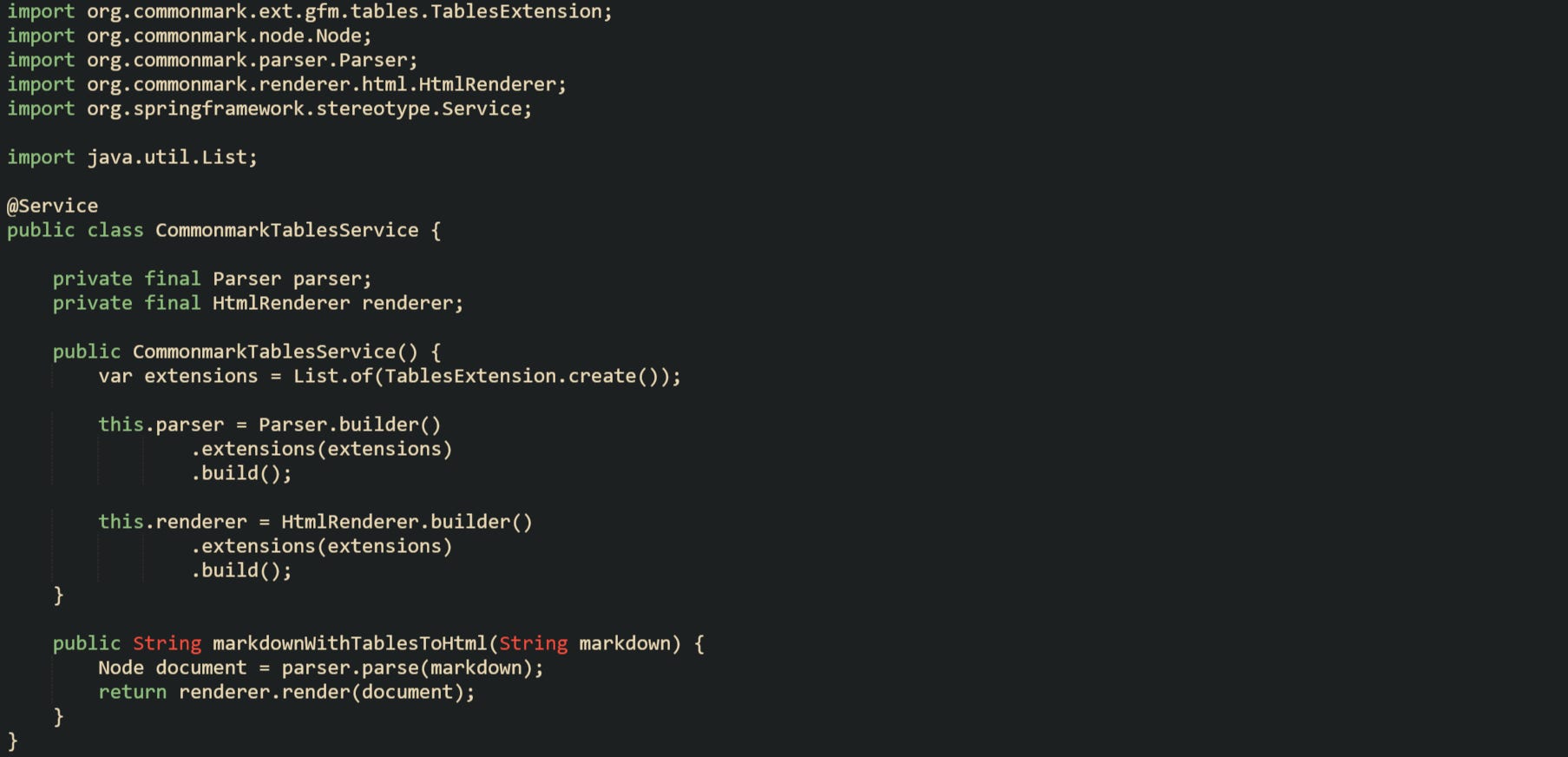
Extensions are passed into both the parser and renderer builders so the node tree and HTML output stay in sync. That alignment means a CommonMark based API can accept Markdown with tables in the request body and still produce well formed table elements in the HTML response.
CommonMark Java keeps its public API small, which suits service code that just wants to call a parser and renderer without a lot of moving parts. More advanced use cases can walk the node tree for custom processing, but a plain pipeline like this is usually enough for blog posts, documentation blocks, and note content.
Flexmark Java Parser Flow
Flexmark Java builds on the CommonMark grammar and adds a large extension family, which suits projects that want GitHub style features, table of contents generation, definition lists, and many other extras. The flexmark-all artifact pulls in the core parser, renderer, and a wide collection of extensions so the build in a Spring Boot project stays short.
Configuration begins with a MutableDataSet that carries options and the list of active extensions. That data object travels into both the parser builder and the HTML renderer builder.
The core parts fit into a service class like this:
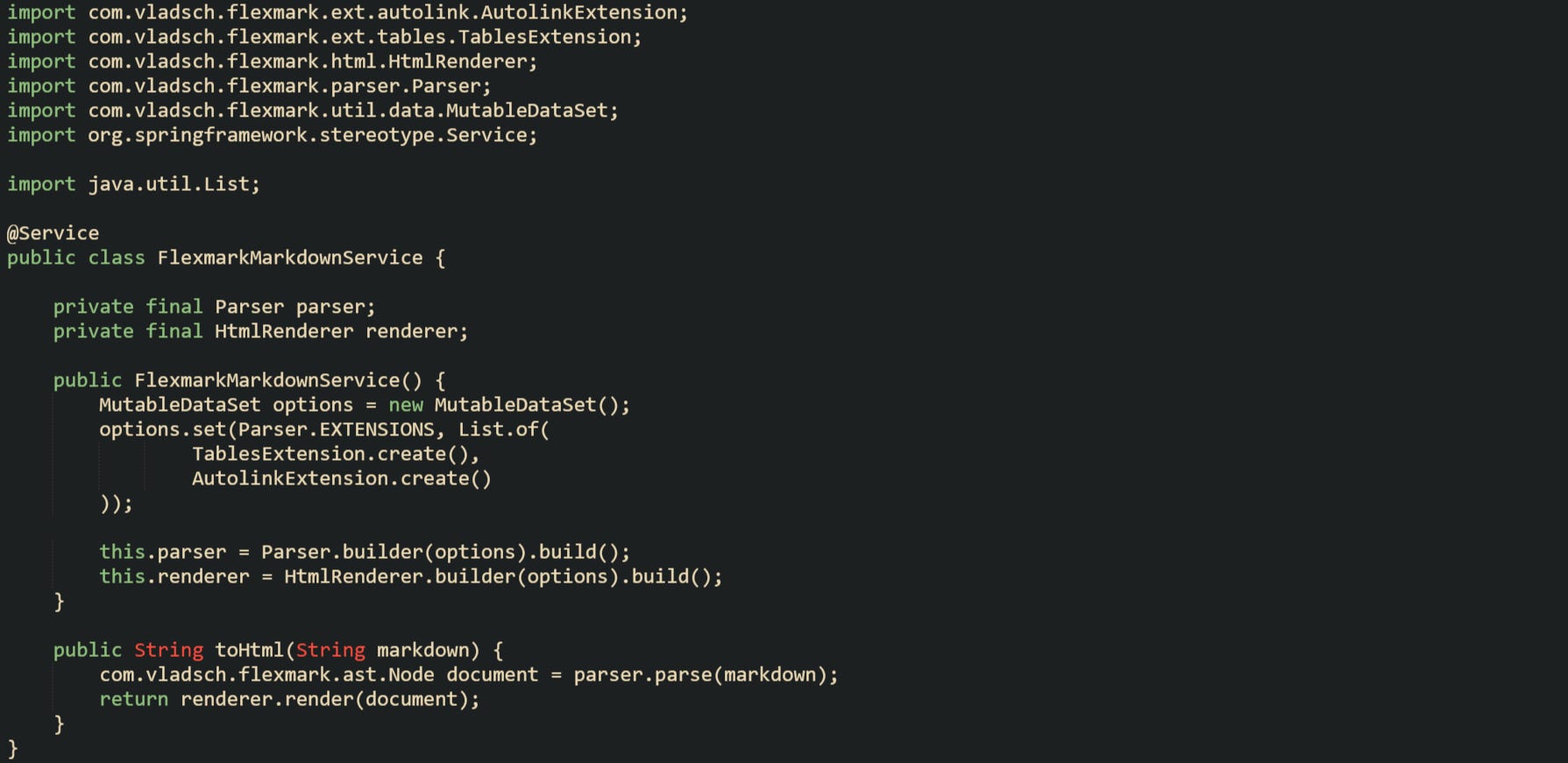
Here the Markdown string gets parsed into a Flexmark node tree that includes extra nodes for things like tables and auto linked URLs, and then the renderer converts that structure into HTML in a single call. Extensions are centralized in the options object so the configuration for parser and renderer stays consistent.
Some APIs want to support more than one flavor and allow clients to select a style that matches their editor. That choice can sit in a higher level service that delegates to CommonMark or Flexmark based on a flag in the request.
A small dispatcher service can layer on top of the two specific services:
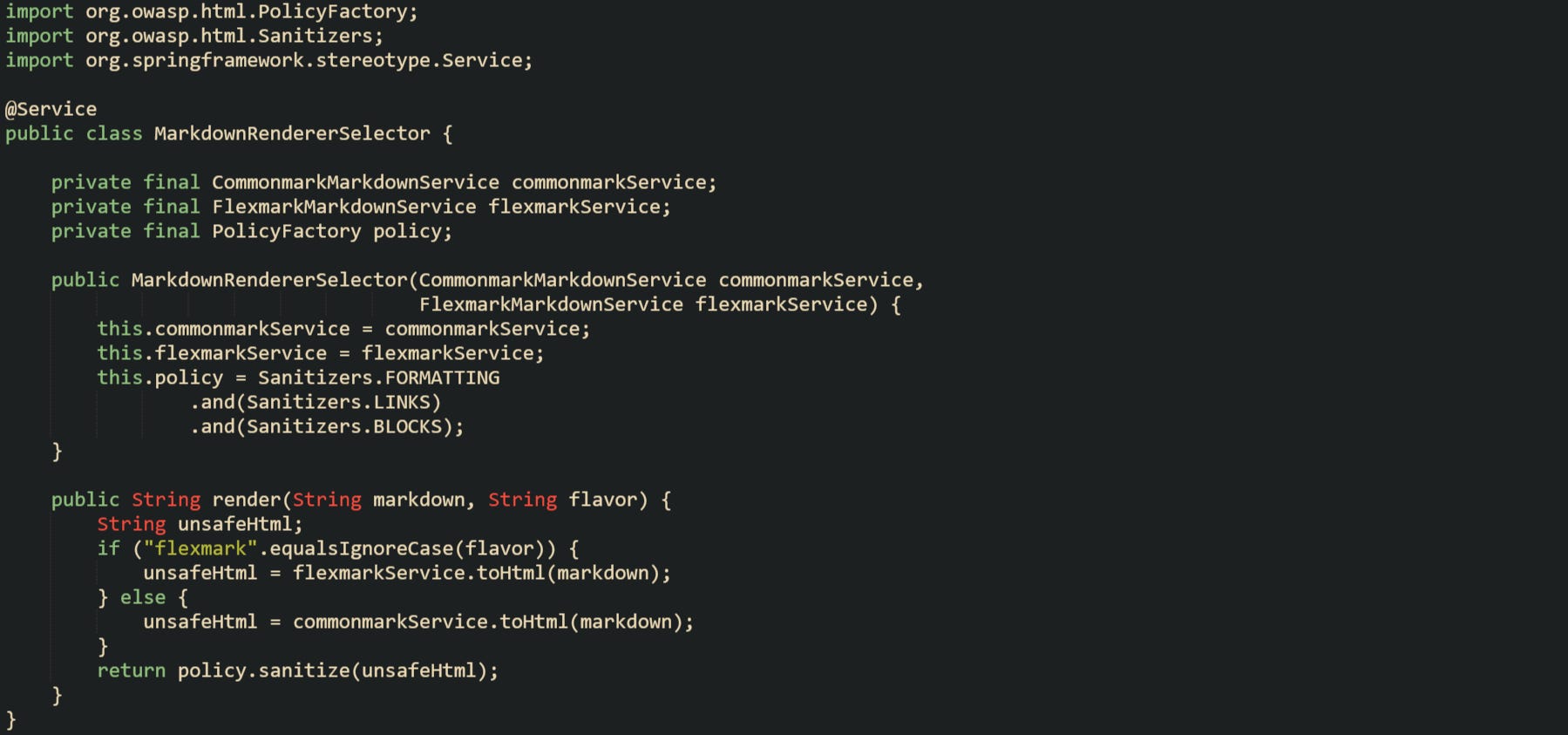
Controllers can accept a flavor field in the JSON body or a query parameter and then call this selector, which hands the Markdown string to the correct parser and renderer pair. That pattern keeps the parsing logic isolated in its own service classes while still allowing the API surface to grow features related to Markdown dialects.
Flexmark exposes many configuration points, such as custom link resolvers and node visitors, and those advanced hooks allow CMS or note taking tools to inject project specific behavior. The core flow in a REST API still follows a simple rhythm of parse, render, and forward the HTML to the sanitizer.
HTML Sanitization With Security In Mind
Markdown content passes through a parser and renderer before it turns into HTML, but that HTML still needs a safety pass so untrusted content cannot inject scripts or unsafe attributes into a page. Both CommonMark and Flexmark accept raw HTML in the input, and that raw HTML can contain script tags, event handlers, or links crafted to run JavaScript in the browser. Sanitization strips unsafe pieces and leaves only a set of approved elements and attributes.
OWASP Java HTML Sanitizer focuses on this exact work. The library builds a PolicyFactory by combining policies such as Sanitizers.FORMATTING, Sanitizers.LINKS, and Sanitizers.BLOCKS. The policy acts as a whitelist, and the sanitizer walks the HTML string and removes or escapes any content that does not match that configuration.
For example, a service method that takes unsafe HTML and returns a sanitized string can look like this:
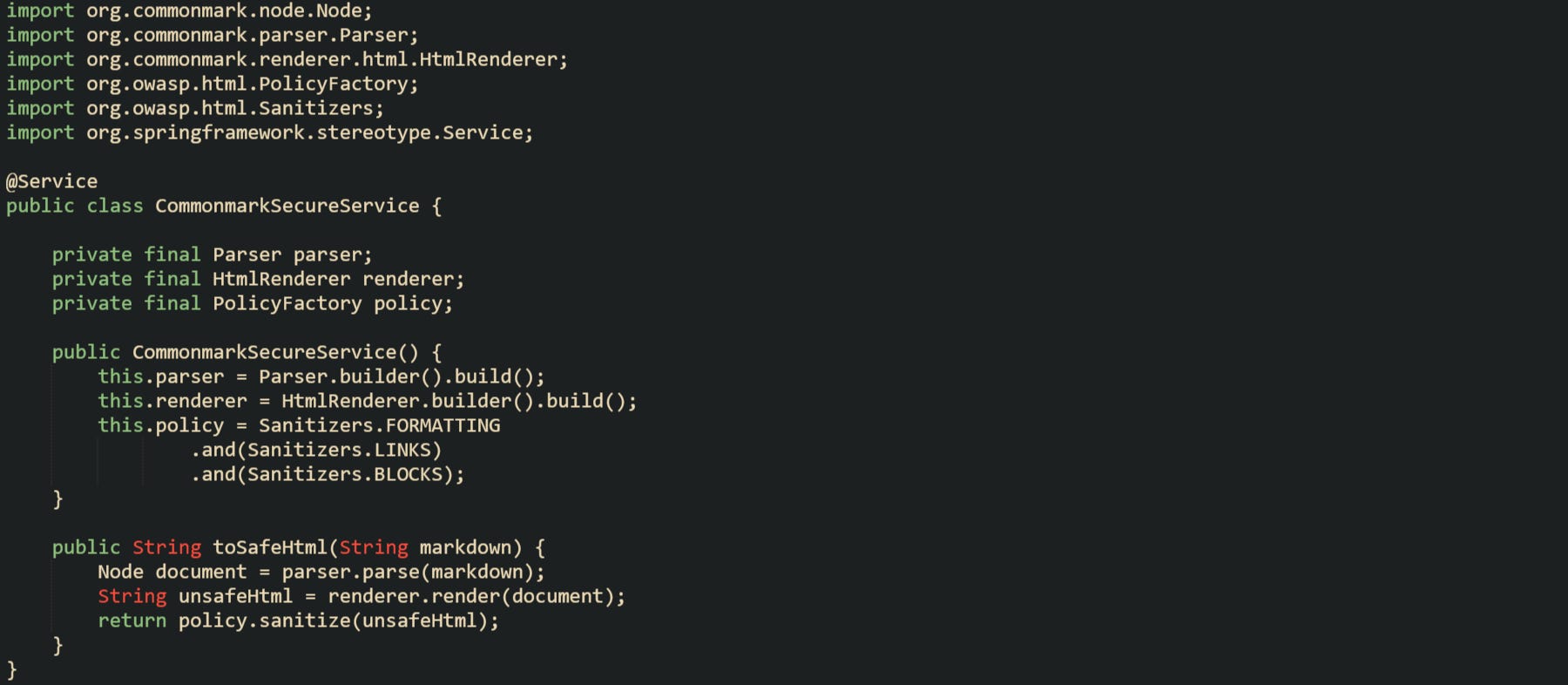
Markdown text travels through parsing and rendering first, then the sanitizer removes any content that falls outside the allowed policies. A controller that calls toSafeHtml does not need to know which sanitizer implementation is in use or which HTML tags the policy accepts, which keeps those details inside the service.
Some teams prefer Jsoup for sanitization. Jsoup parses HTML into a node tree and then filters that tree through a Safelist. Current versions use Safelist rather than the older Whitelist class, and the Jsoup.clean method applies the safelist rules to produce a safer HTML string.
And a small helper built around Jsoup can look like this:

The Safelist.basic configuration permits a small set of formatting tags and links while dropping scripts and unsafe attributes. Projects that favor Jsoup as a general HTML parsing library often use this style of helper side by side with Markdown parsing to keep browser output under control.
Conclusion
The whole Markdown to HTML pipeline in this Spring Boot API comes down to a few stages where the controller accepts Markdown text, a service hands that text to CommonMark or Flexmark to build HTML, and a sanitizer such as the OWASP Java HTML Sanitizer or Jsoup removes unsafe pieces before anything reaches the browser. Keeping HTTP handling, Markdown parsing, and HTML sanitization in their own places makes the code easier to reason about and lets a blog engine, note app, or CMS plug the API in wherever rendered HTML is needed.