
Projects that rely on a relational database tend to repeat the same query text again and again, with identical joins and filters copied into reports, dashboards, and backend code. SQL views reduce that duplication by turning those recurring queries into named objects inside the database, so callers treat them much like tables and don’t have to copy the logic by hand each time. With views you can centralize query logic for reporting, access control, and reuse, while keeping an eye on performance tradeoffs and how view definitions evolve as schemas change.
How SQL Views Work
Relational engines treat views as first class objects that sit beside tables, indexes, and constraints. The idea is that a query can be stored once, named, and then called from other queries without repeating the full text every time. The database keeps the definition in internal system tables and expands it during planning, which keeps the view wired to the current state of the base tables rather than turning it into a separate copy of the data. When you read or in some cases write through a view, the engine maps that request back to the base tables that supply the rows.
Logical Tables From Queries
A standard SQL view is a stored SELECT statement that you can treat as a table in later queries. The definition is kept in the system catalog, and the engine splices that SELECT into any query that references the view name. Data never lives inside the view itself, so changes in the base tables appear automatically when you read from the view.
Let’s look at a basic view that aggregates sales by month:
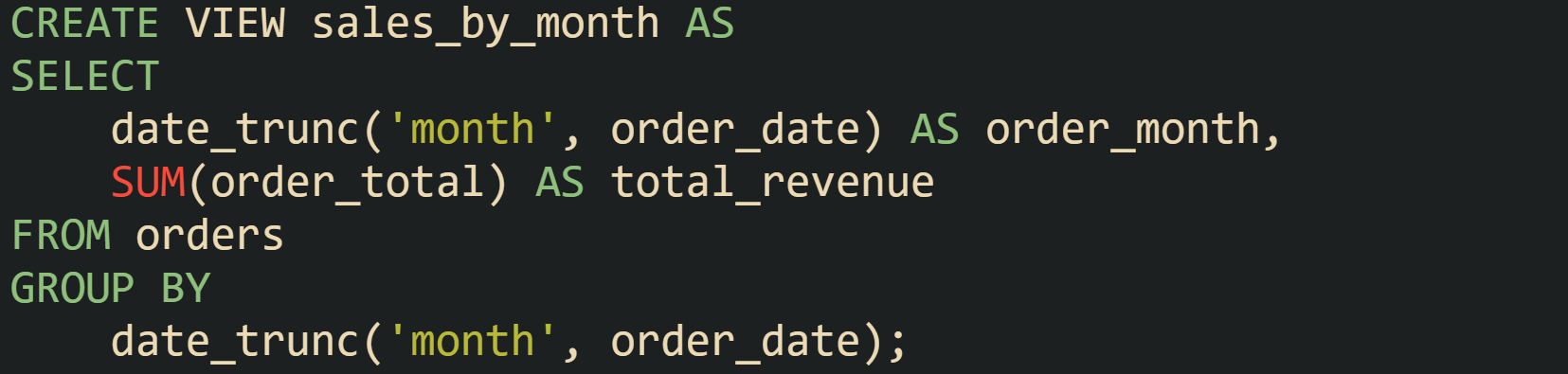
And a query that reads from sales_by_month behaves as if the view text had been pasted into the query:

The planner builds one combined query tree that includes the filter on order_month and the aggregation in the view. That combined tree then goes through normal optimization passes, which can fold constant expressions, push filters down into base tables where possible, and drop columns that are not needed in the final output.
Standard SQL treats a view as an unordered result, the same way it treats a base table. The standard text does not allow an ORDER BY clause inside the view body, because order is viewed as a presentation concern handled by the outer query that reads from the view. Some engines relax this and let you place ORDER BY inside the view, but that behavior is product specific and does not guarantee a stable order when the view is queried without an ORDER BY in the outer query.
Views follow this virtual table model in the major engines in common use today such as PostgreSQL, MySQL, SQL Server, and Oracle even though their catalog structures and syntax options differ. Many of those products offer extensions around the basic definition, such as CREATE OR REPLACE VIEW, security options that control how privileges are checked, and vendor specific clauses that control binding between the view and its base tables.
It helps to look at a view that joins several base tables, which is a common pattern in reporting:
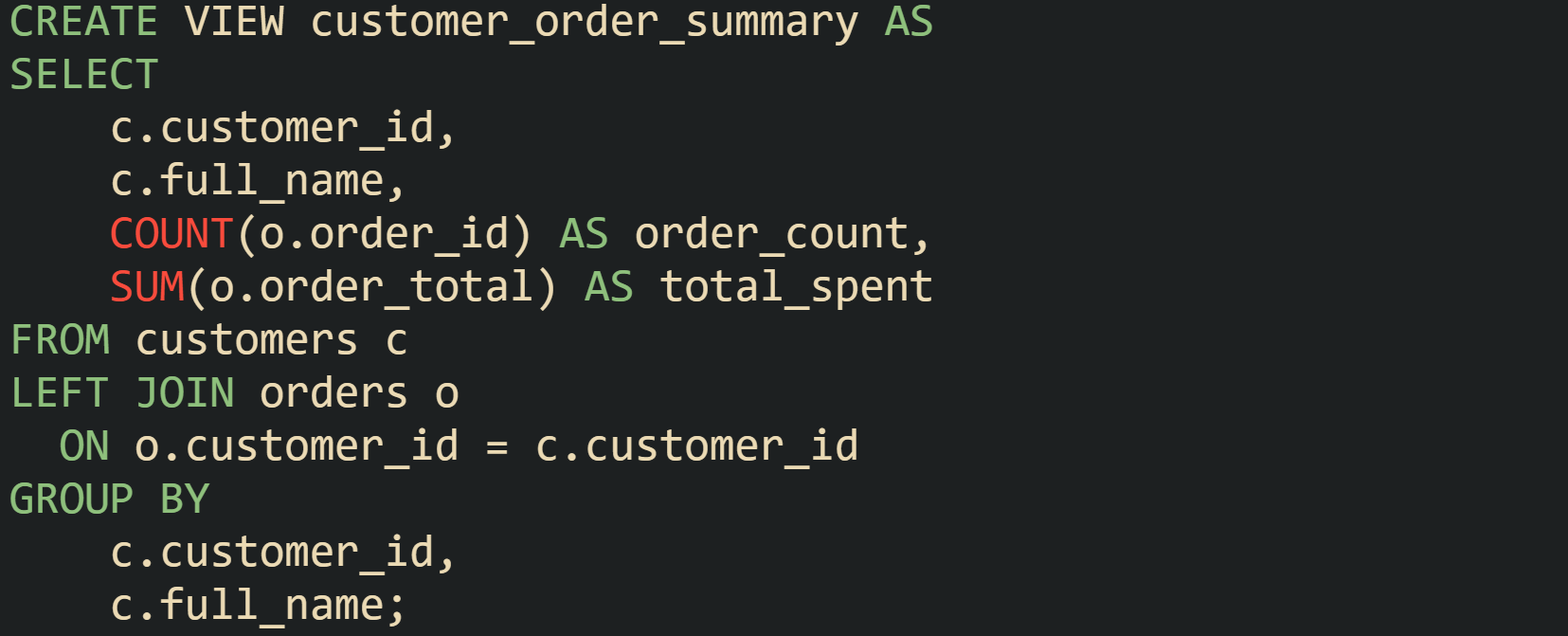
Later, a query can focus on the reporting logic instead of repeating that join and aggregation:

The engine still has to scan customers and orders, apply the join, and compute the aggregates, but the calling query only has to name customer_order_summary and apply its own filter. This encourages reuse of the same business definition for customer spend while leaving physical execution in the hands of the optimizer.
Regular views do not own indexes, sequences, or storage in their own right. All indexing work remains on the base tables, and query performance through a view depends on how well those base tables are indexed for the access pattern in the combined query. When queries grow complex and views start to reference other views, the optimizer has to expand several layers of stored text into a large internal tree before it can plan a path through the base tables. Modern optimizers handle nested views, but long chains of views can make plans harder to read and can extend planning time, so many teams keep view definitions focused on a single responsibility such as a particular aggregation or business concept.
Updatable Views With Limits
Some views can accept writes, which means an INSERT, UPDATE, or DELETE against the view turns into a matching change on one or more base tables. That behavior is only possible when the mapping from view rows back to base table rows is unambiguous enough for the engine to reason about it.
Now let’s look at a typical updatable view that selects columns directly from a single table and may apply a filter that restricts which rows are visible:
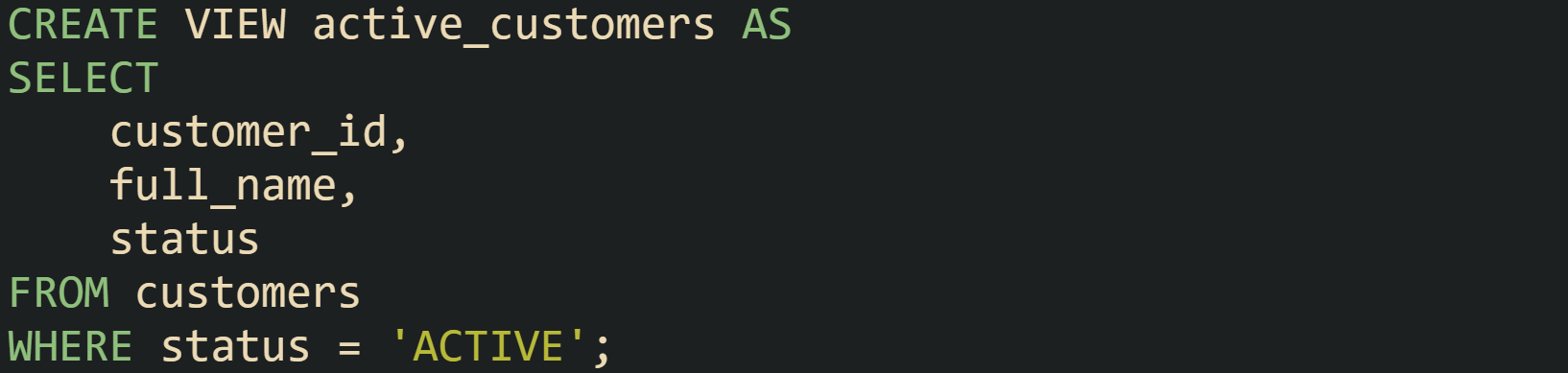
If the database engine judges this view as updatable, an update through the view looks like a normal statement:

Here, the planner converts that statement into an update on the customers table with the same predicate on customer_id, and the same new value for status. Some products also allow inserts through such a view, where an INSERT into active_customers becomes an INSERT into customers, and the client supplies a status value that satisfies the view’s filter, such as ACTIVE.
Engines have to protect referential integrity and other constraints, so updatability comes with a set of structural rules. A view built from a single base table with a straightforward WHERE clause and column projection usually qualifies, while a view that contains aggregates, GROUP BY, DISTINCT, set operations such as UNION, window functions, or complex joins typically does not qualify. When several tables feed the same view row, the system cannot always map one update back to a single base row, so writes are blocked for safety. Vendor documentation for PostgreSQL, SQL Server, MySQL, and Oracle lists the exact conditions that mark a view as updatable in that product.
Some platforms add helper features around this. SQL Server and Oracle have INSTEAD OF triggers on views, which fire when a client runs a write statement against the view. The trigger body can apply custom logic to one or more base tables. That pattern is common when a view joins tables but the application wants to expose a single logical surface for writes. The trigger acts as a small routing layer, taking the change described in the view row and translating it into changes across the underlying tables.
Read performance through updatable views follows the same rules as read only views. The engine inlines the view definition, then chooses an execution plan based on the combined query.
Views For Daily Work
Day to day database work tends to circle back to the same questions from a relational store. Reporting queries, dashboards, exports for outside systems, and backend features that need filtered slices of data all gain from a stable view name instead of repeating the same joins and filters. Named views give that repeated logic a home in the schema and let queries focus on the business question rather than on the plumbing needed to reach the data.
Projects that grow beyond a handful of tables usually collect dozens of views as they mature. Some serve report writers and analysts, some narrow what a certain group of users can see, and some act as stable interfaces while base tables change underneath them.
Views For Reporting
Reporting work commonly relies on the same conditions for status codes, date ranges, soft delete flags, and similar filters. When different developers or analysts rewrite those filters by hand, small differences creep in and reports drift apart, even though they point at the same tables. Reporting views take those conditions and put them in one place so that every chart and export that depends on that concept pulls from the same definition.
Think about an event tracking table that logs page views across a product:
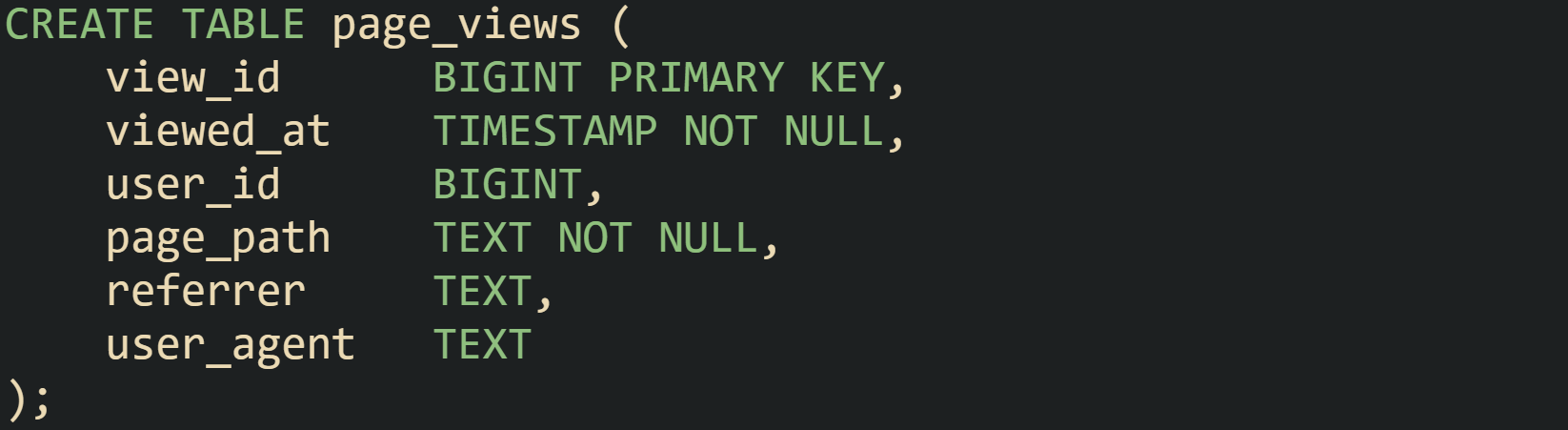
Engineers in analytics may ask for daily page view counts, unique visitors, or traffic for a subset of pages that match a prefix such as /billing. Typically, a base reporting view can capture the daily counts that most dashboards need:
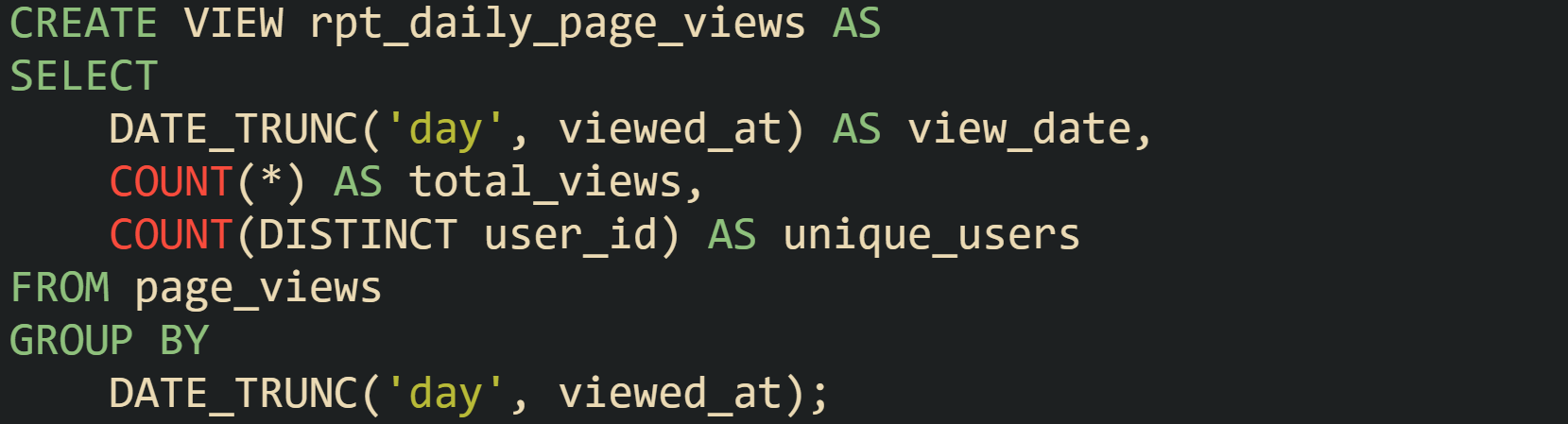
Queries that care about activity trends can then start from rpt_daily_page_views instead of writing their own aggregation logic:
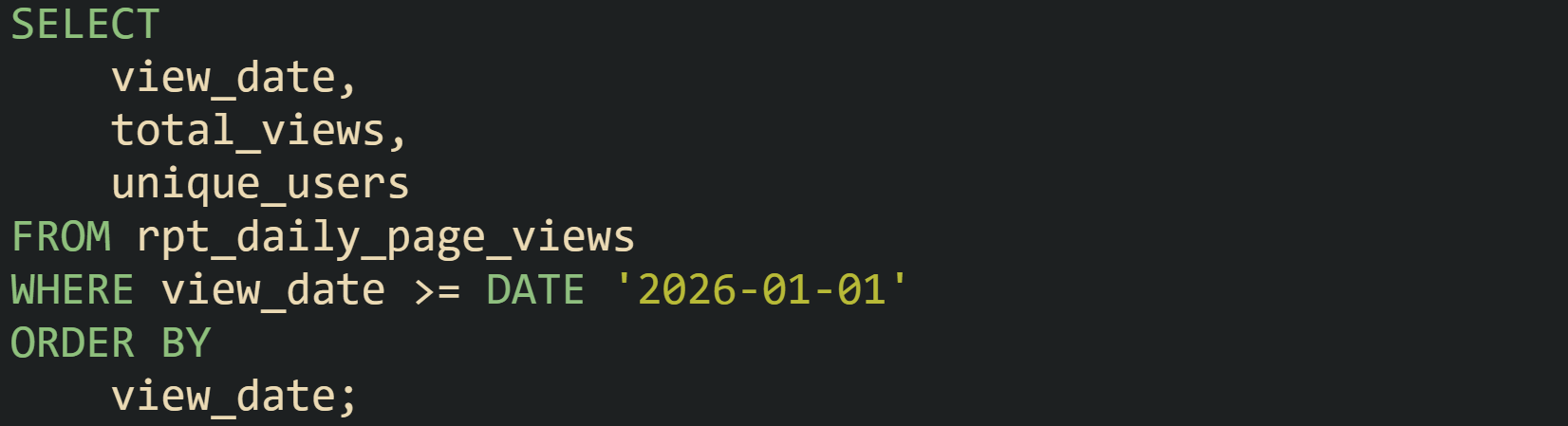
That query rests on shared logic for what counts as a page view in the system, while leaving room for many different reports to group and filter by their own rules. If the team later decides that anonymous views without a user_id should be excluded from certain analyses, the change lands inside rpt_daily_page_views and every query built on that view sees the new behavior without any change in query text.
Regular views keep only the SELECT text and rely on the base tables for storage, which means a heavy reporting query still has to read large tables and perform joins and aggregations every time it runs. When a project has costly aggregations that repeat many times per day, it can make sense to ask the database to store that summary in its own physical structure. Some engines support materialized views for this, while others use different features or do not support them at all. For example, PostgreSQL and Oracle have materialized views, SQL Server uses indexed views, and MySQL Community Server does not include native materialized views, while MySQL HeatWave adds materialized views inside HeatWave.
Materialized views that help with dashboard load times can look like this:
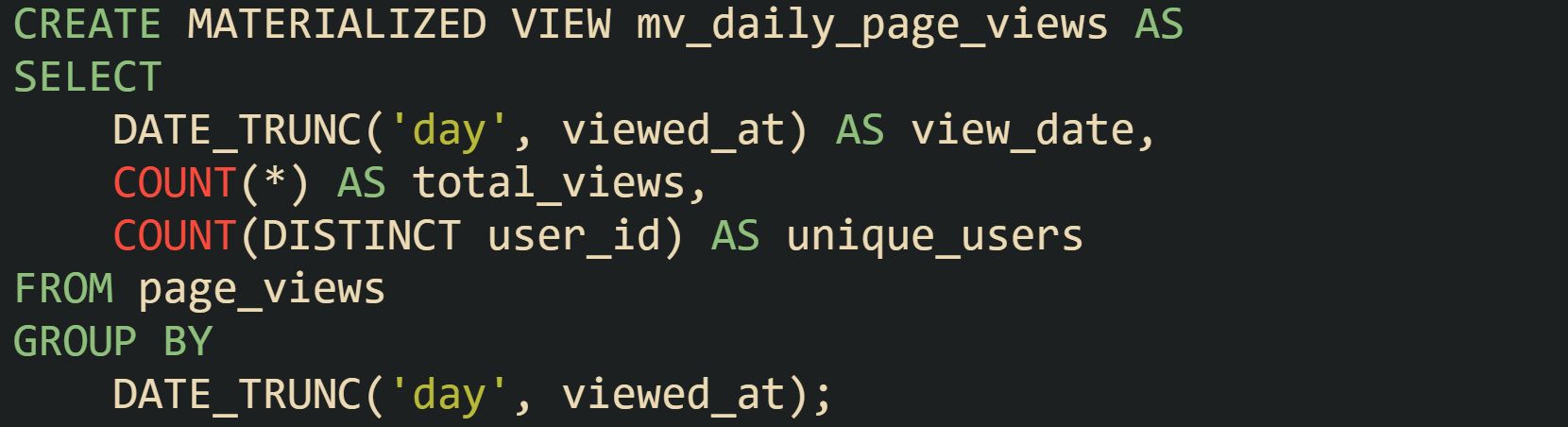
Queries that read from mv_daily_page_views hit precomputed rows instead of scanning the page_views table for every dashboard refresh:
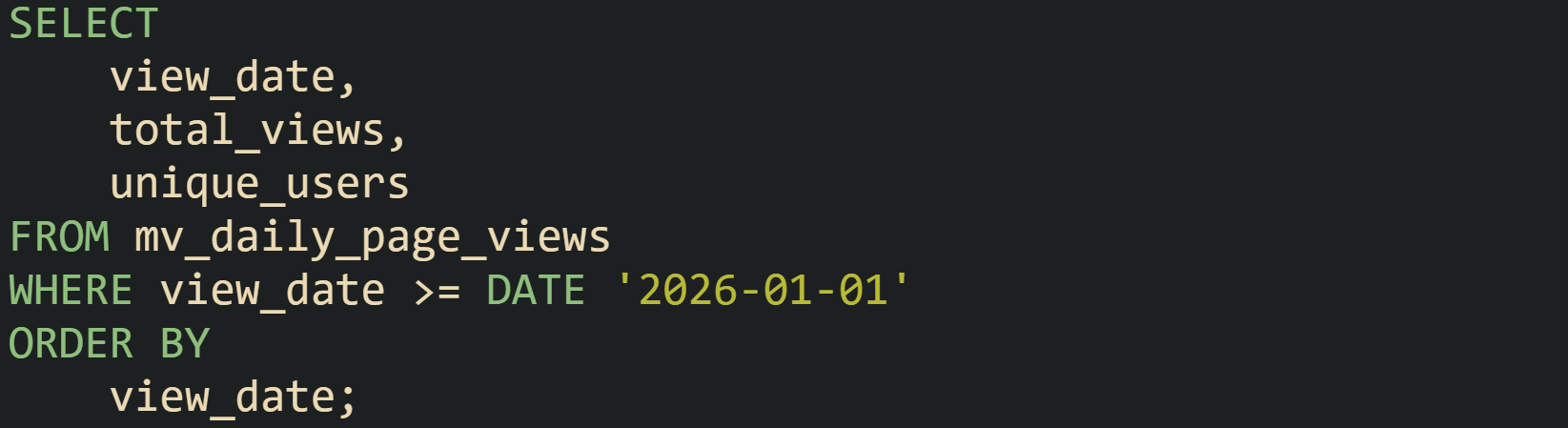
That change trades extra storage and refresh work for faster reads. Depending on how the engine maintains the materialized view, there can be a delay between a new page view arriving and that event showing up in the summary, because many systems refresh materialized views on a schedule or through separate maintenance work rather than on every write. Regular views avoid that delay because they always read current table contents but pay the full cost of query work on every run.
Cloud warehouses and similar platforms extend this picture. Some systems can automatically rewrite queries to use a materialized view when it matches, such as Snowflake and BigQuery. In Databricks, materialized views exist, and metric view materialization is an Experimental feature that describes intelligent query rewrite for metric views, not a general automatic rewrite feature for regular materialized views. That behavior lets a reporting query written against base tables quietly benefit from precomputed results when available, while still working in environments where no materialized view exists.
Views For Access Control
Views also help control which rows and columns a user can reach. Rather than hand out direct access to sensitive tables, many databases support granting access to a view without granting direct access to the base tables. The exact privilege model varies by engine, but it commonly evaluates access to the underlying tables through the view owner or view DEFINER rules, while the caller still needs privileges on the view itself.
Column filtering makes a good starting point. Salary and personal contact data may live in a central employees table, while most reporting users only need names and departments. A public employee view that hides salary and other sensitive attributes can look like this:
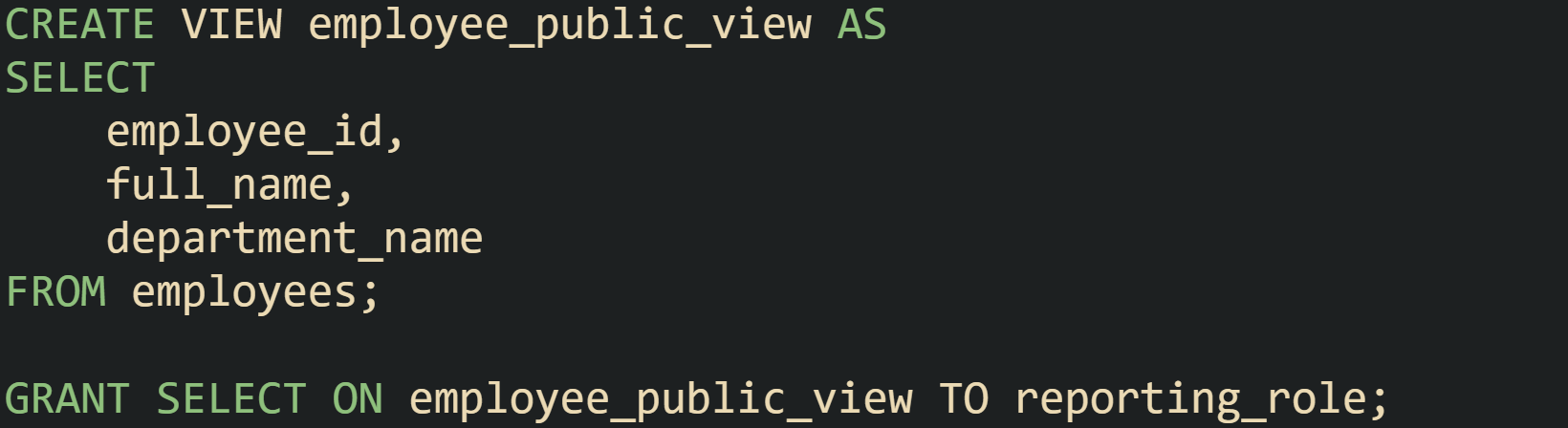
Users mapped to reporting_role can query employee_public_view and see department level information without any risk of reading salary or personal contact data, because those columns never appear in the view. The same database can hold additional views with wider access for HR staff or payroll systems, backed by different grants.
Row level access can be modeled with views as well, particularly when roles match organizational boundaries. Let’s say a sales database tags each row with a region_code such as NORTH, SOUTH, EAST, or WEST. A view that narrows rows to a single region can look like this:
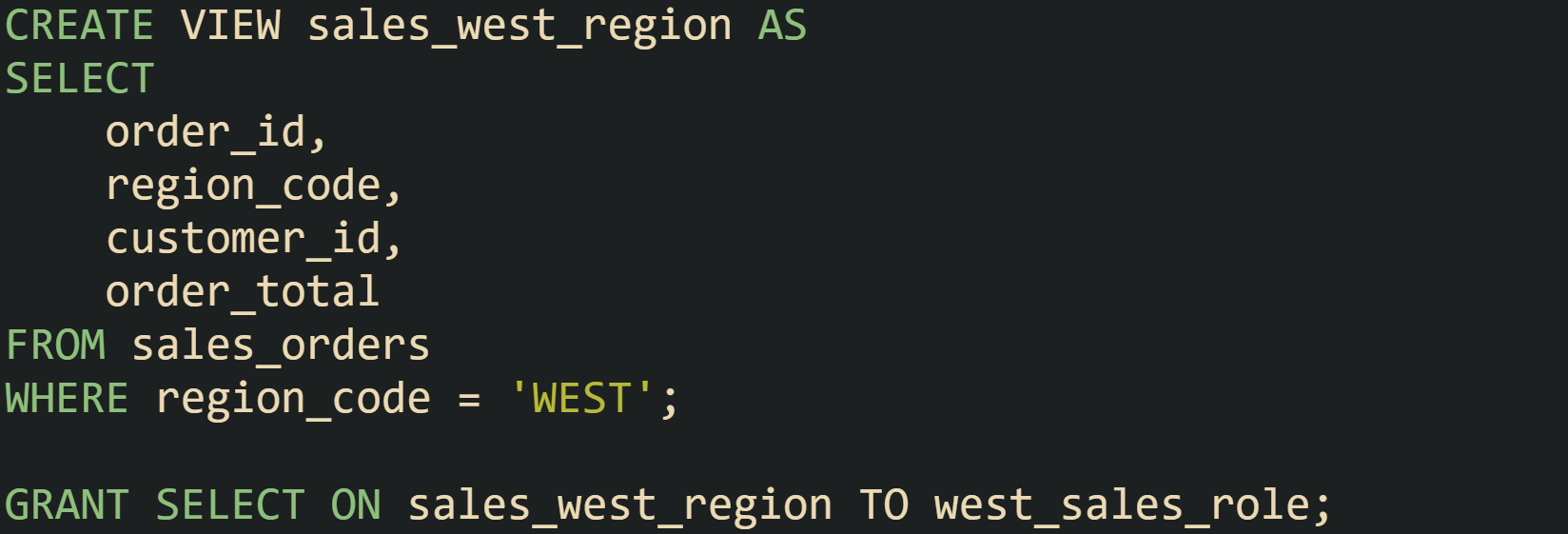
Members of west_sales_role see only rows from the west region when they query sales_west_region. The same base table still holds rows for all regions, but users who work in other regions receive grants on other region specific views instead. That practice keeps privileges expressible with standard SQL features and keeps filters in the database layer, rather than relying on every client to remember to add the right WHERE clause.
Many platforms also include row level security features that hook into session properties or user identifiers. When those features exist, views and policies tend to work side by side. The view definition controls which columns a set of users can read or write, and row level policies restrict which rows those users can see based on current user identity, tenant id, or similar context. That mix gives a database centered way to enforce both column and row access rules in one place.
Views For Query Reuse With Versioning
As schemas evolve and business rules change, view definitions rarely stay frozen. New columns appear in base tables, derived metrics receive revised formulas, and some filters that once made sense fall out of date. Views that sit between clients and base tables give a place to absorb those changes while keeping the rest of the system steady.
Suppose a project tracks customer balances and wants a current figure per customer. One early version might sum transactions across a ledger without any extra filtering:
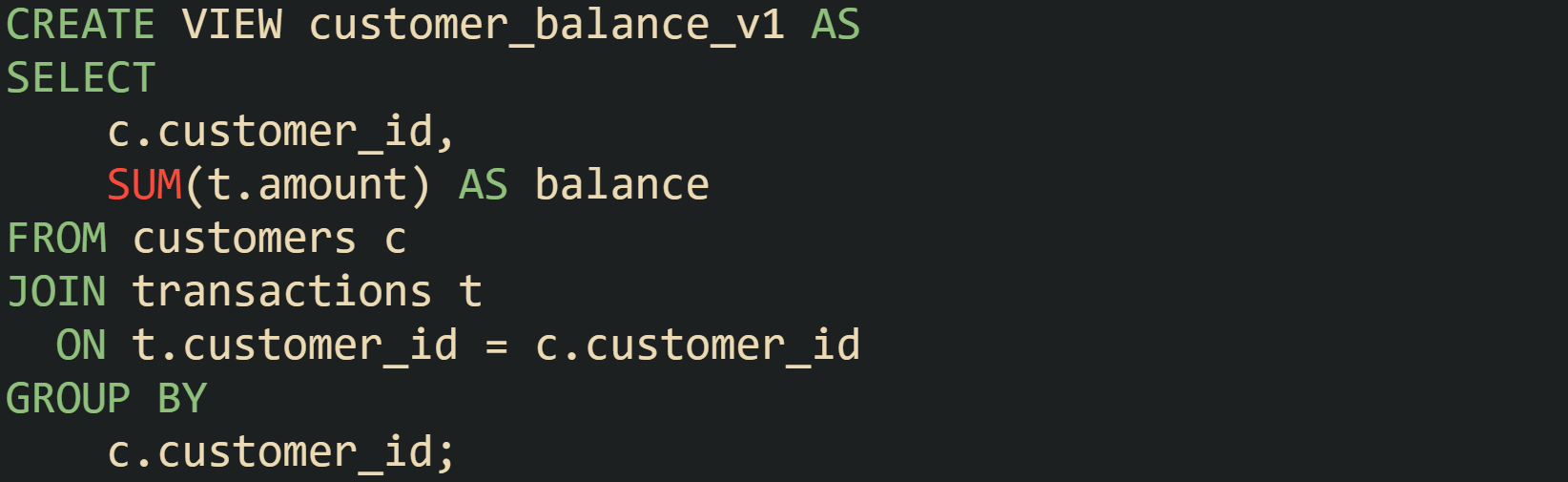
Later, business rules can grow more careful about which transaction types count toward an available balance. Pending holds could need to stay out of that figure while still remaining in the ledger. Instead of editing customer_balance_v1, a new view customer_balance_v2 can appear with a filter on transactions that excludes pending holds or certain adjustment codes. Existing reports that are tied to earlier logic stay bound to customer_balance_v1, while new reports that need the revised metric target customer_balance_v2. Report owners can then move from one version to another on a schedule that matches testing and stakeholder review.
Some environments prefer a stable name with CREATE OR REPLACE VIEW instead of version suffixes. In that style, versioning happens in migration scripts and source control, while database clients always call the same view name. That method suits systems where application deployments, schema changes, and report updates progress in a coordinated way.
Layered view stacks are common in larger schemas. A low level view can present raw transactional facts with light renaming, a second view can add derived metrics or calendar logic, and a higher level view can give business friendly columns ready for reports and dashboards. Materialized views can sit at points in that stack where the same aggregations get queried heavily, caching results in a way that fits real workloads.
Cloud data warehouses extend this stack with query rewrite based on materialized views. When planners in those systems see a query that matches a materialized view definition, they can redirect the query to that stored summary instead of reading the base tables, which improves latency for repeated workloads while keeping the logical query text stable. Across all of these cases, views act as the layer that holds query logic steady while tables, indexes, and refresh methods change underneath.
Practical View Versioning Styles
Earlier, the customer_balance_v1 and customer_balance_v2 views give a picture of one versioning story. But schemas usually fall into two families of view versioning. The first family keeps explicit version numbers in the view name, like customer_balance_v1 and customer_balance_v2. The second family keeps a stable name such as customer_balance and changes the view body over time with CREATE OR REPLACE VIEW, while callers keep querying the same name.
Versioned names help when a change alters business meaning in a way that existing reports already depend on, just like the shift from a raw sum of transactions to a filtered balance that excludes pending holds. Reports that still need the original rule set can stay on customer_balance_v1, while newer reports move to customer_balance_v2. Tweaks like adding a new projected column often stay inside the current version. That said, callers that do SELECT * into a fixed schema or rely on column order can still feel that change, so some shops bump the version for column shape changes too.
Stable names place history in migrations and source control instead of catalog object names. Some engines support CREATE OR REPLACE VIEW, and others provide a similar “replace this view definition” statement, so the scripts change while callers keep querying the same view name. Code in services, ETL jobs, and dashboards continues to query customer_balance, while deployment scripts run CREATE OR REPLACE VIEW customer_balance AS SELECT <new query body> with an updated definition. That style fits environments where schema changes and client updates move in a coordinated way and where groups do not need older semantics available side by side for long periods.
Some schemas combine both ideas. Numbered views can hold specific revisions and a thin wrapper view without a suffix can point at whichever revision is current. That structure lets most callers bind to the wrapper and only a narrow set of reports target a numbered view when they need a frozen contract.
This wrapper view can sit in front of the latest version like so:

When the “current” target changes later, a migration updates the wrapper view definition to point at the newer numbered view. That wrapper lets migrations move customer_balance from customer_balance_v2 to customer_balance_v3 while both numbered versions remain available for long lived reports that still rely on earlier business rules. When no clients depend on a given version anymore, that numbered view can be dropped during planned maintenance, and the wrapper continues to point at the active definition.
Conclusion
Views give a database a way to store query logic as named objects, so the engine can expand a stored SELECT, combine it with current statistics on the base tables, and plan one executable statement every time a client calls that view. Regular views act as virtual tables backed by live data, materialized views cache the results of heavier aggregations, and carefully structured updatable views let INSERT, UPDATE, and DELETE pass through to their source tables. With those mechanics in place, a schema can offer shared reporting surfaces, controlled entry points for sensitive data, and versioned query layers that all sit on top of the same underlying tables while the optimizer turns view definitions into real work inside the engine.