


The way you build collections in Dart has improved greatly over recent versions. Features like collection-if, collection-for, and the spread operator in collection literals make it possible to write expressive code that adapts dynamically at runtime. They give developers a simple way to combine conditions, loops, and data expansion directly inside lists, maps, and sets, creating collections that respond naturally to program logic without extra boilerplate.
Mechanics of Collection If and Collection For in Dart
Dart’s collection features bring control flow right into the middle of list, set, and map literals. Instead of writing long procedural blocks to fill collections, you can now describe what belongs in them right where they’re declared. These additions make your code more expressive and more natural to read. Conditional elements and looping elements both came from the same idea that if a collection is just data, it should still be able to respond to logic.
What Collection If Is
A collection-if expression lets a collection decide whether to include an element at runtime. It works anywhere a collection literal appears, from lists to maps. The syntax looks like an ordinary if statement but acts as an inline filter during construction.
![bool addGreeting = true; var messages = [ 'Welcome', if (addGreeting) 'Hello from Eau Claire', 'Goodbye' ]; print(messages); // [Welcome, Hello from Eau Claire, Goodbye]](https://substackcdn.com/image/fetch/$s_!HOX_!,f_auto,q_auto:good,fl_progressive:steep/https%3A%2F%2Fsubstack-post-media.s3.amazonaws.com%2Fpublic%2Fimages%2F622b15b5-8ed8-4f8f-ab4e-6f4d02311836_1033x320.png "bool addGreeting = true; var messages = [ 'Welcome', if (addGreeting) 'Hello from Eau Claire', 'Goodbye' ]; print(messages); // [Welcome, Hello from Eau Claire, Goodbye]")
The condition decides if ‘Hello from Eau Claire’ becomes part of the list. If addGreeting is false, Dart simply skips that element as though it never existed.
Collection-if can include an else clause as well. That allows for flexible branching without cluttering the logic.
![var temperature = 60; var weatherComments = [ if (temperature > 70) 'Feels warm today', else 'A little cool outside', 'Check the forecast for updates' ]; print(weatherComments); // [A little cool outside, Check the forecast for updates]](https://substackcdn.com/image/fetch/$s_!CXy_!,f_auto,q_auto:good,fl_progressive:steep/https%3A%2F%2Fsubstack-post-media.s3.amazonaws.com%2Fpublic%2Fimages%2Fef0605b1-b09e-4f9a-bd5f-1b77f86cb2f6_981x385.png "var temperature = 60; var weatherComments = [ if (temperature > 70) 'Feels warm today', else 'A little cool outside', 'Check the forecast for updates' ]; print(weatherComments); // [A little cool outside, Check the forecast for updates]")
Map literals can also use conditional entries. This can help when you only want to add configuration values under certain conditions.
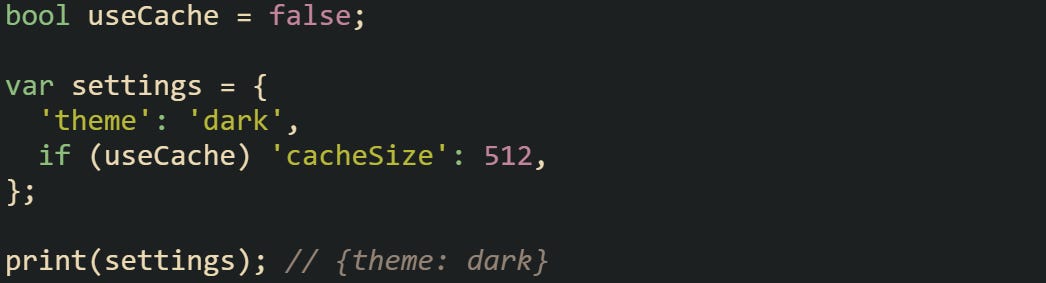
You can combine multiple conditional entries in a single collection. Dart evaluates them in order, which gives you predictable results that feel natural in larger configurations.
How Collection For Works
Collection-for expressions introduce looping right inside literals. They take values from another iterable source and expand them inline. The feature turns repetitive collection-building code into a single declarative expression.
![var names = ['Alex', 'Kaitlyn', 'Pippin']; var greetings = [ for (var name in names) 'Hi $name', ]; print(greetings); // [Hi Alex, Hi Kaitlyn, Hi Pippin]](https://substackcdn.com/image/fetch/$s_!wA94!,f_auto,q_auto:good,fl_progressive:steep/https%3A%2F%2Fsubstack-post-media.s3.amazonaws.com%2Fpublic%2Fimages%2Feb7418c4-8703-43fa-9fa2-546615b7b871_1053x210.png "var names = ['Alex', 'Kaitlyn', 'Pippin']; var greetings = [ for (var name in names) 'Hi $name', ]; print(greetings); // [Hi Alex, Hi Kaitlyn, Hi Pippin]")
This feature is useful for transforming or filtering existing collections while keeping the syntax concise. You can include multiple for-loops in one literal or even combine them with if expressions.
![var scores = [82, 94, 67, 88]; var performance = [ for (var score in scores) if (score >= 90) 'Excellent' else if (score >= 80) 'Good' else 'Needs improvement' ]; print(performance); // [Good, Excellent, Needs improvement, Good]](https://substackcdn.com/image/fetch/$s_!h_ad!,f_auto,q_auto:good,fl_progressive:steep/https%3A%2F%2Fsubstack-post-media.s3.amazonaws.com%2Fpublic%2Fimages%2F4ebd1f22-1b22-48f8-9bbd-396c06f5d612_1076x424.png "var scores = [82, 94, 67, 88]; var performance = [ for (var score in scores) if (score >= 90) 'Excellent' else if (score >= 80) 'Good' else 'Needs improvement' ]; print(performance); // [Good, Excellent, Needs improvement, Good]")
Collection-for isn’t limited to lists. It works with sets and maps as well. In maps, you can build key-value pairs dynamically.

Pulling looping logic into the literal itself keeps all the relevant information together, making the intent of the collection easier to read and reason about without moving between separate parts of the code. There’s no need to declare an empty list first or run a separate loop to fill it.
Why These Features Are Useful
Before these existed, developers had to rely on temporary collections and procedural loops to build lists or maps with dynamic content. That often meant a block of code just to prepare a few entries. Now, those same conditions and loops live directly in the literal. The result is shorter and clearer code that still behaves predictably.
This type collection construction is particularly handy in Flutter, where widget trees are built from lists that can change based on runtime data. You might have a view that includes a loading indicator only when a flag is true or generates a row of items from a fetched dataset.
![bool loading = false; var items = ['Apples', 'Bread', 'Milk']; var widgets = [ if (loading) Text('Loading...'), for (var item in items) Text('Item: $item'), ]; for (var w in widgets) { print(w.data); } // Item: Apples // Item: Bread // Item: Milk](https://substackcdn.com/image/fetch/$s_!DJ3Z!,f_auto,q_auto:good,fl_progressive:steep/https%3A%2F%2Fsubstack-post-media.s3.amazonaws.com%2Fpublic%2Fimages%2Ff13e9e83-8d18-4a5a-9d7b-cc45ba88d134_983x558.png "bool loading = false; var items = ['Apples', 'Bread', 'Milk']; var widgets = [ if (loading) Text('Loading...'), for (var item in items) Text('Item: $item'), ]; for (var w in widgets) { print(w.data); } // Item: Apples // Item: Bread // Item: Milk")
In that example, the collection adapts itself at runtime without any extra logic outside the literal. Developers can think about the structure as a whole rather than juggling multiple steps to build it.
Constraints Notes
Collection-if and collection-for are evaluated from top to bottom, so their order matters. Conditional elements can depend on earlier variables or expressions declared before them. You can nest both constructs, but deep nesting can reduce readability.
Each element inside the literal must resolve to a value appropriate for that collection type. For example, in a map, every for or if expression must yield a key-value pair.
![var filters = ['year', 'author']; var queryParams = { 'limit': 10, for (var f in filters) f: true, if (filters.contains('year')) 'sort': 'desc' }; print(queryParams); // {limit: 10, year: true, author: true, sort: desc}](https://substackcdn.com/image/fetch/$s_!M0Pa!,f_auto,q_auto:good,fl_progressive:steep/https%3A%2F%2Fsubstack-post-media.s3.amazonaws.com%2Fpublic%2Fimages%2F489797dc-6f29-44c6-a921-fcd342f24445_1035x315.png "var filters = ['year', 'author']; var queryParams = { 'limit': 10, for (var f in filters) f: true, if (filters.contains('year')) 'sort': 'desc' }; print(queryParams); // {limit: 10, year: true, author: true, sort: desc}")
Dart’s compiler evaluates collection-if and collection-for expressions when the literal itself is evaluated at runtime, following normal expression evaluation rules. They don’t execute outside of their context or alter data elsewhere.
These features also support nested logic, such as a conditional for within another for expression. That can be useful for flattening data sources or filtering at multiple levels.
![var categories = { 'food': ['bread', 'milk'], 'tools': ['hammer', 'saw'], }; var allItems = [ for (var entry in categories.entries) for (var item in entry.value) if (!item.startsWith('s')) item ]; print(allItems); // [bread, milk, hammer]](https://substackcdn.com/image/fetch/$s_!4NF0!,f_auto,q_auto:good,fl_progressive:steep/https%3A%2F%2Fsubstack-post-media.s3.amazonaws.com%2Fpublic%2Fimages%2F47794c44-97d0-4405-81bd-11fa5974be01_1047x418.png "var categories = { 'food': ['bread', 'milk'], 'tools': ['hammer', 'saw'], }; var allItems = [ for (var entry in categories.entries) for (var item in entry.value) if (!item.startsWith('s')) item ]; print(allItems); // [bread, milk, hammer]")
With that expressiveness, Dart lets you treat collections as living structures that react to your program’s logic in place rather than as containers that must be filled step by step.
Null Aware Collection Elements
Dart includes a feature that lets a collection skip a value when that value turns out to be null. A question mark placed before an expression acts as a filter that decides if the expression enters the collection or gets ignored. This feature was introduced in Dart 3.8, so the library needs a language version of 3.8 or newer for the null aware element syntax to work.
![Widget? subtitle; var items = [ Text('Title'), ?subtitle, Text('Footer'), ];](https://substackcdn.com/image/fetch/$s_!0wL2!,f_auto,q_auto:good,fl_progressive:steep/https%3A%2F%2Fsubstack-post-media.s3.amazonaws.com%2Fpublic%2Fimages%2Fb6b5a786-950b-4893-9c17-c150a754912b_1017x244.png "Widget? subtitle; var items = [ Text('Title'), ?subtitle, Text('Footer'), ];")
Dart keeps the list tight by dropping the middle element when subtitle has no value. Non null values move the expression into the collection without any extra steps.
Null aware elements work inside maps too. The question mark can sit on the key, the value, or both. Each position shapes how the map gets built at runtime.
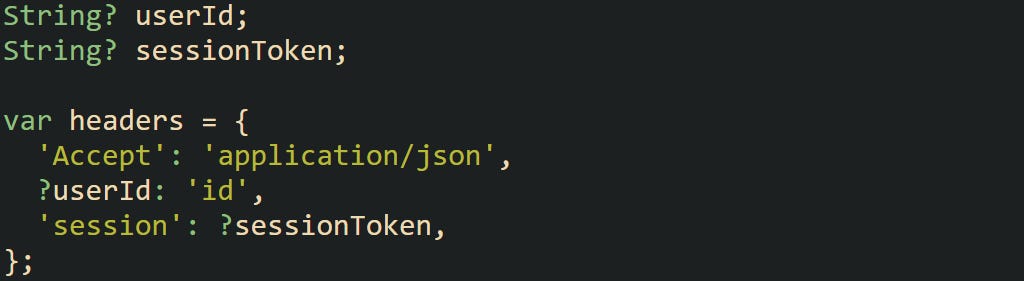
Entries get added only when the null checked side has a value. This keeps configuration maps neat and avoids long branching blocks around values that may not be present.
Spread Operator in Dart Collection Literals
In Dart, the spread operator gives you a way to insert the contents of one collection into another without looping or calling extra methods. It works inside lists, maps, and sets, flattening the referenced data right into the new collection at build time. This feature blends naturally with conditional and looping elements, creating expressive and dynamic collection literals that stay compact and easy to follow.
What the Spread Operator Is
The spread operator ... takes an existing collection and expands its contents inside a new literal. Instead of manually combining lists or calling addAll, you can pull items directly from another collection inline.
![var listA = [1, 2, 3]; var listB = [4, 5, 6]; var merged = [...listA, ...listB]; print(merged); // [1, 2, 3, 4, 5, 6]](https://substackcdn.com/image/fetch/$s_!VjZ0!,f_auto,q_auto:good,fl_progressive:steep/https%3A%2F%2Fsubstack-post-media.s3.amazonaws.com%2Fpublic%2Fimages%2Fe1140622-73ed-4483-b814-046dd6777a25_1052x174.png "var listA = [1, 2, 3]; var listB = [4, 5, 6]; var merged = [...listA, ...listB]; print(merged); // [1, 2, 3, 4, 5, 6]")
This syntax works because Dart treats the spread expression as part of the literal’s build process, unpacking the items before the collection finishes construction. Each element of listA and listB is added in order, producing a single list without creating intermediate variables or loops.
Spread elements can also appear at any position within a collection literal. You can start with static values, insert another collection in the middle, and continue adding more elements afterward.
![var firstHalf = ['Alex', 'Kaitlyn']; var secondHalf = ['Pippin', 'Sam']; var allNames = ['Start', ...firstHalf, ...secondHalf, 'End']; print(allNames); // [Start, Alex, Kaitlyn, Pippin, Sam, End]](https://substackcdn.com/image/fetch/$s_!wEJ-!,f_auto,q_auto:good,fl_progressive:steep/https%3A%2F%2Fsubstack-post-media.s3.amazonaws.com%2Fpublic%2Fimages%2Ff74e6054-6b1f-440d-b786-34276ec5d595_1057x210.png "var firstHalf = ['Alex', 'Kaitlyn']; var secondHalf = ['Pippin', 'Sam']; var allNames = ['Start', ...firstHalf, ...secondHalf, 'End']; print(allNames); // [Start, Alex, Kaitlyn, Pippin, Sam, End]")
The same concept extends to other collection types. Dart’s compiler knows when the spread applies to an Iterable, a Set, or a Map and merges it accordingly.
Null Aware Spread
The null aware spread operator ...? prevents null reference errors when expanding possibly null collections. If the source is null, Dart silently skips over that expression and continues building the rest of the collection.
![List<int>? numbers; var result = [0, ...?numbers, 10]; print(result); // [0, 10]](https://substackcdn.com/image/fetch/$s_!QITh!,f_auto,q_auto:good,fl_progressive:steep/https%3A%2F%2Fsubstack-post-media.s3.amazonaws.com%2Fpublic%2Fimages%2Ff575f36d-633e-4e40-bece-396462756a39_1055x105.png "List<int>? numbers; var result = [0, ...?numbers, 10]; print(result); // [0, 10]")
That feature removes the need for defensive code around list merging. Without ...?, attempting to spread a value that can be null with ... is a compile time error in null safe Dart.
This behavior can be particularly practical in data transformation steps where collections may not always have been initialized. Instead of writing conditional branches, a single expression can safely combine existing values and optional ones.
![List<String>? extras = ['Wisconsin', 'Iowa']; bool includeExtras = false; var states = [ 'Minnesota', if (includeExtras) ...?extras, 'Illinois' ]; print(states); // [Minnesota, Illinois]](https://substackcdn.com/image/fetch/$s_!qFYp!,f_auto,q_auto:good,fl_progressive:steep/https%3A%2F%2Fsubstack-post-media.s3.amazonaws.com%2Fpublic%2Fimages%2Fcfac47f8-b336-44fd-80aa-4f7077f543ba_1037x347.png "List<String>? extras = ['Wisconsin', 'Iowa']; bool includeExtras = false; var states = [ 'Minnesota', if (includeExtras) ...?extras, 'Illinois' ]; print(states); // [Minnesota, Illinois]")
That keeps logic expressive and avoids temporary placeholders when data isn’t guaranteed to exist yet.
Using Spread With Sets
Sets handle spread syntax naturally, preserving their property of holding unique elements. If you spread multiple sets with overlapping values, Dart automatically keeps only one instance of each element.

Spreading sets can help merge categories, tag groups, or unique identifiers without worrying about duplicates. Since the operation takes place during literal construction, there’s no need to manually check for overlap.
A spread inside a set literal can also appear conditionally.
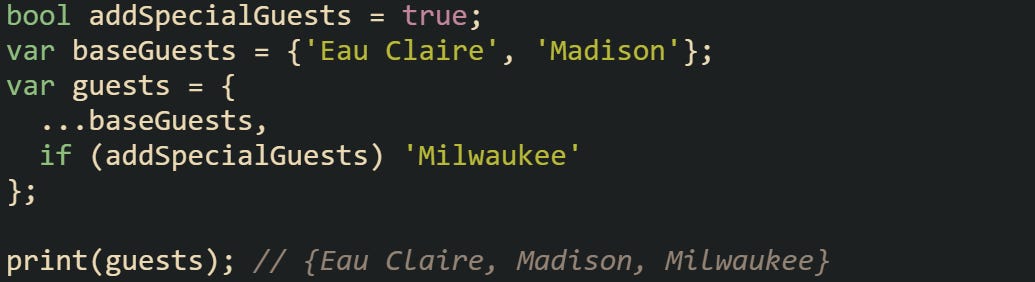
That expression keeps the entire collection declaration concise while still reacting to runtime state.
Using Spread With Maps
Map literals also support the spread operator, but instead of combining values, they merge key-value pairs. When two maps share a key, the value from the latter expression replaces the earlier one.

This merge order makes it easy to layer configurations where user settings override defaults. The logic stays predictable without requiring extra condition checks.
Spread syntax can be chained several times in one literal.
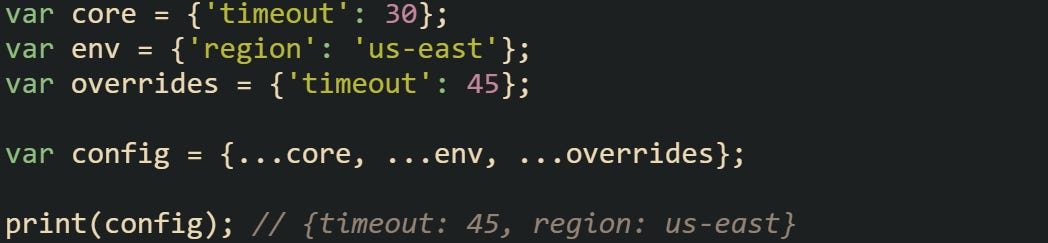
You can also combine null aware spread operators to protect optional sources.

That makes sure collections are merged safely without runtime failures, even when one source doesn’t exist yet.
Combining Spread With Collection If or Collection For
Dart allows mixing control flow expressions with spreads inside the same literal, giving a single expression control over how collections are assembled. You can conditionally include entire groups of items or flatten data based on iteration.
![var numbers = [1, 2, 3]; bool addMore = true; var allNumbers = [ ...numbers, if (addMore) ...[4, 5, 6] ]; print(allNumbers); // [1, 2, 3, 4, 5, 6]](https://substackcdn.com/image/fetch/$s_!Qmre!,f_auto,q_auto:good,fl_progressive:steep/https%3A%2F%2Fsubstack-post-media.s3.amazonaws.com%2Fpublic%2Fimages%2Fa8da1a79-9130-4cbd-85f0-3fa780a0afc8_1035x315.png "var numbers = [1, 2, 3]; bool addMore = true; var allNumbers = [ ...numbers, if (addMore) ...[4, 5, 6] ]; print(allNumbers); // [1, 2, 3, 4, 5, 6]")
That code merges a static list with another only when a condition is true. Each spread expands completely before the literal finishes building, keeping order intact.
A more involved example combines both the for element and the spread operator.
![var groups = [ ['Alex', 'Kaitlyn'], ['Pippin', 'Jordan'] ]; var flattened = [ for (var group in groups) ...group ]; print(flattened); // [Alex, Kaitlyn, Pippin, Jordan]](https://substackcdn.com/image/fetch/$s_!62sE!,f_auto,q_auto:good,fl_progressive:steep/https%3A%2F%2Fsubstack-post-media.s3.amazonaws.com%2Fpublic%2Fimages%2Fd24578c3-beeb-4b1d-acf9-0a57d85b6360_1047x354.png "var groups = [ ['Alex', 'Kaitlyn'], ['Pippin', 'Jordan'] ]; var flattened = [ for (var group in groups) ...group ]; print(flattened); // [Alex, Kaitlyn, Pippin, Jordan]")
This loop flattens a nested list structure into a single list without needing multiple temporary variables or explicit method calls.
You can nest spread and control flow expressions as needed. Dart evaluates them sequentially, meaning later spreads can depend on earlier conditions or loops.
![bool includeCities = true; var regions = [ 'North', if (includeCities) ...['Eau Claire', 'Green Bay'] ]; print(regions); // [North, Eau Claire, Green Bay]](https://substackcdn.com/image/fetch/$s_!5YoG!,f_auto,q_auto:good,fl_progressive:steep/https%3A%2F%2Fsubstack-post-media.s3.amazonaws.com%2Fpublic%2Fimages%2F8638ee77-ed34-4f35-86bc-faa3758f44de_1040x245.png "bool includeCities = true; var regions = [ 'North', if (includeCities) ...['Eau Claire', 'Green Bay'] ]; print(regions); // [North, Eau Claire, Green Bay]")
Such combinations give developers a clear way to build adaptive data structures without losing readability.
When Spread Is Better Than Methods
Spread operators provide a shorter and often clearer alternative to calling collection methods like addAll or putIfAbsent. They integrate directly into literal expressions and remove the need for mutating statements after initialization.
![var defaults = ['debug', 'logging']; var extra = ['metrics']; var fullList = [...defaults, ...extra];](https://substackcdn.com/image/fetch/$s_!LnJJ!,f_auto,q_auto:good,fl_progressive:steep/https%3A%2F%2Fsubstack-post-media.s3.amazonaws.com%2Fpublic%2Fimages%2Fdfa1bc75-681f-46bd-ab14-93318f1b470d_1041x105.png "var defaults = ['debug', 'logging']; var extra = ['metrics']; var fullList = [...defaults, ...extra];")
This syntax avoids creating an empty list first, which would otherwise require extra steps. The literal form communicates intent right away and a merged list built from two existing ones.
For immutable or const contexts, spreads also support compile-time construction when all parts are const.
![const a = [1, 2]; const b = [3]; const combined = [...a, ...b]; print(combined); // [1, 2, 3]](https://substackcdn.com/image/fetch/$s_!24gI!,f_auto,q_auto:good,fl_progressive:steep/https%3A%2F%2Fsubstack-post-media.s3.amazonaws.com%2Fpublic%2Fimages%2F2312af3b-b8f5-4249-b4cd-efed6060a82b_1052x135.png "const a = [1, 2]; const b = [3]; const combined = [...a, ...b]; print(combined); // [1, 2, 3]")
Because it’s evaluated at compile time, no runtime cost is added. This makes spread syntax well suited to defining configuration data or constants that combine smaller fragments.
The spread operator’s expressiveness lies in its simplicity. It merges data sources directly where you define the collection, reduces side effects, and aligns well with Dart’s preference for declarative, readable code.
Conclusion
Collection-if, collection-for, and spread operators give Dart a natural way to express logic directly inside collections without extra steps or clutter. They make it possible to build lists, maps, and sets that react to conditions and data as they’re created. Each feature works in harmony with the others, turning what used to be multiple lines of setup into a single expression that still reads smoothly. These mechanics bring a sense of flow to collection building and make everyday Dart code more direct, readable, and easy to follow.