


Working with functions in Dart comes down to how parameters are declared and passed. The choices you make shape how easy it is to read the code, how naturally others can call your functions, and how predictable your results stay. Parameters can be required, optional, positional, or named, and they all behave a little differently.
Required and Optional Parameters
Parameters give structure to how a function receives information. Dart’s flexibility here is one of its strengths, letting you decide if values must be passed every time or if some can be left out. These options change how your code feels to read and write, making function calls either brief and ordered or descriptive and self-documenting.
Required Positional Parameters
For Dart, required positional parameters are the most direct way to define input. Each parameter has a fixed place, and callers must provide values in that same order. The compiler enforces this, so any missing argument or mismatch triggers an error before the code even runs.

Both first and second must be passed in or the function call fails. This structure works best for short functions with obvious argument meaning. For instance, a function that converts Fahrenheit to Celsius doesn’t need named arguments because there’s only one value involved.

When someone reads that call, the purpose is instantly understood. But as the number of parameters grows, positional arguments can start to obscure intent. That’s where Dart’s optional and named parameters start to shine.
Optional Positional Parameters
Optional positional parameters bring flexibility when you want to let callers skip certain values. Dart marks these by wrapping them in square brackets []. If the caller leaves them out, the parameters default to null, unless a default is provided.
![String greet(String name, [String? greeting]) { return '${greeting ?? 'Hello'}, $name!'; } void main() { print(greet('Alex')); // Hello, Alex! print(greet('Kaitlyn', 'Hey')); // Hey, Kaitlyn! }](https://substackcdn.com/image/fetch/$s_!rx07!,f_auto,q_auto:good,fl_progressive:steep/https%3A%2F%2Fsubstack-post-media.s3.amazonaws.com%2Fpublic%2Fimages%2F3399994c-fc57-44d2-bc3e-d508e111db81_1280x280.png "String greet(String name, [String? greeting]) { return '${greeting ?? 'Hello'}, $name!'; } void main() { print(greet('Alex')); // Hello, Alex! print(greet('Kaitlyn', 'Hey')); // Hey, Kaitlyn! }")
You can take this further by giving the parameter a set default, which avoids null checks and makes the function safer to call.
![String greetWithDefault(String name, [String greeting = 'Welcome']) { return '$greeting, $name!'; }](https://substackcdn.com/image/fetch/$s_!Dcy2!,f_auto,q_auto:good,fl_progressive:steep/https%3A%2F%2Fsubstack-post-media.s3.amazonaws.com%2Fpublic%2Fimages%2F384856ee-ad66-4957-818a-90397b7cdb63_1294x105.png "String greetWithDefault(String name, [String greeting = 'Welcome']) { return '$greeting, $name!'; }")
This is nice when your function can do its job without needing every bit of input but still benefits from flexible customization. You might use it for logging messages or lightweight string formatting.
![void logMessage(String message, [String source = 'System']) { print('[$source] $message'); } void main() { logMessage('Update complete'); logMessage('Low memory detected', 'Monitor'); }](https://substackcdn.com/image/fetch/$s_!2IW9!,f_auto,q_auto:good,fl_progressive:steep/https%3A%2F%2Fsubstack-post-media.s3.amazonaws.com%2Fpublic%2Fimages%2F31d4caa3-7c9c-4249-9134-0944d91f10dd_1283x280.png "void logMessage(String message, [String source = 'System']) { print('[$source] $message'); } void main() { logMessage('Update complete'); logMessage('Low memory detected', 'Monitor'); }")
Optional positional parameters make sense when order matters but extra input isn’t always necessary. If argument order could confuse readers, switching to named parameters helps.
Named Parameters
One of the most expressive features of Dart functions are Named parameters. Instead of relying on argument order, you use names in curly braces {} to make each input explicit. This gives clarity to both function definitions and calls, particularly when there are multiple parameters of similar types.

Each call makes it immediately clear what’s being passed. The required keyword marks parameters that must be given every time, even though they’re named. Defaults like location = ‘Eau Claire’ save repetition without making arguments mandatory.
Named parameters can also combine with optional ones to let functions read more like plain sentences.

This style increases readability for APIs or functions with multiple optional details, while the compiler still enforces correctness through parameter names.
Mixing Forms Rule
Dart allows both positional and named parameters in one function, but they can’t be mixed in the same parameter group. You may start with required positional parameters and then add a block of named parameters at the end, but you can’t reorder things so that named parameters come first and positional ones come after.

The first two parameters are positional and required, while the others are named and optional with defaults.
You can’t write something like:
![// Invalid function - Dart won't compile this void badMix([int a = 0], {int b = 0}) {}](https://substackcdn.com/image/fetch/$s_!nHOA!,f_auto,q_auto:good,fl_progressive:steep/https%3A%2F%2Fsubstack-post-media.s3.amazonaws.com%2Fpublic%2Fimages%2F2ffc9149-1ab1-4638-b62b-e72979cc2d5d_1295x71.png "// Invalid function - Dart won't compile this void badMix([int a = 0], {int b = 0}) {}")
Dart’s compiler rejects that mix. The language keeps these forms distinct to preserve both clarity and type safety.
Blending required, optional, and named parameters thoughtfully gives you control over how others interact with your code. It helps prevent misuse while keeping your functions pleasant to read and flexible to call.
Effects Of Defaults Types And Readability
For many, defaults and type choices have a larger impact on code readability than most developers expect. They decide how predictable a function feels and how much mental work it takes for someone else to use it. Dart gives a lot of control here through default values, nullability, and type annotations, all of which can make function calls more self-explanatory.
Default Values And Nullability
Default values reduce uncertainty in how functions behave. Instead of forcing callers to pass arguments every time, you can set practical fallbacks that make calls shorter and safer. It’s a small feature that can make large projects feel consistent.
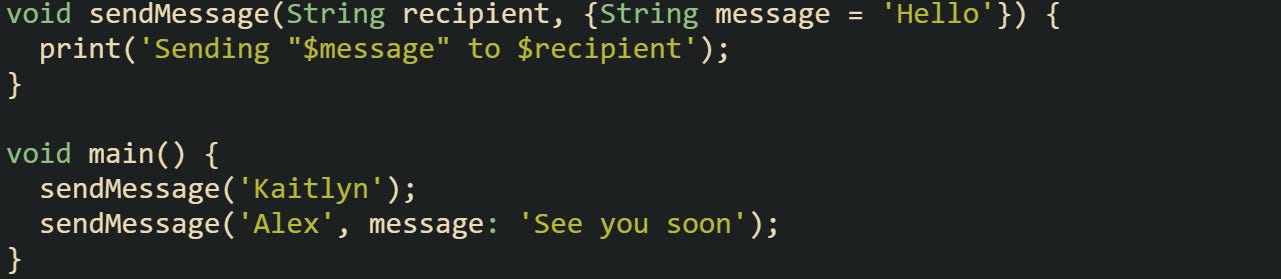
The two calls are valid, but the first uses the default message automatically.
Nullability adds another layer to how defaults work. A parameter that’s nullable but lacks a default means you have to handle the null value inside the function. That could be intentional, but it can also make code harder to read if overused.

A nullable parameter like name signals uncertainty, which is fine when null means something real, such as an unknown value. For parameters that always need a valid input, giving them a default is usually clearer.
![void greetUserDefault([String name = 'Guest']) { print('Hello, $name'); }](https://substackcdn.com/image/fetch/$s_!O5vh!,f_auto,q_auto:good,fl_progressive:steep/https%3A%2F%2Fsubstack-post-media.s3.amazonaws.com%2Fpublic%2Fimages%2F2a6e50c1-f701-40d3-962a-4fb94f18cad6_1298x105.png "void greetUserDefault([String name = 'Guest']) { print('Hello, $name'); }")
That version reads cleaner, as it avoids the noise of a null check. Good defaults and clear nullability rules save time and prevent confusion later.
Parameter Types And Readability Of Calls
Type declarations in parameters help communicate expectations. Dart’s type system lets you write expressive signatures that make misuse unlikely without being restrictive. The more explicit your parameter types, the easier it is for someone to understand what belongs in a function call.

This example is basic, but it shows how explicit types improve clarity. Both parameters are doubles, so anyone reading the function can tell what kind of values it handles. Leaving types out or using dynamic parameters can make the code ambiguous.

That version compiles, but without types it’s easier to make mistakes like passing a string instead of a number. Explicit typing also helps when null safety comes into play, as non-nullable types guard against skipped inputs.
Named parameters pair nicely with clear types. They read naturally and prevent ordering mistakes in calls with many arguments.

Everything reads naturally here. You don’t need to recall the order of parameters, and the types make the intent obvious. When parameter lists get longer or the arguments are of similar types, named parameters combined with strong typing protect readability.
Choosing Parameter Style For Use
Choosing how parameters behave depends on what you expect from your function. Required positional parameters make sense when there’s no room for omission, while named parameters shine when readability matters more than brevity. Defaults help when you want flexibility without forcing extra arguments every time.
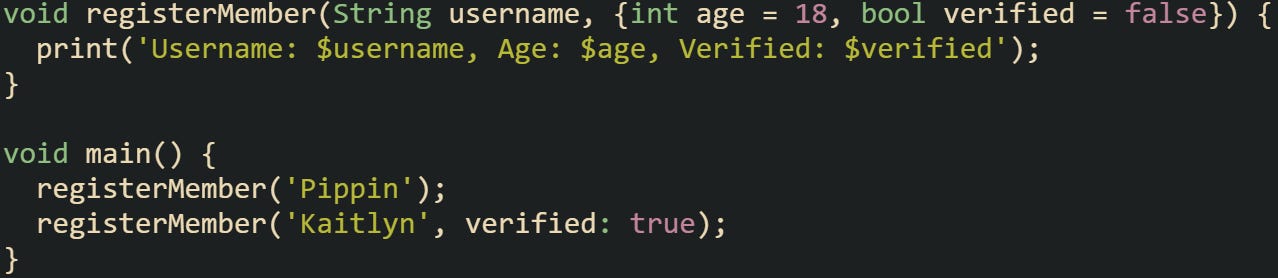
The defaults for age and verified make it easy to call this function while keeping behavior consistent.
Parameter style also affects how APIs feel to work with. For short mathematical or formatting utilities, positional parameters keep things quick. For configuration-heavy functions, named parameters with defaults are clearer.
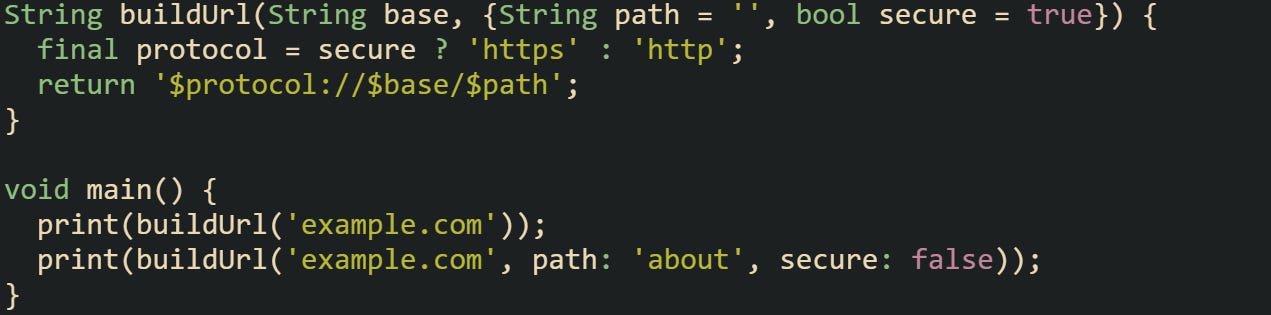
The second call looks longer but reads like a sentence, which helps prevent mistakes. Choosing between these forms isn’t about rules but about readability and intent.
Conclusion
Function parameters define how data moves through Dart code and how much control you have over that flow. Required, optional, positional, and named forms each serve a different purpose but share the same goal of making functions behave predictably. Defaults and type declarations give structure to that behavior, turning what could feel abstract into something dependable and readable. When you start combining these features thoughtfully, the language gives you space to write functions that feel natural to use and easy to follow from start to finish.