
Readable labels in query results help make dynamic reports easier to work with. Instead of plain numbers or codes, you can combine text with data to produce labels that are descriptive and easy to follow. Two SQL functions often paired for this are CONCAT and CASE. Together, they give you fine control over how rows are presented, letting you build labels directly in the query so the output is ready for reporting.
How CONCAT Creates Strings from Columns
When you want to create labels that read naturally in SQL results, the CONCAT function is usually the first tool to reach for. It turns values of different types into text and joins them into a single string. That makes it possible to stitch together words, numbers, and column values into one readable label that can go directly into a report. To see how this happens in practice, it helps to look at the different steps involved, then move through special cases like multiple arguments and handling of NULL.
String Construction Step by Step
At the most basic level, CONCAT accepts one or more expressions and produces a string by joining them in sequence. Each input is first resolved for the current row, then cast into a text representation if it isn’t already text. That means integers, dates, and even decimal values are all converted before they’re combined.

For a row where invoice_id is 2051, the database evaluates 'Invoice #' and the numeric value 2051. The number is automatically cast into a string "2051", then the two parts are joined together. The output becomes "Invoice #2051".
A slightly more involved case is when you use other data types like dates.

If sale_date holds a value like 2025-09-01, the database converts that into its standard text format and then appends it, giving "Sale on 2025-09-01". That behavior makes CONCAT flexible, as you don’t need to cast values yourself before combining them into labels.
Handling of Multiple Arguments
In PostgreSQL, MySQL, and SQL Server, CONCAT accepts multiple arguments and processes them in order. In Oracle, CONCAT takes two arguments. For more parts, nest CONCAT calls or use the || operator. This lets you create detailed strings that pull in several columns at once.

When product_name is "Desk" and category is "Office", the result is "Desk (Office)". Every part is resolved and appended from left to right.
Longer examples are also common in reporting queries.

A row with values 101, "West", and "Premium" comes out as "101-West-Premium". The function takes care of turning the numeric 101 into text before the final string is assembled.
It’s also common to combine multiple values with static text markers to make the result easier to scan.

For a row with dept_id = 7, fiscal_year = 2025, and fiscal_quarter = 3, the output is "Dept=7, Year=2025, Q=3". This kind of labeling is often used in queries where grouped results are exported for analysis, because it creates a compact but descriptive identifier in a single column. The function evaluates its inputs for each row and produces the output string during query execution.
Null Value Handling
A special case worth noting is how CONCAT treats NULL. Many string operations in SQL return NULL if any part of the expression is NULL. With CONCAT, the behavior depends on the database engine.
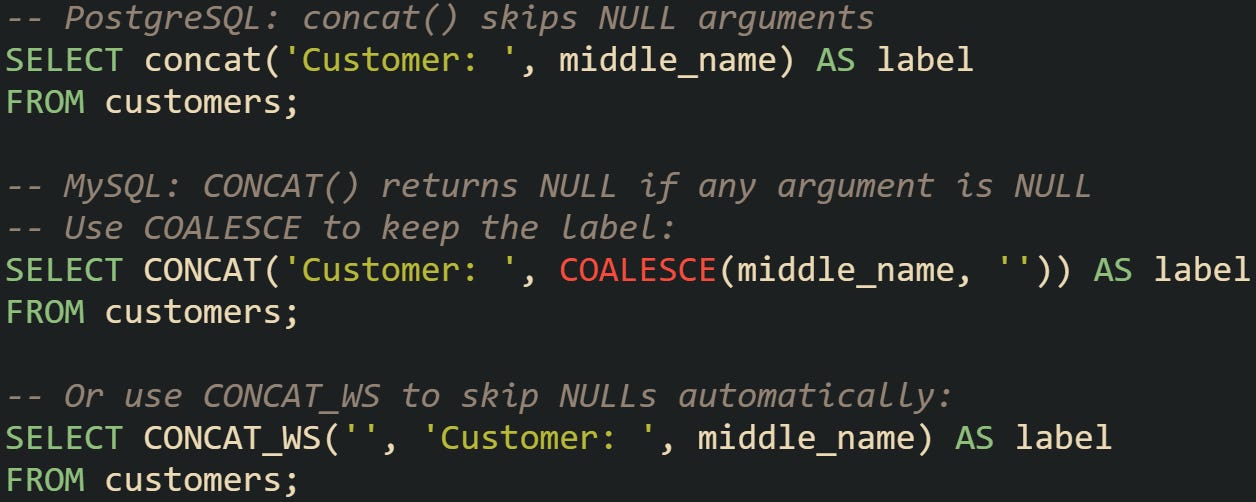
In PostgreSQL, concat('Customer: ', middle_name) yields "Customer: " when middle_name is NULL. In MySQL, CONCAT('Customer: ', middle_name) returns NULL if middle_name is NULL. Use COALESCE or CONCAT_WS to keep a non-null label. On the other hand, the concatenation operator || in some engines produces NULL if one argument is NULL.
How CASE Adds Logic to Labels
Readable row labels often need more than text stitched together. Many datasets carry coded values that make sense for storage but don’t communicate well on a report. The CASE expression lets you add logic directly into a query so each row can return a label that reflects its meaning. When paired with concatenation, it becomes a flexible way to create results that are ready for human eyes without extra processing later.
Row by Row Evaluation
The CASE expression works like a conditional ladder. For every row processed, the database checks each WHEN branch in the order you wrote them. The first branch that matches returns its result. If nothing matches, the ELSE clause is used. If there’s no ELSE, the output becomes NULL.
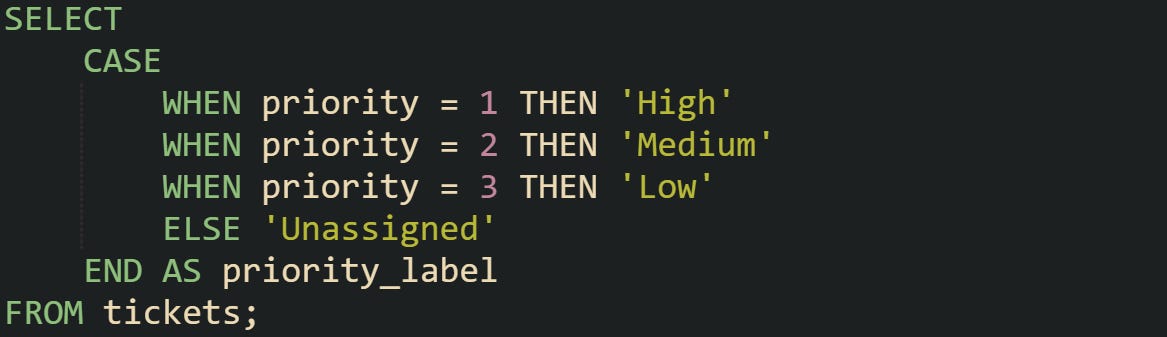
A ticket with priority = 2 comes out as "Medium". Rows are handled one at a time, so the condition is tested independently for each.
Numerical ranges can also be converted into text categories:
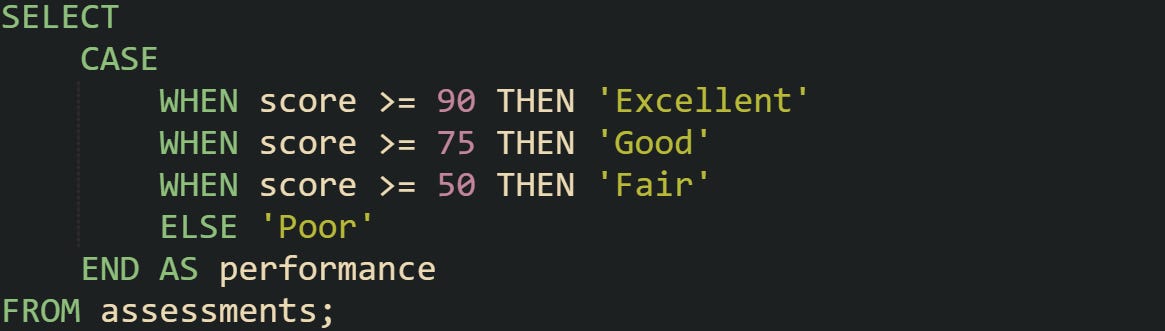
Here the engine checks conditions in order. A score of 88 is labeled "Good". The expression doesn’t keep testing after it finds the first match, which makes ordering of conditions important.
This mechanism isn’t limited to integers. It can evaluate text, dates, or Boolean expressions as long as the condition returns a truth value.
Combining CASE with CONCAT
While CASE decides what text should appear, CONCAT gives structure to the final label. Together they make output more descriptive.
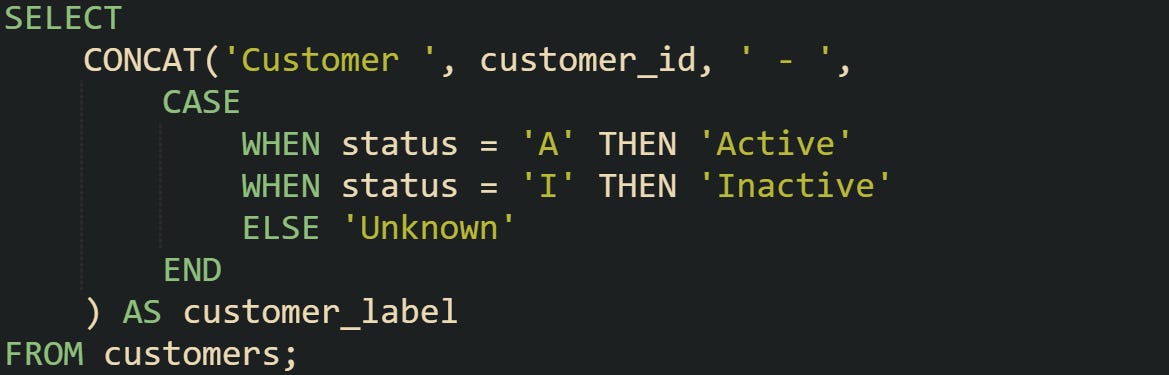
A row with customer_id = 5002 and status = 'A' turns into "Customer 5002 - Active". The CASE expression is fully evaluated before the CONCAT function combines everything.
Sometimes the label needs more detail. A shipment might need both its state and an urgency tag:
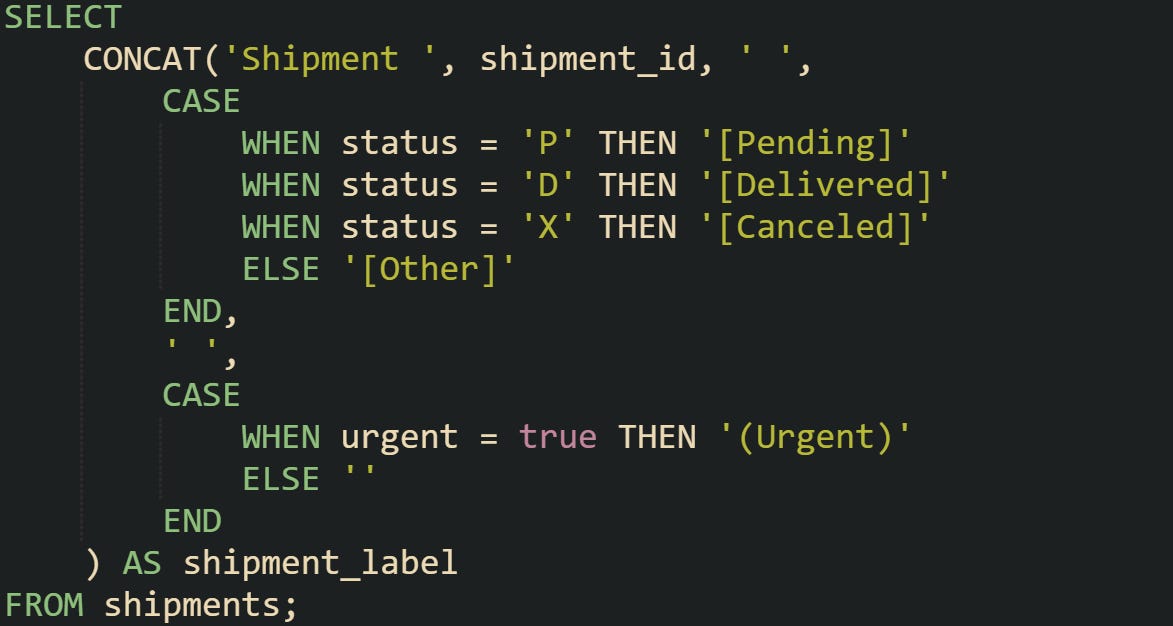
If shipment_id = 3001, status = 'P', and urgent = true, the label is "Shipment 3001 [Pending] (Urgent)". Two CASE expressions were combined into a single string, giving you precise control over what text gets added.
This layering shows how logical checks can be stacked to produce context-rich output without extra application code.
Why This Is Useful For Dynamic Reports
Reports often need to be read by people who aren’t familiar with raw codes or internal shorthand. Labels that contain descriptive text reduce friction and make the data more accessible. CASE is valuable here because it adapts output based on conditions, meaning you don’t have to manually rewrite labels every time new rows are generated.
Lets use a quarterly sales export as a example. The raw table stores regions as "NE", "SW", and "MW". Those codes make sense for storage but don’t read well on a chart. A CASE expression can make the output friendlier:
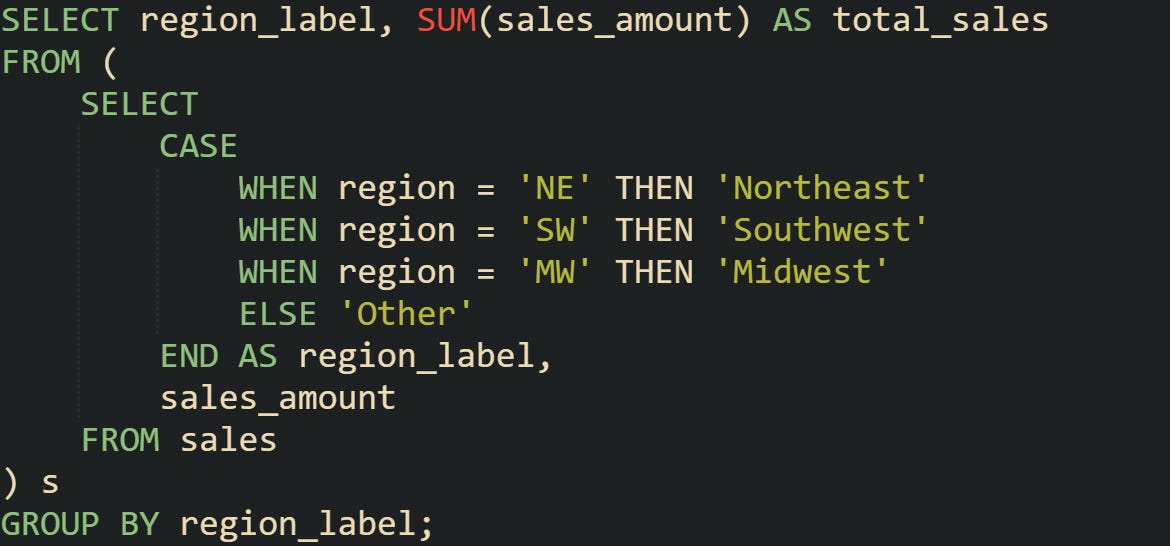
With this query, charts and tables display "Northeast" or "Southwest" instead of cryptic codes.
It’s also helpful when reports need different wording depending on business logic. For instance, a loyalty points report can label accounts differently depending on thresholds:
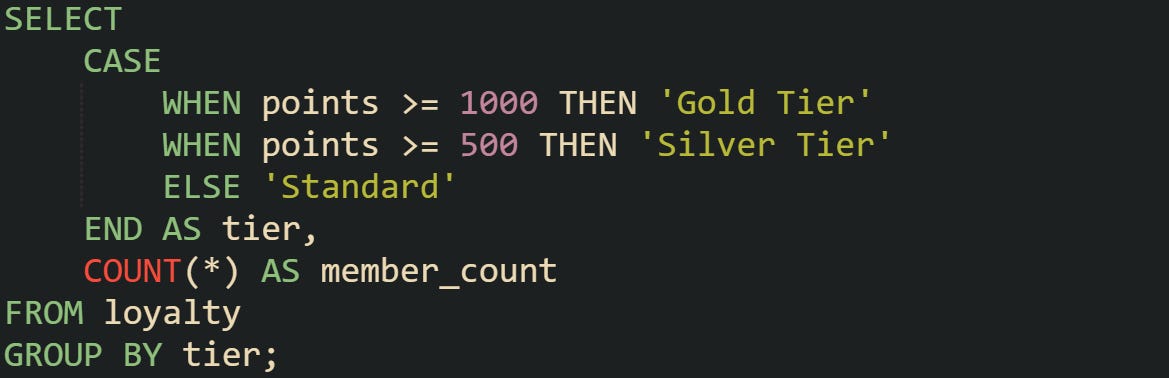
This produces results that already use the language of the rewards program, without needing another layer of transformation outside the database.
Grouped Reports
Grouping with custom labels is an area where CASE combined with CONCAT becomes especially practical. The labels are more than cosmetic because the database can use them directly as grouping keys for aggregates.
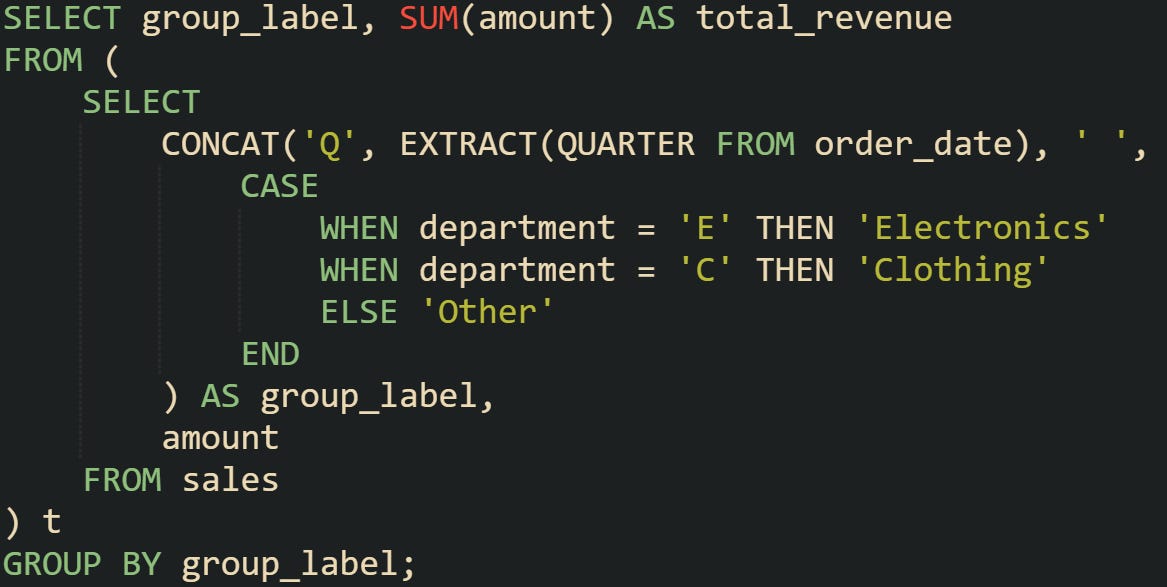
A row with an order in the first quarter for department "E" contributes to the group labeled "Q1 Electronics". That label is both what you see in the output and the value the database uses to group the rows.
A different case could involve membership data where a label combines age ranges with status codes:
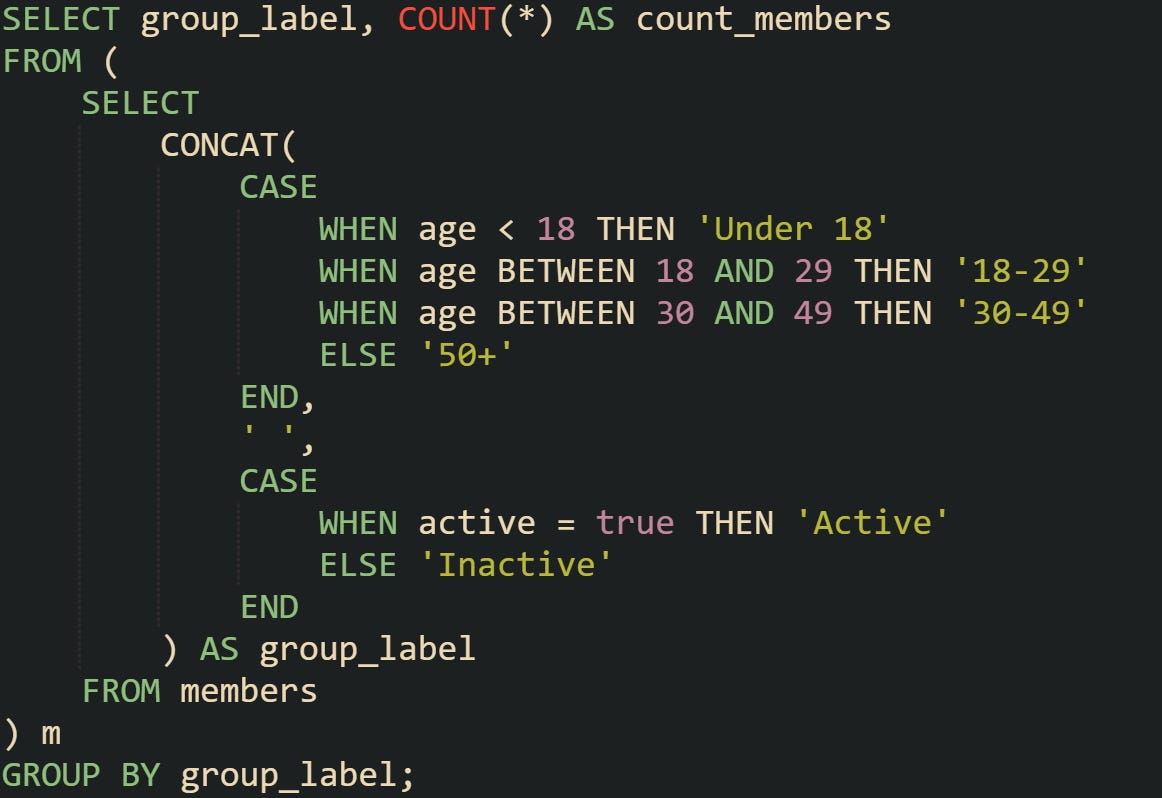
The group labels could be "18-29 Active" or "50+ Inactive". The database evaluates both conditions, produces the text for each row, concatenates them, and then groups rows sharing the same label. This lets you create reports where the labels are meaningful summaries of multiple fields, and the grouping is aligned with how the results are presented.
Conclusion
The mechanics behind CONCAT and CASE give you a way to reshape raw database values into labels that are more practical for reports. CONCAT handles the assembly of text by converting different data types into strings and joining them together, while CASE applies logic row by row so the output can adapt to the contents of each record. Both processes happen during query execution, with the database engine converting, checking, and combining values in a single pass. The end result is output that carries meaning without extra steps outside SQL, which makes it easier to work with data directly where it’s stored.