How JavaScript String.raw Lets You Handle Escape Sequences Directly
Preserve Backslashes and Escape Sequences Without Guesswork



There are a few different ways to work with strings in JavaScript, but one of the more overlooked features is String.raw. This method allows developers to handle raw strings, meaning escape sequences like \n, \t, or \\ are not interpreted but preserved exactly as typed. This has important use cases for handling file paths, writing regular expressions, and working with template literals that should preserve formatting or special characters.
How String.raw Works and What Makes It Different
The String.raw method gives you a way to get the raw, uninterpreted version of a template literal. Escape sequences like \n, \t, or \\ are not treated as special characters. They're kept exactly the way you typed them. For file paths or regex patterns in JavaScript, this can remove a lot of confusion caused by double backslashes or unexpected formatting.
String.raw behaves differently from normal strings because it's tied to how JavaScript parses tagged template literals. When you use it, you’re not just printing a string. You're telling JavaScript to return the original content from the template literal, before escape sequences are processed. Template literals store two versions of a string. One has escape sequences already parsed. The other keeps everything exactly as written. String.raw uses the original version.
The Basics Of Tagged Template Literals
Tagged template literals let you call a function using a template literal. The function gets the string pieces and the values that were inserted. It’s a way to take control of how the string is built, piece by piece.
Here’s an example using a tag function:
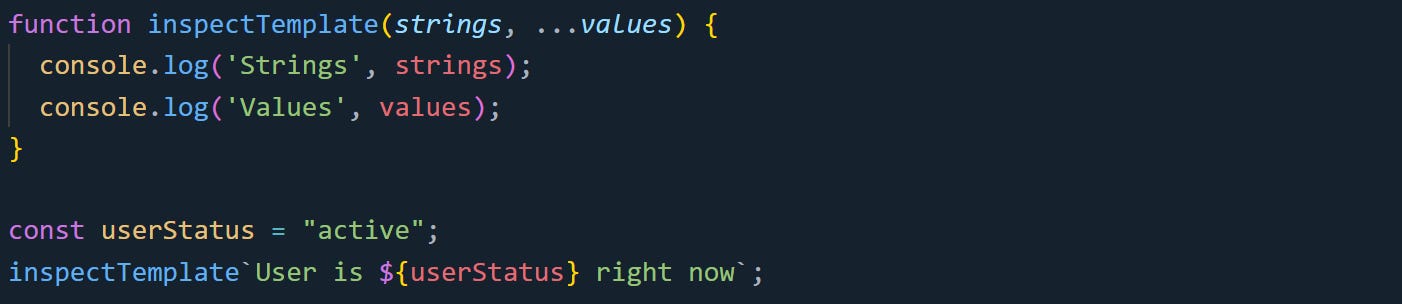
This logs:

The function receives two things. The strings array holds the cooked text, where escape sequences are already processed, and it's split between the inserted values. The values array holds the expressions inside ${}.
If the input has escape characters like \n, JavaScript automatically processes them. But the function can also read the untouched version using strings.raw.
Here’s what that looks like:

Output:

The cooked version turns \n into a newline. The raw version keeps it exactly as backslash-n.
This two-part behavior is what String.raw is built on.
Using String.raw With Template Literals
String.raw is a built-in tag function. It works like any other tag function. Instead of writing your own, String.raw uses the raw version of the string segments and joins them together with the inserted values.
Here’s an example:

The backslashes stay as-is. They don’t turn into anything else. Compare it to this:

A plain string literal must escape each backslash. Writing it with double backslashes avoids a SyntaxError and produces the intended text.

Only the literal string sections are raw. The inserted value still gets placed in like normal.
Another example where this can help is when writing long strings with formatting. Instead of using \n and joining lines with +, you can keep the formatting as it was typed:

This prints exactly what’s inside the backticks. It matches what you typed without needing extra escapes.
Why String.raw Skips Escape Processing
String.raw works by accessing the raw version of the string segments in a tagged template literal. JavaScript stores both cooked and raw forms for every template literal. The raw version is available through the raw property on the strings array.
When you call String.raw, it skips the cooked version entirely. It loops through the raw segments and inserts any expressions between them. Then it joins everything together and returns the result.
Here’s a basic simulation of what it does:
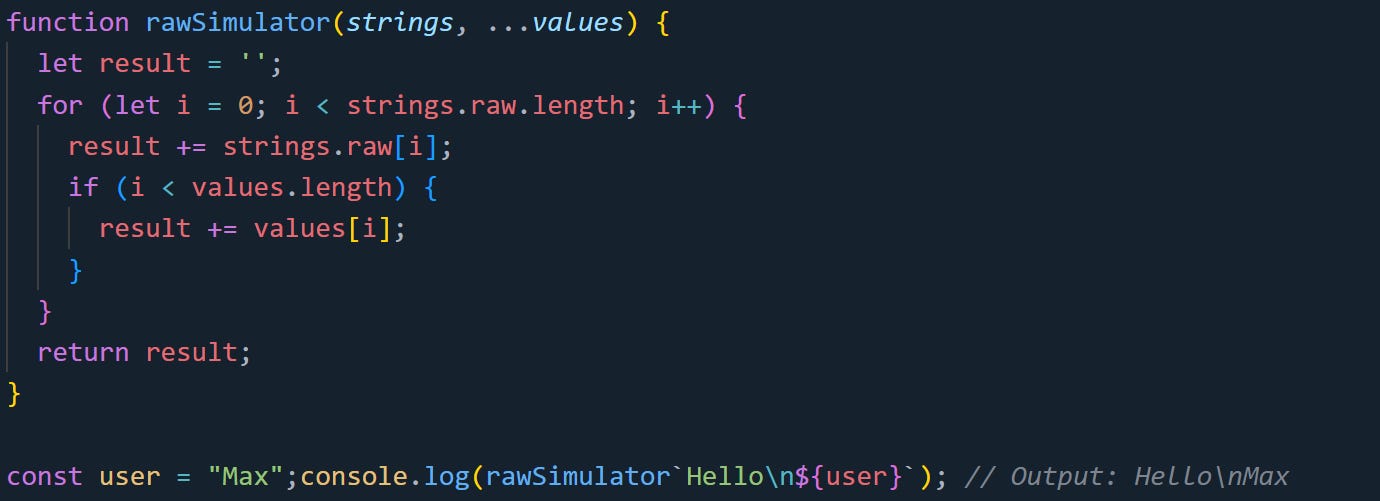
Nothing interprets \n. It stays as backslash-n in the output.
This kind of behavior helps in contexts where escape characters shouldn’t be changed by the language. If you’re writing a regex or a config file string that gets processed later, String.raw lets you pass it through unchanged. That removes extra steps and makes the string easier to manage.
Real Use Cases for Raw Strings in JavaScript
The value of String.raw shows up most when you're working with strings that depend on exact character sequences. In some places, a single backslash or special character can break your output if it gets processed too early. Raw strings help with this by keeping everything exactly as typed. You don’t have to double escape or find workarounds to keep your string intact.
Working With File Paths
File paths on Windows are written with backslashes, like C:\Users\Admin\Documents. That causes problems in normal JavaScript strings because \ is used to escape characters. If you're not careful, \n turns into a newline, \t becomes a tab, and your file path ends up broken or unreadable.
You could escape every backslash manually:

But that clutters the string. It’s harder to scan and harder to update. You have to remember which characters were real and which were escapes.
Now compare that to the same path using String.raw:

You get the same output, but the code looks cleaner. You write the string once, exactly as it should appear, without worrying about JavaScript changing it during parsing. This helps if you’re generating paths dynamically too. You can keep the structure readable and handle variables without needing to think about which parts need escaping:

This way you don’t have to mentally step through what the final string will be. You just read it directly.
Writing Regular Expressions
Regular expressions are full of escape characters. Writing them inside a normal JavaScript string forces you to double every backslash. That makes regex patterns harder to debug and sometimes hard to get right on the first try.
Take this example written with standard escaping:

That matches one or more digits, followed by one or more spaces, followed by one or more word characters. But you can’t tell what the pattern means just by looking at it. You’re reading through double escapes and guessing how many slashes were intentional.
Using String.raw lets you write the pattern like you would on paper:

The pattern is easier to read. You don’t have to escape everything twice. The string stays closer to what you’d see in a regular expression tester or documentation.
This also helps when regex is used inside more complex templates, like input validation or parsing logs:
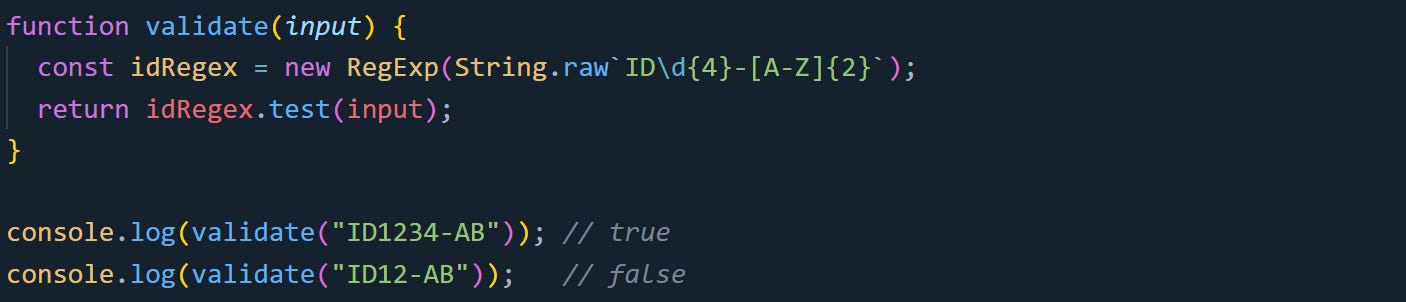
You still get full regex support, but now you can write your pattern without extra escape noise.
Writing Custom Template Literal Tags
Tagged template literals let you build custom functions that take control of template string input. If you want to work with raw text directly, String.raw helps you reach that lower level of input without needing to build your own full parser.
You might use this for debugging or when building a tool that processes custom strings. Here’s a simple example where we log the raw text that a user types into a template:
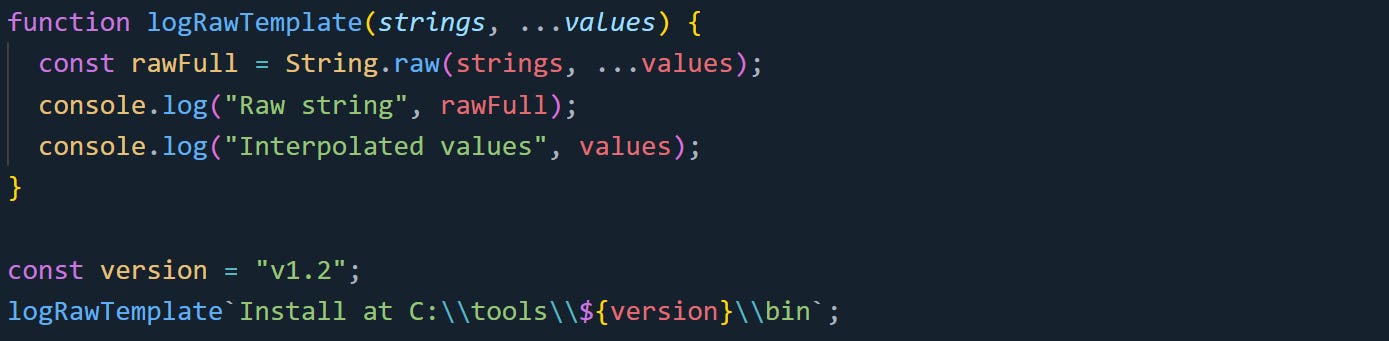
Output:

The double backslashes are preserved because String.raw returns the raw template text exactly as written. This gives you access to what the developer actually typed. The function gets the original string with escape characters untouched. That’s nice if you’re writing a system that needs exact matches or needs to preserve formatting, like a code generator or a configuration builder.
You can also combine String.raw with a tag function to build something like a debug-safe log formatter:
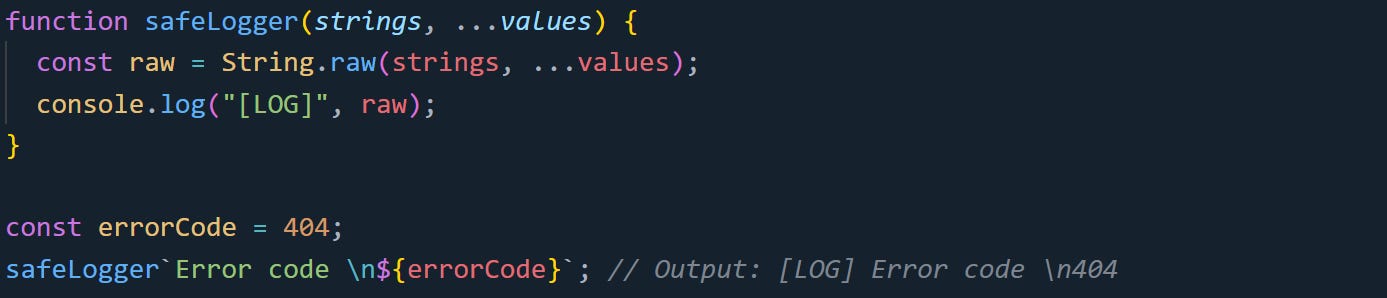
The \n stays visible, so it doesn’t break the log formatting. This kind of output can be piped into other tools without needing to clean up escape artifacts.
Raw strings give you more predictability in cases where formatting matters or the string is meant to be passed somewhere else without being changed. You can handle special characters directly without adding extra logic to deal with escape sequences.
Conclusion
The mechanics behind String.raw come down to how JavaScript separates raw and cooked versions of template literals. It doesn’t modify escape sequences and doesn’t guess what you meant. It gives you exactly what was typed, with no rewrites or surprises. That difference matters when working with paths, regex, or any string that depends on precise characters. Instead of working around JavaScript's built-in parsing, you get a way to bypass it entirely and handle the string on your terms.