
Applications sometimes need to serve the same data in different formats depending on what the client requests. JSON, XML, and CSV are the most common, and Spring Boot makes it possible to return all three from a single controller. The way this works comes down to how Spring Boot decides what format to return and how it converts Java objects into the right output behind the scenes.
Mechanics of Content Negotiation in Spring Boot
When a controller in Spring Boot sends back data, it doesn’t leave as Java objects. The framework transforms those objects into a format that makes sense to the client, such as JSON, XML, or CSV. That decision is handled through a process called content negotiation. Every request follows a pattern that decides what to return, how to convert it, and how to write it back to the response.
Request Flow From Return Value To Response
A Spring Boot request passes through several layers before it reaches the client. When a request arrives, it’s first received by the DispatcherServlet, which acts as the main coordinator for the entire web layer. It finds the right controller method based on the request mapping, calls that method, and waits for a return value. That return value could be a single object, a list, or a wrapper type. When the controller finishes, Spring Boot figures out how to transform that return value into something the client can read. This is handled by several internal components that work in sequence to process the result.
A basic example can make this easier to follow:
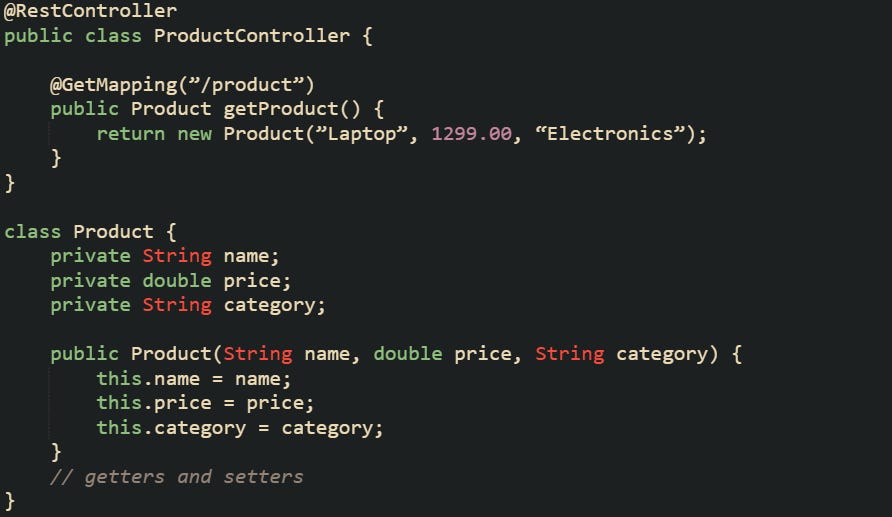
A request made with curl -H “Accept: application/json” http://localhost:8080/product asks for JSON. The DispatcherServlet routes the call to the matching controller. After the controller returns a value, Spring’s return value handler consults the ContentNegotiationManager to resolve the requested media types, then selects an HttpMessageConverter that can write that value for the chosen media type. If the converter can handle both the object type and the requested media type, it serializes the data and writes it back to the response body. If not, the framework sends back a 406 status code.
Every request follows this same path: servlet, controller, negotiation manager, and converter.
How Format Selection Works
Spring Boot has to figure out what format the client expects before it can return anything. That’s where the ContentNegotiationManager steps in. It checks a few parts of the request and chooses the best fit. The most common clue is the Accept header. When a client sends something like Accept: application/xml, Spring Boot reads that and knows to produce XML instead of JSON.
There’s also another option that uses a query parameter. You can add a configuration that lets requests include something like /product?format=csv, which forces the format to CSV regardless of the header. That’s handy for browser testing or services that don’t set headers automatically. Older versions of Spring used file extensions in URLs, like /product.json or /product.xml. That method is now off by default because it can cause confusion and doesn’t play well with some web servers.
Here’s what a configuration class looks like that controls how Spring Boot makes its format decision:
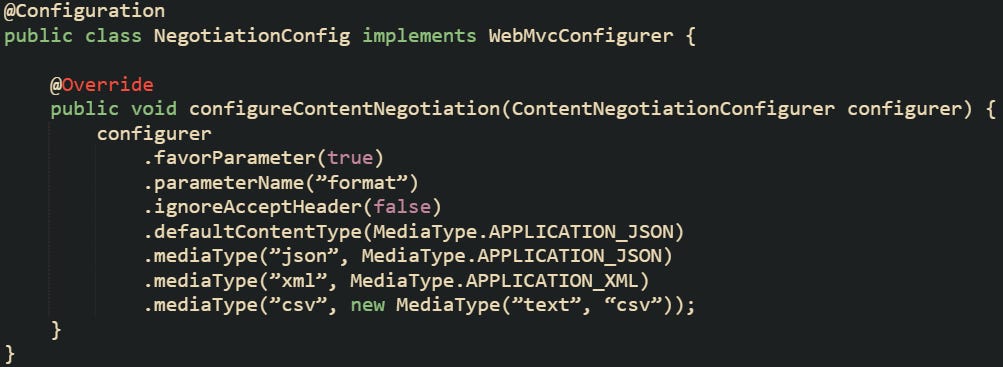
With this configuration in place, a query parameter called format takes priority. If that isn’t present, the framework falls back to the Accept header. If neither is found, it returns JSON.
Running these two commands shows how it behaves in practice.

Both reach the same controller but end up returning different formats. One is determined by the header and the other by the parameter.
Content negotiation runs fresh for every request, meaning Spring Boot doesn’t keep or reuse a previous choice. That matters when a service handles different kinds of clients such as mobile apps, browsers, or automated systems, because each one can request its own format without affecting the others.
How Message Converters Fit Into The Process
After the framework knows which format the client wants, the response is handed to a message converter. A converter’s job is to turn Java data into the proper media type. Each converter knows what it can handle through two methods, canWrite and write. Spring Boot loads a set of converters automatically based on what libraries are included. If Jackson is on the classpath, a JSON converter is registered. If Jackson’s XML module is on the classpath, Spring Boot registers MappingJackson2XmlHttpMessageConverter for XML. A JAXB-based converter is optional and only applies if Jakarta XML Bind is added. The same goes for text or binary converters.
Converters are picked in order. The first one that reports it can write the object for that media type is the one that handles the response.
A simple custom converter for text can look like this:
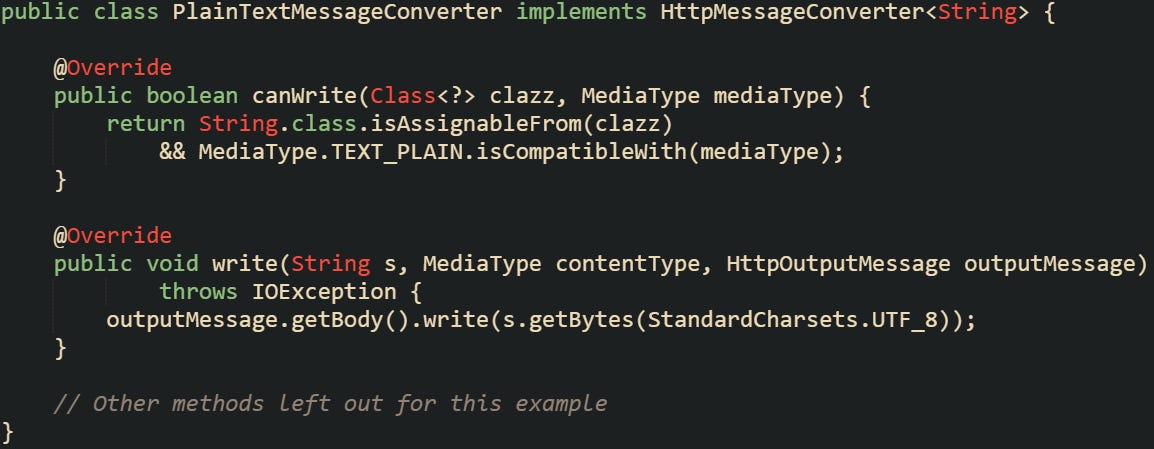
This converter handles plain text whenever the controller returns a String and the media type is text/plain. After it’s registered, Spring Boot can automatically use it when needed.
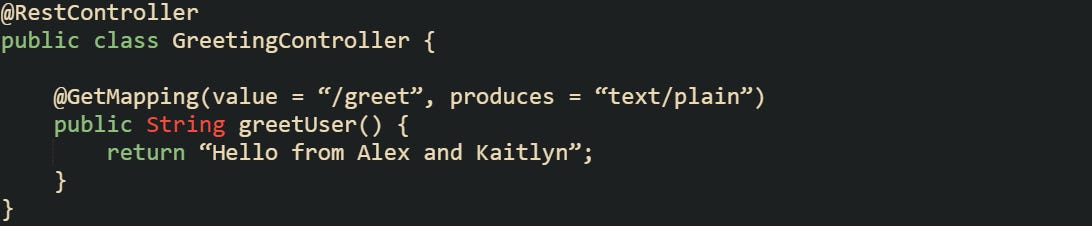
A call to /greet with Accept: text/plain triggers the plain text converter. It writes the response as raw text instead of JSON or XML.
Different converters handle different formats. Binary data, for instance, goes through the ByteArrayHttpMessageConverter.

This converter takes the byte array and sends it as PNG data to the client. The process follows the same pattern, Spring checks the type and media type, finds the right converter, and writes the response. Message converters sit at the center of how Spring Boot handles content negotiation. They take Java objects and turn them into the format the client expects, bridging the gap between code and readable output.
Returning JSON, XML, and CSV from One Controller
Spring Boot can serve multiple output formats from a single endpoint without having to duplicate code. When configured properly, the same controller can send JSON, XML, or CSV depending on the request headers or query parameters. This flexibility comes from how the framework ties content negotiation to message converters and how easy it is to register custom ones for formats that aren’t provided out of the box.
To build this kind of controller, it helps to start with the right dependencies, move into how converters are added, and then see how a single controller method adapts its output for each format. CSV support usually requires a few extra steps since Spring Boot doesn’t include a default converter for it.
Adding Dependencies
Spring Boot automatically brings in JSON support through Jackson, but XML and CSV need to be declared explicitly. Jackson’s XML and CSV modules provide full serialization support, letting the framework treat them as first-class response types.
Here’s what the dependencies look like in a Maven build file:
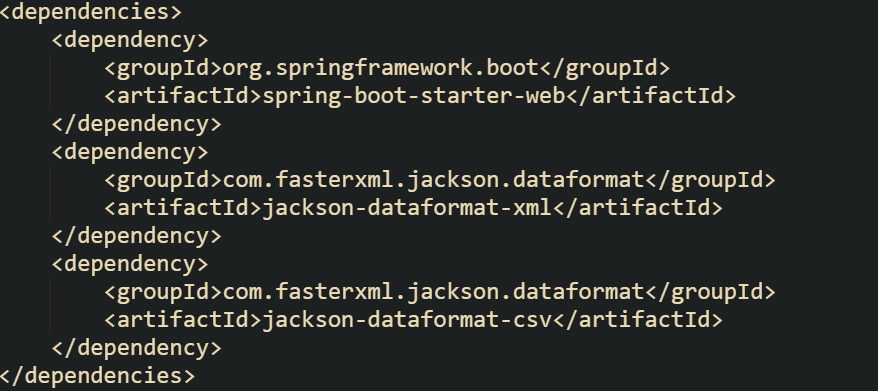
The XML module makes Jackson capable of reading and writing XML documents automatically when the media type is application/xml. The CSV module extends that support so Jackson can handle structured text output with headers and rows.
You can verify that both have been loaded by checking startup logs at DEBUG level. Spring Boot logs the configured message converters when debug logging is enabled. You’ll see entries like MappingJackson2XmlHttpMessageConverter and your custom CSV converter once it’s registered.
Sometimes Gradle builds use a slightly different notation, which is worth noting when switching between build tools.

Having these libraries on the classpath lets Spring Boot auto-detect which message converters to initialize. The only extra step needed is to register a converter for CSV, since it’s not automatically added.
Creating a CSV Converter
Spring Boot doesn’t come with a converter that can serialize objects into CSV, but Jackson’s CSV library can handle most of the heavy lifting. To connect it to Spring’s conversion pipeline, you can extend one of the Jackson base converters and configure it for text/csv.
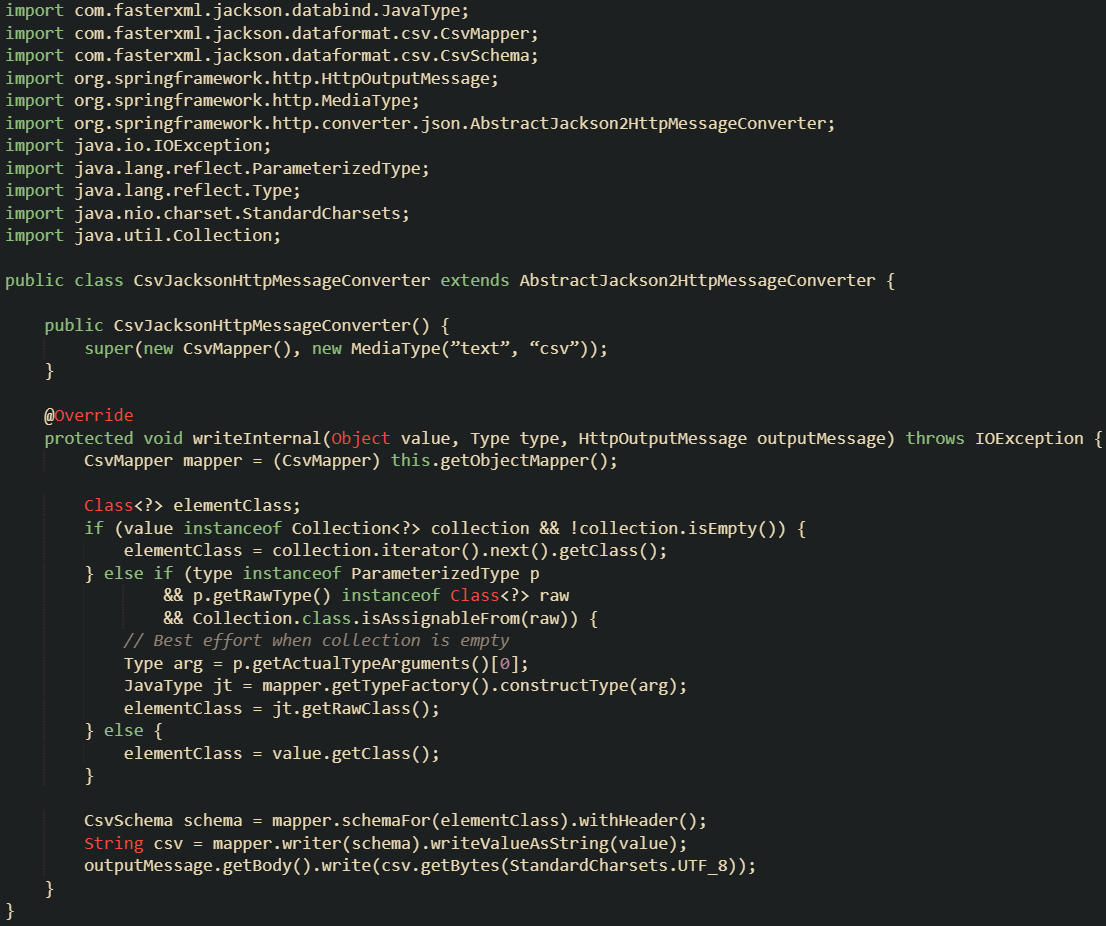
This converter uses CsvMapper to write objects into CSV text with a header row. Once added to Spring’s converter list, it’s automatically called whenever a controller returns a Java object and the requested media type is text/csv.
The converter can be registered in a configuration class that extends WebMvcConfigurer.

Adding it this way keeps Spring Boot’s default converters intact while extending the list with your custom one. Each converter only handles specific cases, so the default JSON and XML converters remain unaffected.
If you ever need to tweak CSV output further, such as adding custom delimiters or quotes, you can modify the CsvSchema in the converter.
Controller Returning Multiple Formats
After the converters and negotiation settings are in place, a single controller method can return data in multiple formats depending on what the request asks for. The process happens automatically based on the Accept header or the format query parameter you configured earlier.
Here’s a practical example that serves user information in different formats:
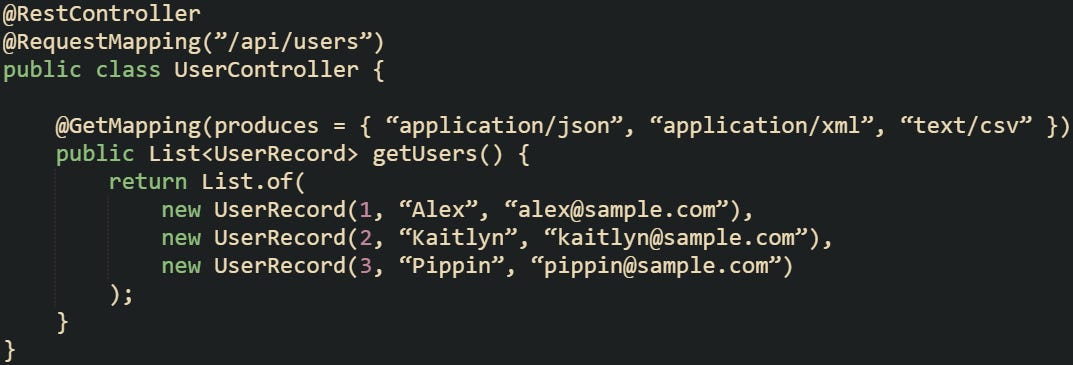
The data class for this example supports both JSON and XML serialization through Jackson annotations.
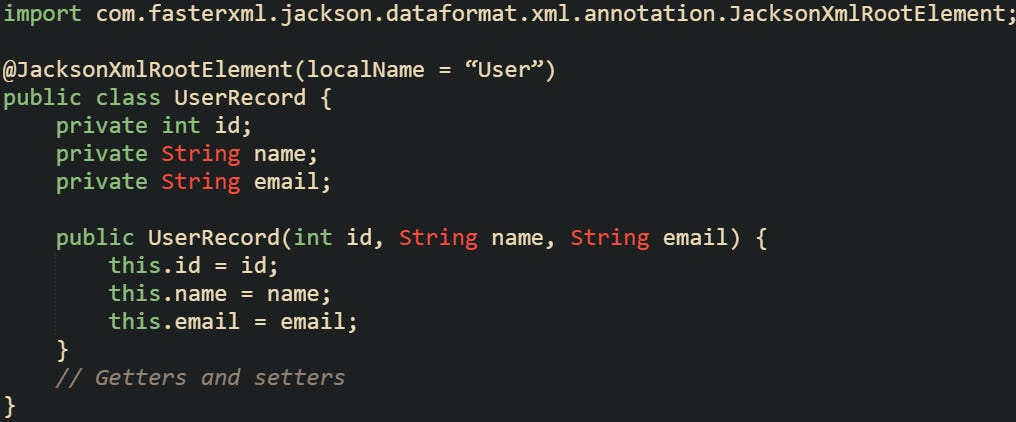
Requests sent with different headers or parameters trigger different converters without modifying the controller code.

Each response uses the same data source but is serialized differently depending on the client’s request. JSON and XML are handled automatically through Jackson, while CSV is produced by your custom converter. To confirm that the negotiation is working correctly, you can check Spring’s debug logs. It prints messages showing which converter was chosen for the response. That’s a useful way to troubleshoot if a format isn’t being picked up.
Some projects also separate endpoints by version or type, such as /v1/users or /export/users, but this configuration makes that unnecessary when the only difference is format.
Writing CSV Manually For Exports
There are situations where you want full control over CSV output, such as large exports or data that streams directly to a client for download. Writing the response manually gives flexibility over buffering, headers, and how data is written to the stream.
A controller method can write directly to the HttpServletResponse output stream instead of returning an object.
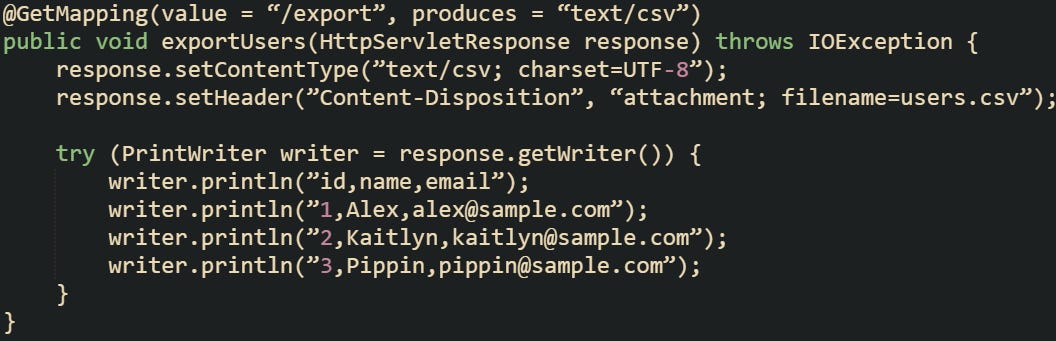
This method writes CSV directly without passing through the message converters. It’s a good choice for streaming large datasets or generating downloadable files.
Some people prefer to use libraries like OpenCSV for advanced formatting or escaping, but the built-in Java I/O methods handle smaller exports well. The choice depends on how large or complex the data is.
A similar export could handle reports or logs:
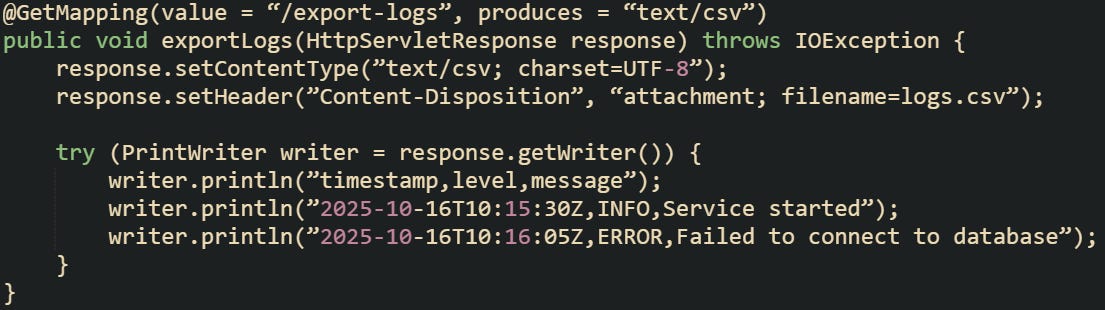
Manual CSV responses skip Spring Boot’s negotiation layer but work well for endpoints intended only for file downloads. This approach lets you control the content headers, the filename, and the writing process while keeping the overall API flexible for other formats on different routes.
Conclusion
Spring Boot’s content negotiation works through a structured sequence that connects the request headers, negotiation manager, and message converters into one smooth process. Each piece contributes to how data is selected, formatted, and delivered back to the client. JSON and XML responses are handled automatically through Jackson, while CSV support can be added with a custom converter or written manually for full control. The result is a system that can adapt its output based on what the client asks for, all driven by how Spring Boot manages the mechanics behind the request and response cycle.