Reading query plans is one of the main ways people diagnose slow statements in relational databases. The EXPLAIN family of tools lays out how the optimizer expects to run a statement, how tables link through joins, which indexes are involved, and how many rows the engine expects at each step.
EXPLAIN Basics For SQL Query Plans
Engineers use EXPLAIN as a diagnostic tool to see whether a query will scan large tables, rely on indexes, or push work into expensive joins, so it sits at the heart of day to day performance tuning across engines.
What Execution Plans Represent
At the logical level, the database talks about high level operations such as scanning a table, filtering rows, joining row sets, grouping by a column, or sorting by a field. At the physical level, those high level operations map to concrete operators such as a table scan, an index seek, a hash join, a merge join, or a sort node over a specific input. SQL Server documentation separates logical and physical operators in its plan reference, and PostgreSQL, MySQL, and Oracle follow the same idea even when the names differ slightly.
Most engines show the plan as a tree where every node feeds rows to a parent node. A scan node reads from a table or index, a filter node removes rows that do not match the predicate, a join node merges rows from two inputs on a join condition, and a sort node orders rows before they move up the tree. Higher nodes depend on the output of lower nodes, and the root of the tree is the final result set that the client receives. That structure lets you read from the top to understand the overall query goal and from the bottom to see how individual tables or indexes are accessed.
PostgreSQL presents plan nodes as text lines. Take this query targets a single table with a basic filter:

One possible PostgreSQL plan line for that statement could be Seq Scan on sales (cost=0.00..310.00 rows=5000 width=120)
The phrase Seq Scan on sales names the physical operator, which is a sequential scan of the sales table. The cost=0.00..310.00 range is the planner’s estimate of how expensive this operation is relative to other plan choices. The rows=5000 value is the estimated number of rows that will come out of this node, and width=120 is the estimated row size in bytes. The Filter line records the predicate applied at that node.
SQL Server graphical plans represent the same ideas with operator icons such as Table Scan or Index Seek that feed into filter or join icons. MySQL can present similar operator details in its JSON and tree formatted plans. Oracle uses DBMS_XPLAN output to list operator names and row estimates in tabular form. In all of these engines, every operator has an input, an output, and metadata about cost and row counts that reflects how the optimizer expects that operator to behave. Execution plans also describe joins and aggregation steps. Join nodes name the join method, such as Nested Loop, Hash Join, or Merge Join, and include the join condition on the relevant columns. Aggregate nodes may appear as GroupAggregate in PostgreSQL or Hash Match (Aggregate) in SQL Server and list the grouping columns. Those labels indicate how rows will be grouped, how hash tables will be built for aggregation or joins, and how join keys will be matched as data flows upward.
How To Run EXPLAIN Across Common Databases
SQL engines expose execution plans with different commands, yet all of them center on asking the optimizer to describe its work. For each engine there is a way to request an estimated plan, which runs the optimizer without executing the statement, and a way to request an actual plan, which runs the statement and records real row counts and timings.
PostgreSQL uses an EXPLAIN command in front of a normal query.

In this mode PostgreSQL runs only the planner and then prints estimated cost and row counts. Adding the ANALYZE option makes PostgreSQL execute the query and record runtime statistics.

The output then includes actual time, rows, and loops on every node. Those values come from the real run and make it possible to compare estimated work against actual work.
MySQL exposes plans through the EXPLAIN keyword in front of a statement.

MySQL returns a row set with columns such as id, select_type, table, type, possible_keys, key, rows, and filtered. The type column describes the access method, such as ALL for a full scan or range for a range scan on an index, and the rows column gives the estimated number of rows that node will process. MySQL exposes richer EXPLAIN formats through the FORMAT option, such as FORMAT=JSON and FORMAT=TREE, which present the same plan information as nested structures that resemble the textual trees from PostgreSQL.

In FORMAT=TREE MySQL exposes extra details such as hash join usage and a more structured view of how the query will be handled than the classic tabular EXPLAIN result.
Oracle takes a different route through EXPLAIN PLAN like:

This command writes the plan into a plan table. To read it, Oracle provides the DBMS_XPLAN.DISPLAY function, which queries the plan table and prints a formatted plan with operator names, estimated rows, and cost figures. Typical use is to run EXPLAIN PLAN FOR, then call SELECT * FROM TABLE(DBMS_XPLAN.DISPLAY); to see the text representation. Logical and physical operators in that output match the optimizer’s choices for the statement.
SQL Server retrieves estimated and actual plans through database options and graphical tools. In Transact SQL it is possible to request an estimated plan by setting SHOWPLAN_XML before running a query.
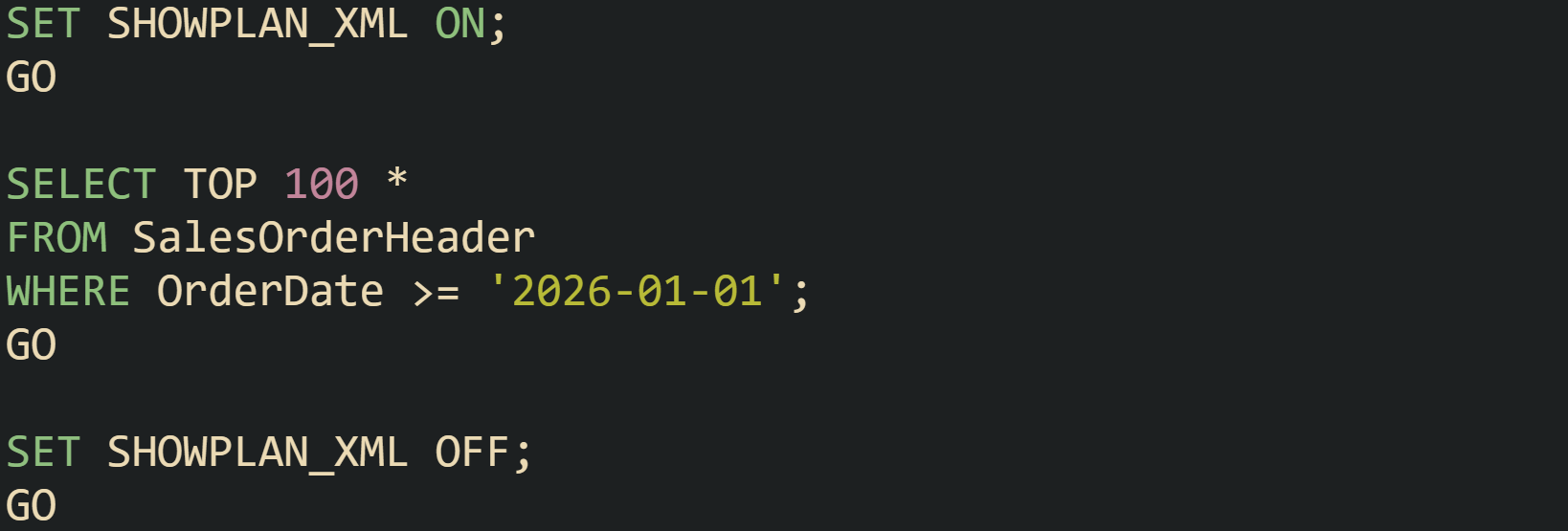
That sequence returns an XML representation of the plan rather than actual rows. Turning on the actual execution plan in SQL Server Management Studio, or calling SET STATISTICS XML ON, causes the server to run the statement and then return XML that contains actual row counts and timing for each operator. The graphical view in the tools is built from the same XML.
Across these engines, estimated plans are obtained without executing the query, while actual plans execute the statement and attach runtime statistics to each operator. Both forms describe the same logical steps and physical operators; the difference is whether the numbers for row counts and timing come from estimates or from real execution.
Fields To Read First In Text Plans
Plan output carries many fields, and a small set of them gives a quick picture of what the optimizer expects. Names differ by engine, but the main ideas appear everywhere: row estimates, cost, access method, join method, and predicate placement.
Estimated row counts give a direct view of what the optimizer predicts for each step. PostgreSQL shows an estimated row count in the rows attribute of each node, and with EXPLAIN ANALYZE it prints actual rows and loop counts, such as rows=1200 loops=1. MySQL’s tabular output includes a rows column that reports the estimated count for that part of the plan. SQL Server’s XML and graphical plans have attributes like EstimatedRows and ActualRows. Oracle’s DBMS_XPLAN output includes a ROWS column that represents estimated cardinality for each operation, with extended formats able to show both estimated and actual row counts. When the actual count is much higher or much lower than the estimate for a node, that gap points to statistics that no longer match real data and that mismatch can push the optimizer toward inefficient choices.
The cost figures describe how heavy an operator is compared with other options in the same plan. PostgreSQL prints cost as a range on every line, such as cost=0.00..310.00, where the start value is the startup cost and the end value is the total cost. These numbers are dimensionless units based on page reads and CPU work, but when two plans produced by the same configuration are compared, a plan with a much higher total cost usually requires more time and resources. SQL Server expresses similar information as a percentage of the whole plan and shows that percentage next to each operator in graphical plans, while its XML representation records estimated I/O and CPU costs. Oracle and MySQL attach their own cost units in plan output as well.
Access method or scan type tells how an operator walks through a table or index. MySQL uses the type column for this purpose in its traditional EXPLAIN table. Values such as ALL, index, range, ref, and const represent different access patterns, with ALL indicating a full table scan. PostgreSQL builds the scan type directly into the node name, such as Seq Scan, Index Scan, or Index Only Scan. SQL Server emits Table Scan, Index Scan, and Index Seek as operator names. Oracle’s PLAN_TABLE includes ACCESS_PREDICATES and FILTER_PREDICATES columns for each step, separating predicates that drive access from predicates applied after rows are fetched. A query that touches millions of rows through a full scan when only a small fraction is needed will show that difference in access method and row counts.
Join operators carry labels such as Nested Loop, Hash Join, and Merge Join, which describe how the engine combines rows from their inputs. Nested loop joins process each row from an outer input and probe the inner input for matches, hash joins build a hash table on one side and probe it from the other side, and merge joins rely on sorted input and walk both sides in order. These methods have different sensitivity to row counts, memory usage, and sort work, and the chosen method has a direct impact on how a query scales as data grows.
Predicate placement tells you where filters are applied in the plan. PostgreSQL uses attributes like Index Cond to show predicates that drive index lookups and Filter for predicates that run after rows have been fetched. MySQL records conditions in columns such as Extra, and its JSON and tree EXPLAIN formats can attach predicates more precisely to individual operations. SQL Server distinguishes between Predicate and Seek Predicate in its XML, with Seek Predicate describing conditions that form part of the index lookup. Oracle’s DBMS_XPLAN format separates access predicates from filter predicates in its columns. Those fields show whether a filter runs early enough to reduce row counts before joins and aggregates, or whether it is applied late, which can cause extra work on rows that will be discarded.
This PostgreSQL example ties several of these ideas together visually:

The plan for that query includes a scan on sales, possibly an index scan if an index on sale_date exists, a filter on the date condition, and an aggregate node that groups by customer_id. Row counts show how many sales pass the date filter, cost values reveal which operator dominates the work, and predicate fields indicate whether the date condition drives an index lookup or acts as a filter after rows are loaded. Looking at those attributes on each node turns a block of EXPLAIN text into a traceable description of how the database will process the query.
From Scan Choice To Join Strategy
Scan choice explains how the database engine reads from tables and indexes, while join strategy explains how it combines those row streams. Execution plans link these two layers into a single tree, so reading both together explains why a statement touches a large number of rows or spends time in a particular join. Scan nodes sit near the leaves of the plan and feed rows upward, and join nodes sit higher in the tree, pulling from one or more scans and from intermediate operators such as filters and aggregates.
Common Scan Types In Relational Engines
Plan nodes differ in how they walk through storage for a given table, and that behavior is captured by the scan type. Relational engines share similar categories, even when the labels differ. Sequential scans read every row in a table, index based scans walk an index to find candidate rows and then fetch table data as needed, and some systems add bitmap scans that combine a wide index probe with batched table access. PostgreSQL, MySQL, SQL Server, and Oracle all contain these ideas, with different operator names and cost models.
Sequential scans, called Seq Scan in PostgreSQL and Table Scan in SQL Server, read the entire heap or clustered index from start to end. MySQL exposes the same concept in its EXPLAIN output with type = 'ALL'. Engines move to this method when no helpful index exists, when statistics suggest that most rows will match the predicate, or when a query needs nearly all data from a table. Cost numbers in the plan reflect that a full scan touches many pages, and row estimates show that a large fraction of rows will pass filters.
Lets consider a table that records customer orders:
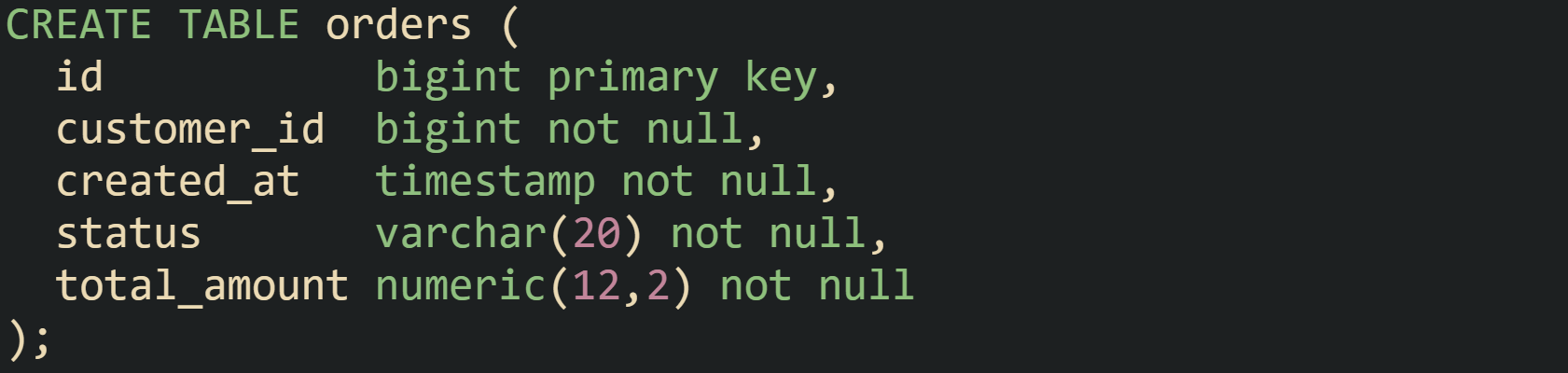
Suppose queries frequently look at recent orders for one customer:

Without a supporting index, PostgreSQL is likely to report a Seq Scan on orders node, and MySQL will tend to show type = 'ALL' for the orders table in its EXPLAIN output. The engine estimates that it has to inspect many rows, and the plan reflects that by picking a full table walk as the access method.
Index scans, seen as Index Scan in PostgreSQL, Index Seek or Index Scan in SQL Server, and type values such as ref or range in MySQL, limit reads to rows that match index conditions. When a query filters on customer_id and created_at, and there is a composite index on those columns, the engine can go straight to matching index entries instead of touching every row.

Running the same query with that index in place often produces a plan in PostgreSQL that includes Index Scan using orders_customer_created_idx on orders with an Index Cond mentioning both customer_id and created_at. MySQL EXPLAIN output can shift to type = 'range' and show orders_customer_created_idx in the key column, with a much lower rows estimate. Index statistics feed those decisions, so plans change as data distributions and index definitions change.
Index only scans extend this idea by serving the query entirely from index pages when all referenced columns live in the index. PostgreSQL exposes this with an Index Only Scan node, and relies on its visibility map to decide which index entries are safe to read without visiting the heap. SQL Server can serve some queries from nonclustered indexes alone when included columns cover the projection, and graphical plans record that choice.

A query that selects customer_id, created_at, and total_amount while filtering by customer_id and a created_at range can use that index alone in SQL Server, and PostgreSQL can use Index Only Scan when its visibility map has been populated by recent vacuum activity. These plans reduce heap access, which is visible in operator cost and in lower I/O at runtime.
Bitmap index scans appear in PostgreSQL as Bitmap Index Scan feeding into Bitmap Heap Scan. This pair helps when a filter selects more rows than a narrow index scan handles efficiently but still far fewer rows than a full table scan. The index step first creates a bitmap of candidate row locations across the table, and the heap step then visits pages in an order that minimizes repeated reads. When predicates touch several indexed columns with OR conditions, PostgreSQL can build multiple bitmaps and combine them in memory, which lets the planner keep a scan that uses indexes even when conditions stretch across several columns.
Other engines reflect similar ideas through different plan nodes or internal mechanics. MySQL can intersect and union index scans in some cases, and SQL Server can combine filter and seek predicates to read ranges that align with composite indexes. Scan type columns and node names in EXPLAIN output tell which of these behaviors the optimizer selected for a specific query.
Join Operations With Practical Rewrites
Join strategy describes how the engine combines rows from two or more inputs. Execution plans name the join method directly, and reading that label together with row estimates and scan types reveals how a statement ties tables together. Nested loop joins, hash joins, and merge joins form the main family of join methods across PostgreSQL, MySQL, SQL Server, and Oracle, with some variations in implementation and terminology.
Nested loop joins take an outer input and, for each row in that input, probe an inner input for matches. PostgreSQL prints Nested Loop as the node name, SQL Server uses Nested Loops in graphical plans, and Oracle lists NESTED LOOPS in DBMS_XPLAN output. When the inner input has an index on join columns, the engine can run many small index lookups, which works well when the outer result is small. When the outer input has many rows and the inner input lacks a supporting index, nested loops can lead to plan shapes where a large number of full scans occur, which shows up in EXPLAIN text as repeated scans and high total cost.
Hash joins build a hash table from one input with the join columns as hash keys, then scan the other input and probe the hash table for matches. PostgreSQL names these nodes Hash Join, SQL Server uses Hash Match, MySQL 8 shows hash joins in EXPLAIN FORMAT=TREE plans, and Oracle lists HASH JOIN operators. Large inputs favor hash joins when the join condition is an equality on indexed or well distributed columns. Memory usage appears as part of operator cost and can be inferred from row estimates and column width, because the hash table has to hold rows or projected fields from one input.
Merge joins rely on both inputs being sorted on join columns. Operators such as Merge Join in PostgreSQL and Merge Join in SQL Server take advantage of sorted streams to walk both inputs in lockstep, matching rows without building a hash table or running nested loops. When indexes already enforce the needed sort order, merge joins can work well for large equality or range joins. When no useful order exists, the engine has to insert sort operators before the merge join, and the extra cost appears in EXPLAIN output as separate sort nodes with their own row and cost estimates.
One practical plan example uses a nested loop that runs poorly when tables grow.

Lets say orders contains a large number of rows and payments has an order_id column but no index. PostgreSQL can emit a plan with Nested Loop at the top, a Seq Scan on orders as the outer input, and a Seq Scan on payments as the inner input. SQL Server or MySQL plans tell a similar story with table scans on both sides. Row estimates then multiply: the nested loop processes many outer rows, and each of those causes a full scan on payments. The plan shape reveals the problem immediately.
Indexing the join column on the inner side changes that:

Running EXPLAIN again on the same query in PostgreSQL can now yield a Nested Loop where the outer input remains a selective scan on orders but the inner input becomes Index Scan using payments_order_idx on payments. SQL Server would typically switch to an Index Seek on payments in the join, and MySQL could move its type column for payments from ALL to ref. Row estimates for the inner step drop sharply, and nested loops become suitable again, because each outer row now drives a cheap index lookup instead of a full scan.
Join strategy also depends on how many rows pass through filters and how accurate statistics are, which is visible in EXPLAIN output through gaps between estimated and actual row counts. One query that joins a large events table to a smaller dimension table captures this behavior.
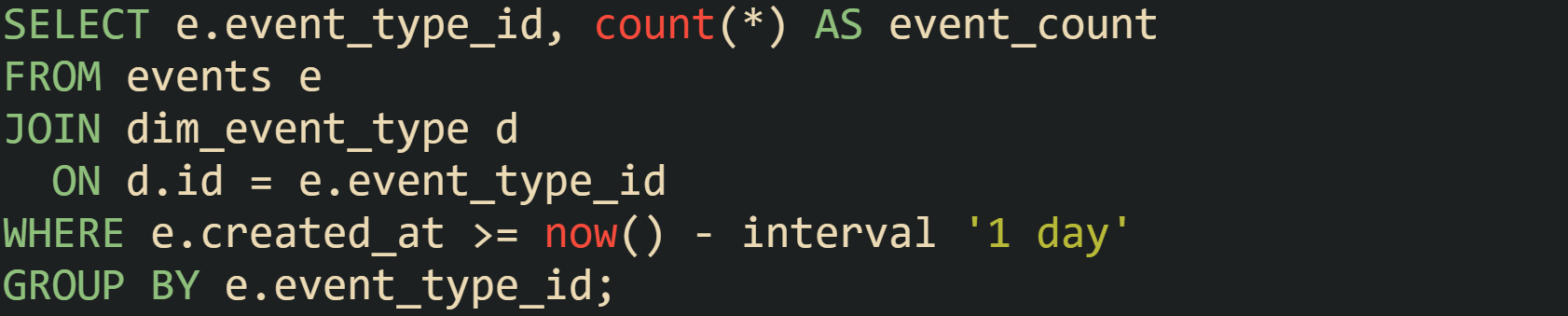
PostgreSQL often chooses a Hash Join here, building a hash table from dim_event_type and scanning a filtered subset of events. If statistics underestimate the number of recent events, the plan still shows a hash join, but at runtime the hash table grows larger than the optimizer expected, which can be inferred from EXPLAIN ANALYZE output when actual row counts at scan nodes and the hash join node exceed estimates by a large factor. Refreshing statistics on events gives the planner a better view of daily data volume, and in some setups, creating partial indexes on recent time ranges guides the optimizer toward plans that treat recent partitions differently from older data.
Restrictions in filters and join predicates can block index use, which is visible in scan and join nodes. Queries that wrap a column in a function near a date boundary can show this a bit better:

When there is an index on created_at, PostgreSQL still tends to report a Seq Scan on orders with a Filter: (date_trunc('day', created_at) = date_trunc('day', now())), because the function on the column does not match the index definition. Engines that support functional indexes can change that.

With that index in place, the same query can be served by an index scan on orders_created_day_idx, and EXPLAIN output reflects the change by replacing the sequential scan with Index Scan. This rewrite avoids the function in the predicate altogether:

For this range query the optimizer can use an index on created_at directly without needing a functional index. Engines then show index scans with Index Cond or seek predicates bounded by the start and end timestamps, and row estimates in those nodes align with the expected volume of current day orders.
Correlated subqueries in the select list or in predicates frequently lead to nested loops in plans.
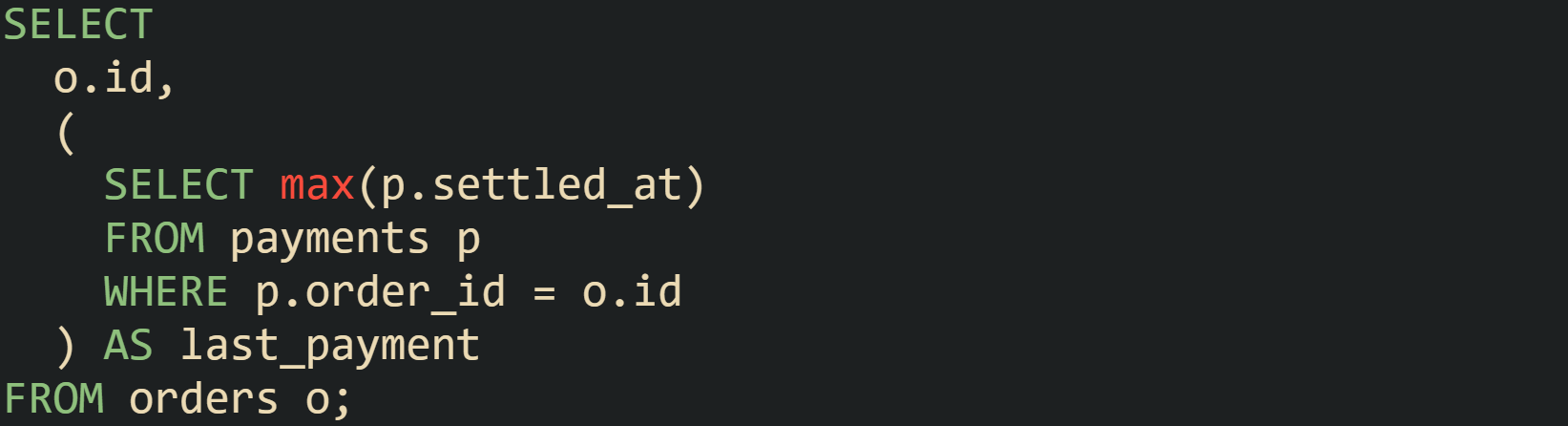
PostgreSQL describes this with a Nested Loop in EXPLAIN ANALYZE, where the outer side is a scan on orders and the inner side is the correlated subquery executed once per outer row. SQL Server and Oracle plans reveal the same behavior, with an inner index or table access that depends on o.id. When orders grows large, that structure can produce many index lookups or scans against payments.
Creating a composite index on payments(order_id, settled_at) improves those inner lookups.

Another common rewrite replaces the correlated subquery with a join and aggregate like this:
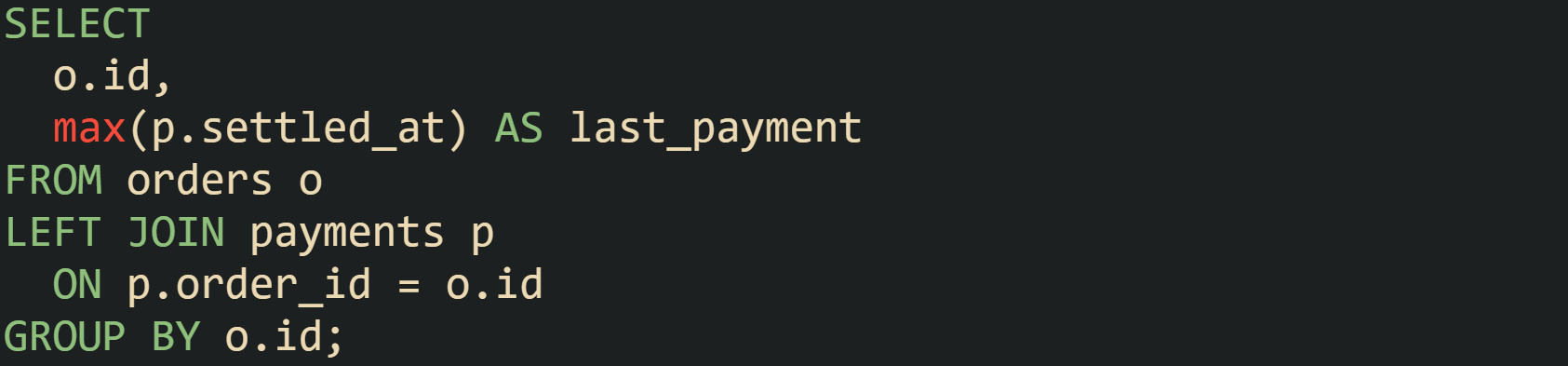
Execution plans for this form tend to expose more options to the optimizer. PostgreSQL can choose between Hash Join and Merge Join for the orders to payments relationship, depending on index layout and statistics. SQL Server might select a Hash Match join with a Stream Aggregate or Hash Match (Aggregate) on top, with operator cost percentages reflecting where most work occurs. Reading those join nodes in conjunction with scan types and row counts gives a precise view of how the engine walks through fact tables and dimension tables and helps guide index design and query structure toward plans that match real workload patterns.
Conclusion
Reading EXPLAIN output turns a query from a line of SQL into a sequence of specific steps that the engine runs on tables and indexes. Focusing on scan types, join methods, row estimates, and cost values lets you connect slow behavior to missing indexes, predicates that block index use, or statistics that no longer match real data. The same mechanics appear in PostgreSQL, MySQL, SQL Server, and Oracle, so habits built on reading plans in one system carry to others and help you reason about how the optimizer runs each query.