
Traffic surges push a gateway in ways that leave some calls waiting longer than they should. Login checks, health probes, or quick payment checks can get stuck if everything falls into the same line. Gateways can lift the pressure a bit by steering those shorter calls toward lighter routes, trimming work inside filters, and guiding threads so the quick stuff moves faster. Modern Spring Boot gateways built on Spring Cloud Gateway make room for this through filter chains, route rules, thread pools, and small policy cues that help certain routes rise closer to the front during heavy moments.
Routing Flow for Priority Calls
Spring Cloud Gateway gives room to trim the work that login checks, health checks, and other short interactions need to do so they keep moving even when everything around them slows down.
Priority Routing Paths
Filtering and routing decide how much work a request must travel through before it reaches a backend or returns a quick answer. Priority calls gain speed when their routes hold short filter lists and avoid long chains meant for larger calls. Login checks, for instance, can stay lean by skipping deep validations or large body inspections. Health checks can stay even lighter when the handler returns a cached string or a quick status result.
A route with a focused chain trims the time spent in reactive flow. Spring Cloud Gateway lets route definitions point to filters without attaching extra steps that bring work the request doesn’t need. A route that catches login attempts can receive a stack trimmed down to authentication steps only, leaving out content filters, bulky rewrites, or extra logic. The shorter the work, the easier it is for the gateway to move it along.
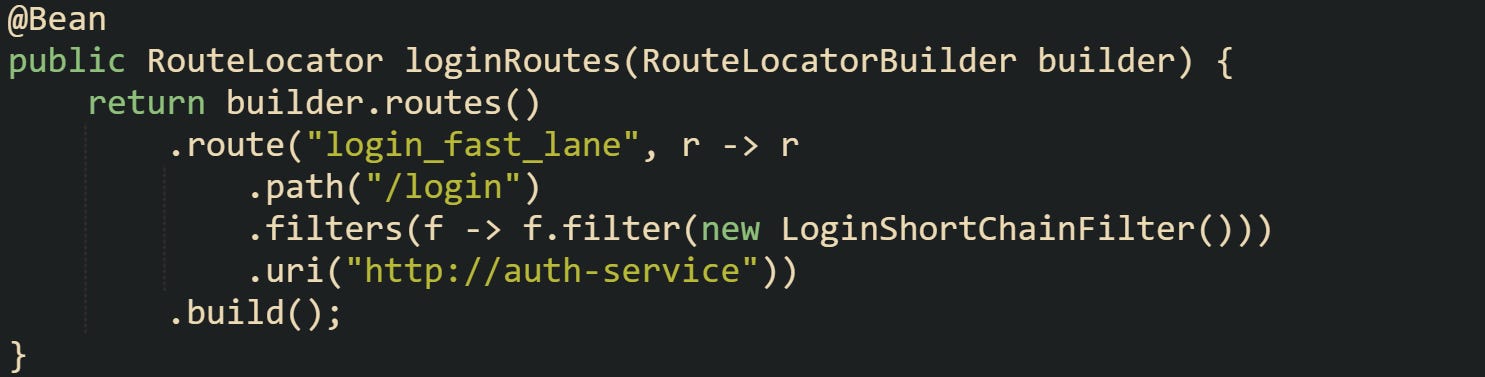
The code gives the login route a small chain with one custom filter. A route with this narrow focus stays out of larger stacks reserved for heavier calls coming from different parts of the service. The gulf in work between the two keeps surges from drowning out quick routes.
Shorter routes also reduce waiting pressure when traffic grows from many directions. A login check moves through without sharing heavy processing with other calls. A health check goes even further by relying on a tiny handler. That handler responds without remote calls or long loops, which stops it from acting as a drag on the system.
Filter Flow Tuning
Filters act as stepping stones during request travel. They can grow a request’s workload or leave it light. Priority grows when filters step back from doing too much. A filter that processes bodies, checks signatures, or does slow remote calls can drag down the entire lane of requests that pass through it. Keeping priority calls away from those filters protects their travel time. A gateway filter can choose how much extra work it wants to attach to a request. Quick calls can glide through filters that simply tag the request or handle tiny transformations. Filters that work with large content blocks or broad validation steps should stay on low-tier routes so top-tier calls don’t wait behind them.
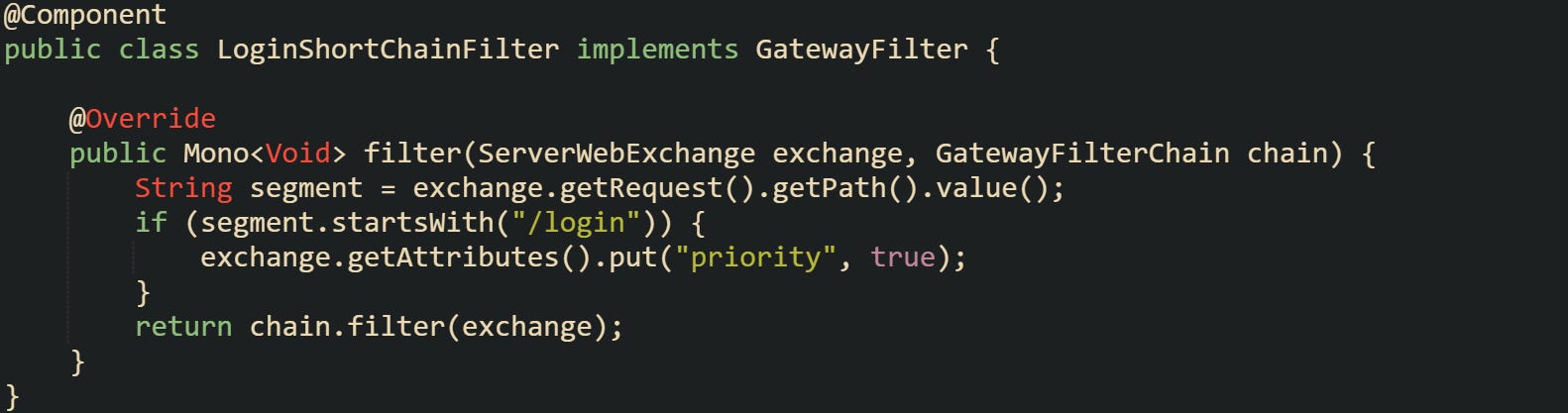
The filter avoids heavy logic and simply tags the request. A tag like this can help later routing steps or handler logic decide how to treat it. The main gain is that the filter doesn’t force extra work upon small calls.
Some flows bring up cases where a filter trims body reads. A request with a tiny JSON body doesn’t need a filter that reads or parses large payloads intended for reporting routes. That gap gives priority calls a smoother path through the chain. Trimming what filters do helps everything keep rolling.
Response Path Trimming
Response flow can slow down the tail end of priority calls if the reply is too large or too complex. Smaller replies leave the system quickly and free space for new calls to enter. Login routes that return compact JSON bodies or tokens keep the tail short. Health checks that return a quick string leave almost no tail at all. Caching helps reduce repeated work. Short lived caches that serve status messages or reference tokens keep backend calls out of the picture during surges. A tiny cached value follows a short route and leaves the gateway quickly.
Some cases call for a trimmed login reply. Short token replies use fewer buffers and keep the reply cycle small. A trimmed reply also helps downstream servers keep their own load light. Any improvement in the reply size for priority calls keeps them from competing with larger, slower interactions handled elsewhere.
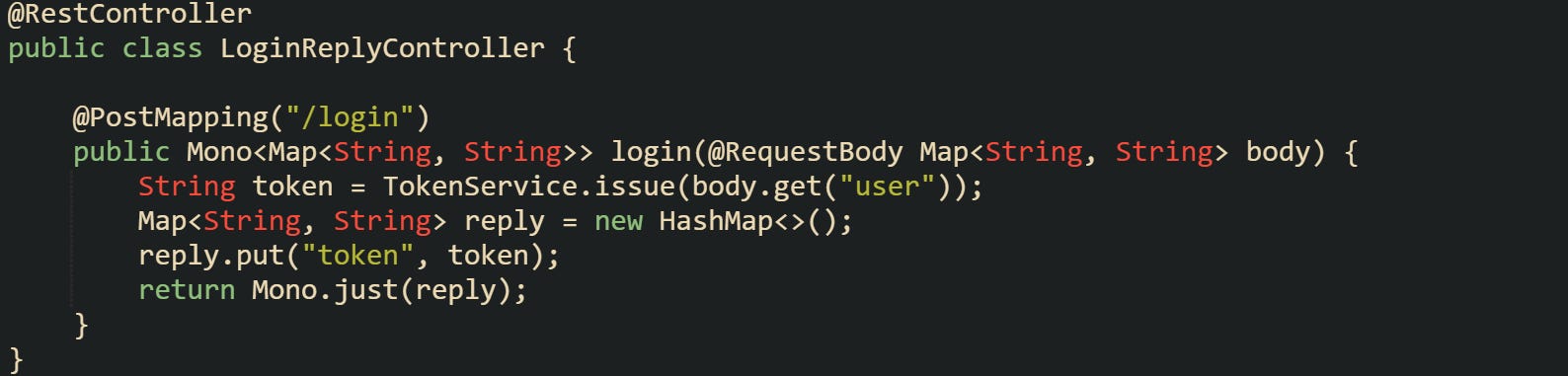
The reply remains compact, which reduces outgoing pressure during a traffic spike. The gateway benefits from quick drops in active response buffers. The whole flow of priority traffic gains breathing space when replies move quickly.
Queue Control and Short Lane Methods
Traffic pressure can flood a gateway with requests that don’t all need the same amount of attention. Short calls that finish quickly deserve a lighter queue, and Spring Cloud Gateway gives several ways to place those calls where they won’t sit behind slower traffic. Reactive flow, lane separation, token buckets, and tiny caches all work together to keep priority calls moving.
Queue and Scheduler Shaping
Reactive gateways move work through schedulers that hold small queues. Those queues don’t behave like long servlet thread pools. They carry short tasks and pass them along without tying up full threads. A gateway can push different routes into different schedulers so heavy calls don’t stand in front of shorter calls that only need a few steps.
A common pattern places large reports or export calls into a scheduler meant for heavy work, while login or health checks stay on a faster lane. Separating these lanes reduces friction during spikes, because short calls don’t wait behind work that takes more time. A filter can identify heavy calls and move them into a different lane so the main scheduler stays light.
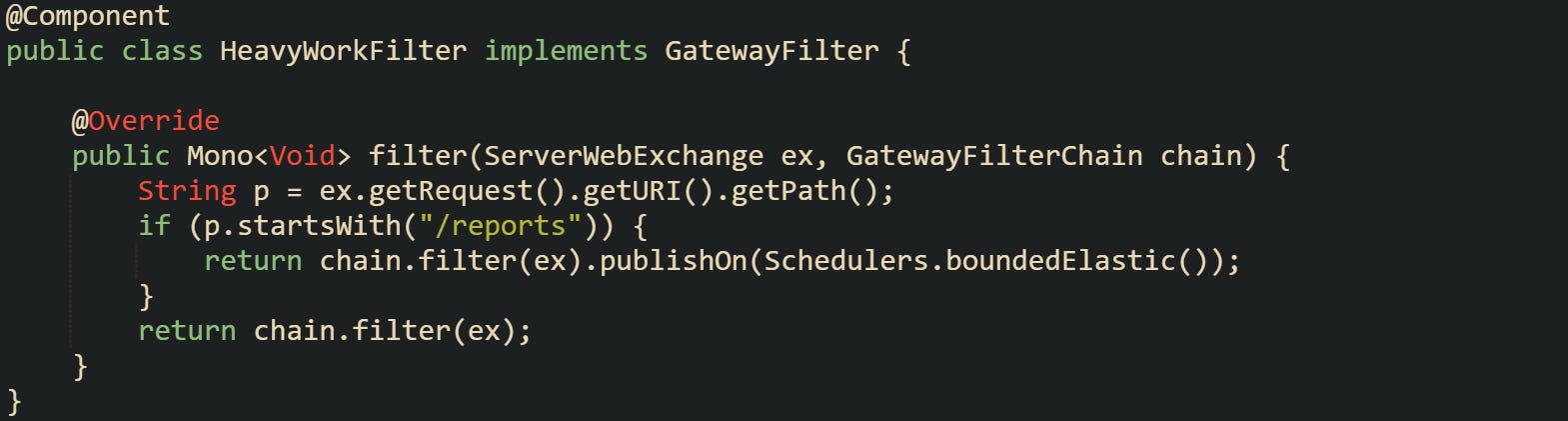
Large report calls pass through a lane made for heavier operations. Lighter calls remain in the default pipeline with shorter queues.
Some setups go one step further by tagging priority calls. A server can attach a marker that helps handlers or downstream logic decide how quickly to process a request or how long it should wait in shared queues.
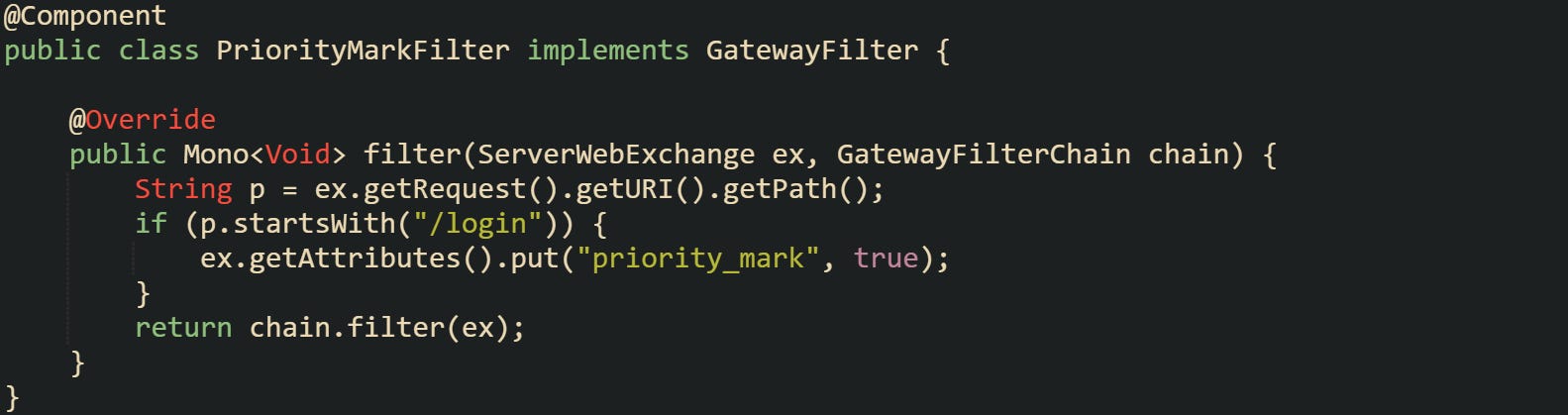
A basic mark like this doesn’t change the queue on its own, but some teams use it to help speed up related handler work or choose a faster downstream path. When paired with scheduler separation, it keeps login calls from touching long chains meant for slower work.
Rate Plans and Bucket Lines
Token buckets guide how requests enter the gateway when pressure grows. A bucket holds tokens that refill at a steady pace. A route can’t proceed until it has a token, which naturally slows down routes that don’t need to rush. A gateway can shape buckets so priority calls have a faster refill rate, while large or slow calls take tokens from a bucket that refills gently. Spring Cloud Gateway supports bucket filters that slow down certain paths without blocking everything outright. Priority paths get paired with a bucket tuned for fast passes. Heavy paths sit behind buckets that drip tokens at a slower speed to keep them from crowding the line.
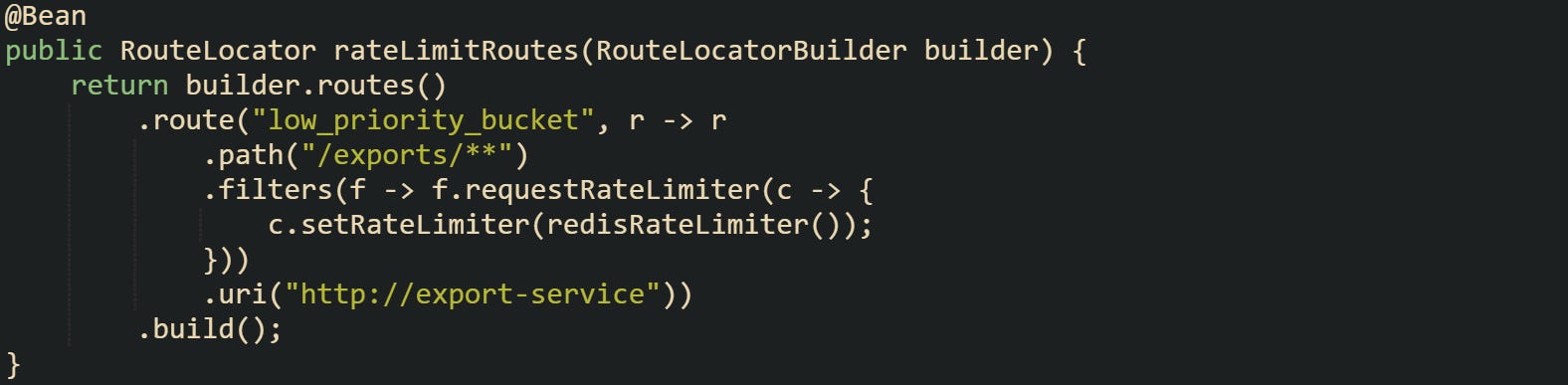
The bucket here restricts exports to a gentle flow. Tokens refill slowly enough that a surge of export calls won’t push login or health calls out of the way. Those higher priority paths usually sit on their own routes with faster refill settings.
Some developers wrap rate limits with small custom checks that account for user load or known hot moments. Spring’s filter chain lets custom rate logic run before or after built in rate limiters, giving more control when certain hours produce predictable spikes.
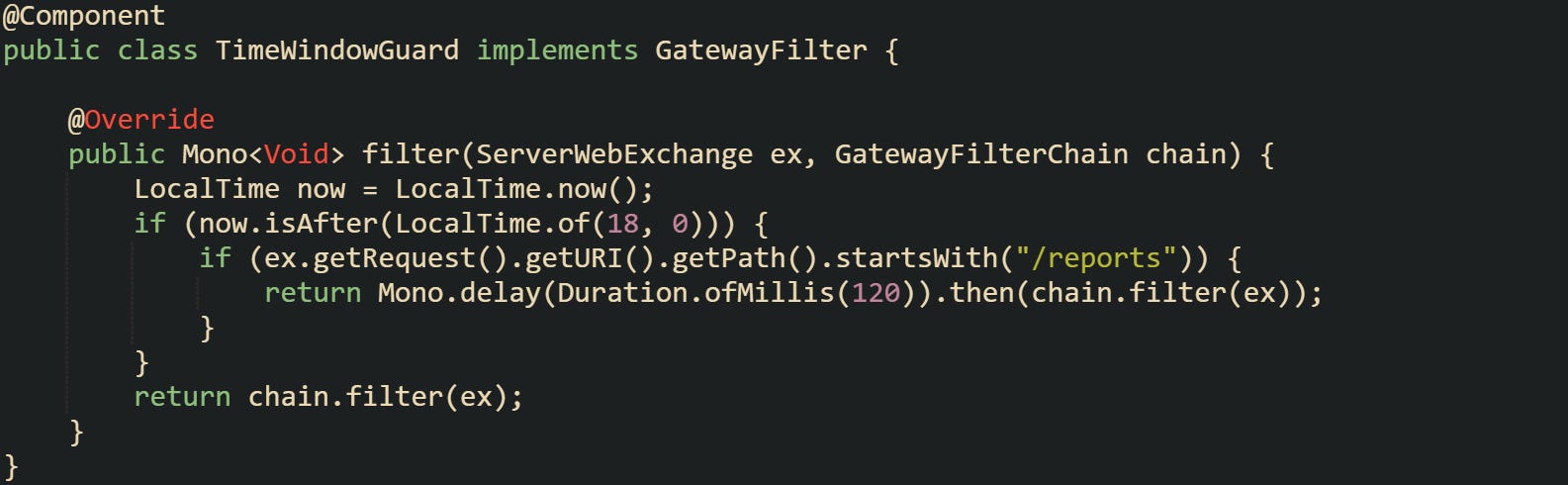
The delay doesn’t freeze the request. It creates a small buffer during hot moments that helps priority routes stay fluid. Light paths remain unhindered.
Short Caches for Vital Calls
Short lived caches can cut a large amount of work from priority calls. Instead of routing every check through downstream servers, the gateway can return a tiny cached response for calls that don’t need deep checks. Health probes, lightweight status checks, and certain authorization checks fall into this group. A small cache keeps the result in memory and updates it occasionally, which avoids unnecessary round trips during pressure spikes.
A quick health status cache keeps its value in a thread safe container and returns it instantly. A health probe only needs a tiny piece of text, so keeping that text local helps during high traffic moments.
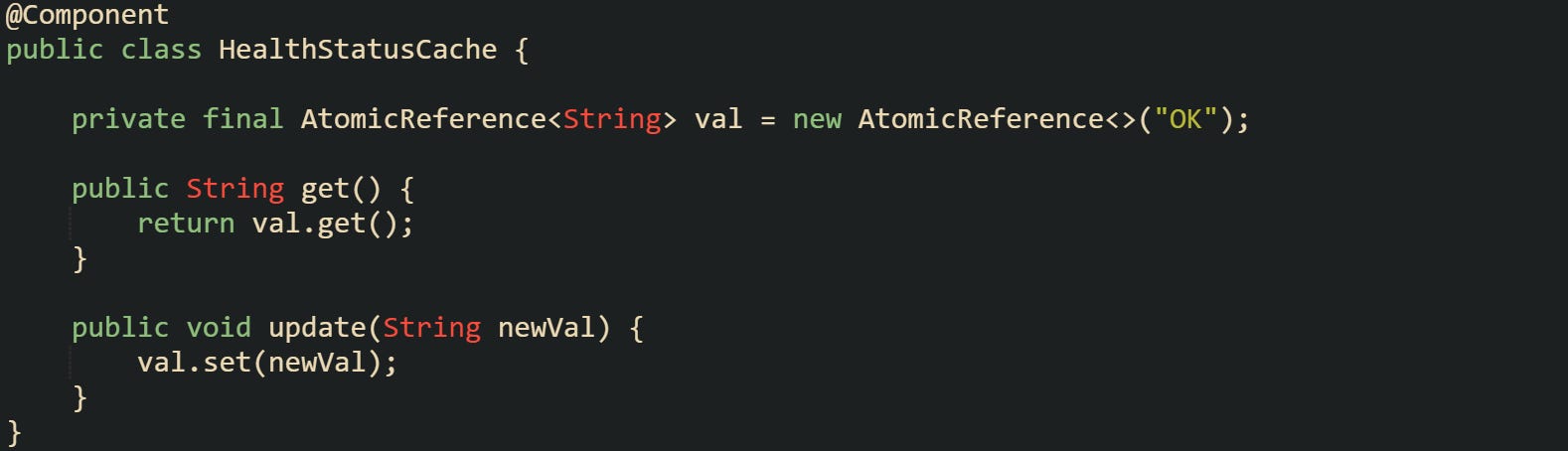
Controllers can pick up that value and return it without delays.

The gateway doesn’t involve downstream services for this route, which protects the rest of the system during high load.
Some flows use short lived caches for authentication checks when it makes sense. A login call can skip repeated discovery steps by checking a small in memory flag set earlier by a background process.
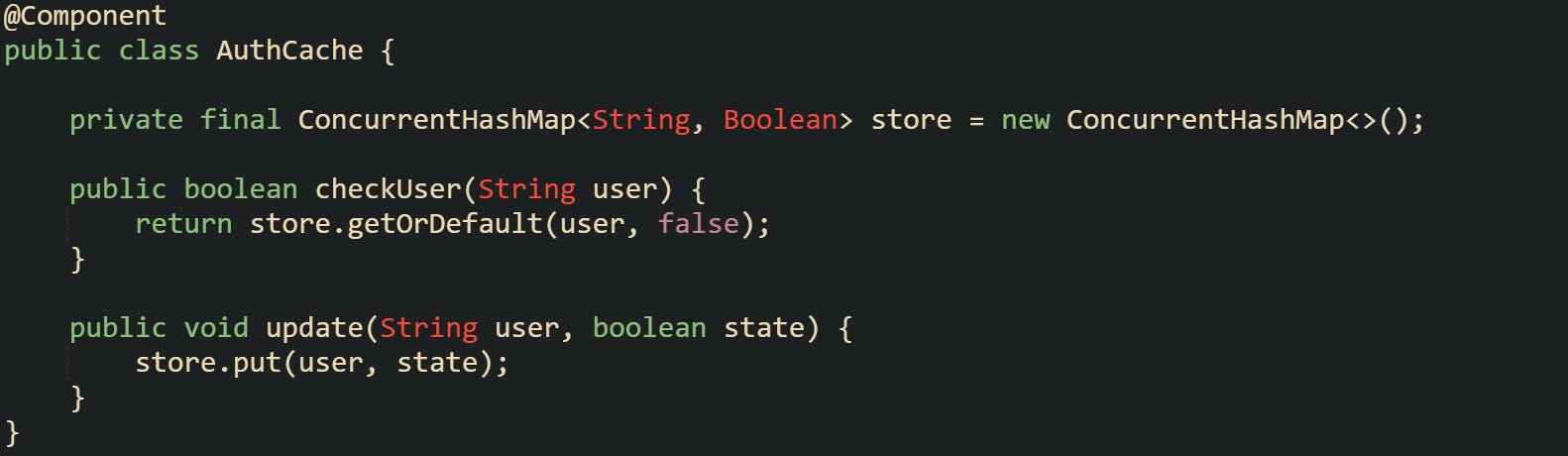
Caches like this need careful tuning so it doesn’t grow too large, but it cuts delays sharply during bursts of login traffic. Short lived values help gateways stay responsive when pressure grows, and they reduce the load on backend servers that normally handle those checks.
These tools give priority paths a lighter trip through a gateway. Queue lanes stay manageable, heavy routes stay contained, and short caches back them up with quick answers.
Conclusion
Traffic spikes put pressure on every layer of a gateway, and the mechanics behind lighter routing, tuned filter chains, shaped queues, and small caches all work toward the same goal of keeping short calls moving. Routes trimmed to their smallest steps, schedulers that separate heavy flows from quick traffic, and cached values that return answers right away give the gateway room to move with less strain. These parts form a practical way to guide login checks, health probes, and similar calls through lanes that stay clear enough for them to finish without getting tangled in slower work around them.