
Ranking rows without sorting an entire table every time comes up regularly in data work. Many databases offer window functions that pass through ordered partitions and assign positions in a predictable way. Two window functions in particular return numbers that line up with ties and the rules in the ORDER BY clause. These functions read from a defined window without changing the base table layout and help answer questions such as which row comes first within a category or which items share the same score.
Ranking Methods in Modern SQL
Modern relational engines share a common window function model across MySQL 8, PostgreSQL, SQL Server, and Oracle. Window functions treat a group of rows as a logical frame, read them in a defined order, and return a value for every row without collapsing the set. RANK and DENSE_RANK belong to this group and assign position numbers that reflect ties inside that ordered frame. Execution plans focus on the rows inside each partition, so ranking can work on a subset of a table instead of forcing a fresh full sort for every query that needs relative order.
Window Partition Mechanics
Window partition refers to the group of rows that share the same values in the PARTITION BY clause. When a query defines PARTITION BY department_id, every department forms a separate stream for the window functions, and ranking restarts from one for each stream. Rows that share a partition participate only in comparisons with other rows in that partition, so high values in one department never affect ranks assigned in a different department.
Queries that omit PARTITION BY treat the whole result as a single partition, so ranking crosses all rows that pass the FROM and WHERE steps. Many analytic queries use a combination of filters in WHERE and partitions in OVER to control which rows feed a given ranking. That separation between filtering and partitioning keeps the logical data set flexible while still giving tight control over where ranking resets. Database engines implement this model by materializing partition inputs in temporary work areas or runs, ordered according to the window ORDER BY. Execution then scans that ordered slice while computing window values. Implementation details differ across products, yet the logical contract for RANK and DENSE_RANK stays the same, which makes query behavior comparable across vendors.
Row Number Movement
Function RANK scans each ordered partition and tracks when the sort value changes. Rows that share the same ordered value receive the same rank, and the next distinct value advances the rank counter by the size of the tie group. Function DENSE_RANK follows the same scan but increments the counter by one for every distinct value, so ranks stay consecutive with no gaps.
This query ranks sales within each store:
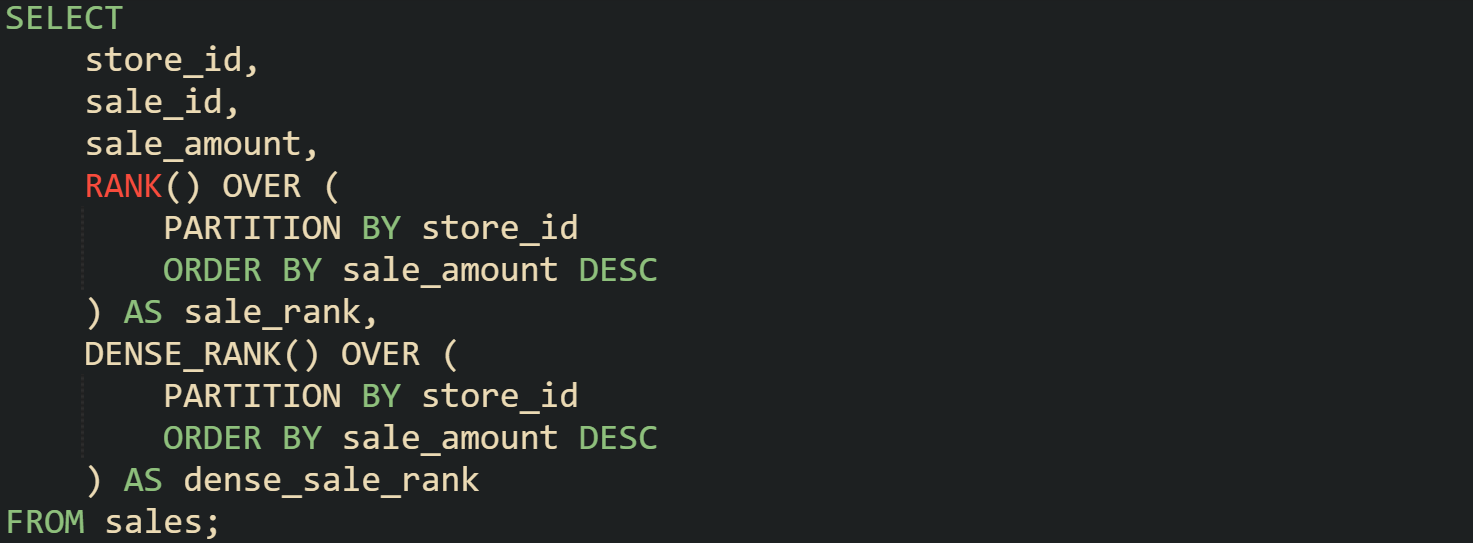
Query planners build an ordered list of sales per store and feed that list into both functions, so each row receives two numbers that share the same ordering rules yet differ on gap behavior. sale_rank jumps when a tie group finishes, while dense_sale_rank advances by one with every new distinct sale_amount.
Function ROW_NUMBER belongs to the same family but behaves differently, because it never repeats a value. Every row receives a unique sequence number within the partition. Many ranking problems pick RANK or DENSE_RANK in preference to ROW_NUMBER when ties should share a position, while ROW_NUMBER suits cases where every row must have its own place in line.
Tie Behavior Mechanics
Ties occur when multiple rows in a partition share identical values in the window ORDER BY expression. Window processing groups these rows into a tie group and keeps them adjacent in the ordered frame so that ranking functions can treat them as a unit. That grouping step is what lets RANK and DENSE_RANK assign the same number to several rows without losing information about the underlying data.
This query ranks exam scores where multiple students share the same score:
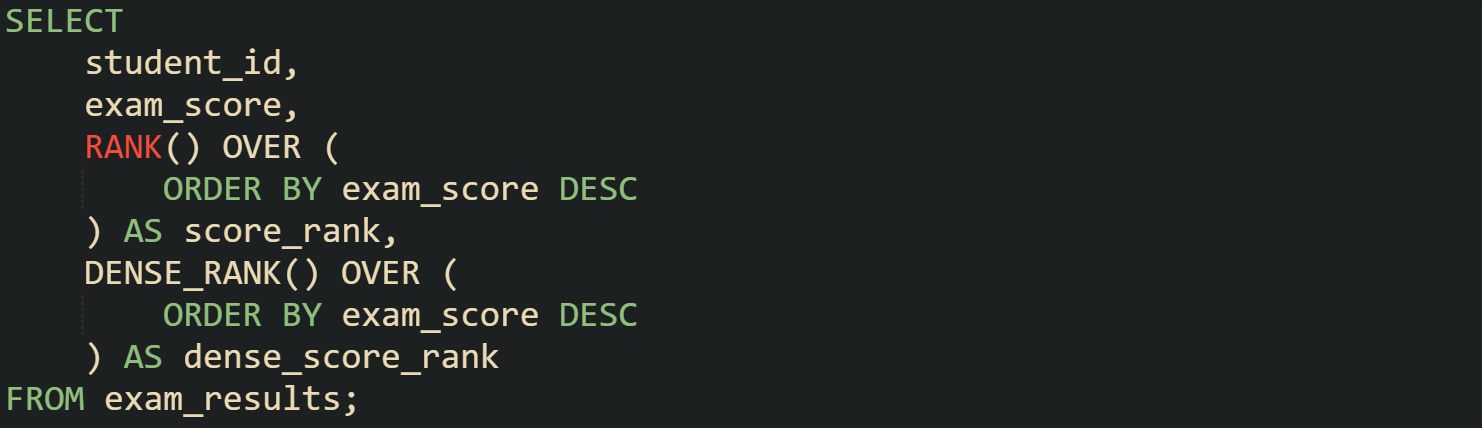
Rows that share exam_score receive the same score_rank, and the next lower score jumps the rank to a value equal to the previous rank plus the size of the tie group, while dense_score_rank advances by one for each distinct score. Result sets from this query still list every student, yet the ranking columns make it clear which scores share a position and how many unique score levels exist.
Database engines detect ties during the ordered scan by comparing each row with the previous one in the frame. When the sorted value matches, the row enters the current tie group. When the value changes, the tie group ends and the rank counters advance according to the rules of RANK or DENSE_RANK. That process repeats across the partition until all rows receive numbers.
Ties remain local to a partition, which this query shows for department level bonuses:
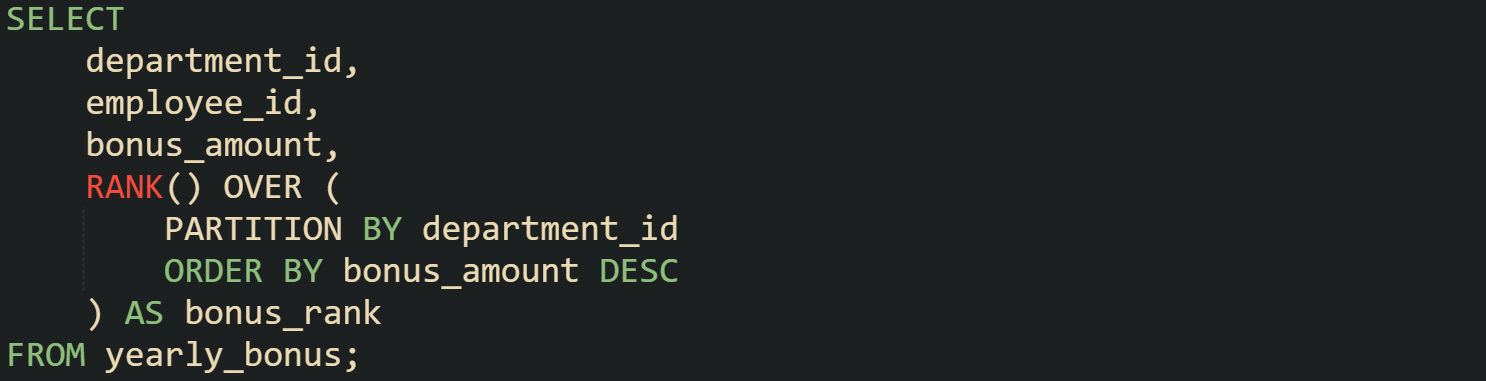
Every department receives its own tie groups, so employees in different departments with the same bonus_amount never affect ranks in other departments. Ties therefore interact with both PARTITION BY and ORDER BY, and the interplay between those clauses shapes how RANK and DENSE_RANK mark relative position inside grouped data.
Partition Ranking Example
Partition based ranking appears in many reporting queries. Frequent usage assigns ranks to employees inside departments based on salary or performance scores, so analysts can see relative position without collapsing rows into aggregates.
The query below ranks employees in each department by salary and returns both RANK and DENSE_RANK values.
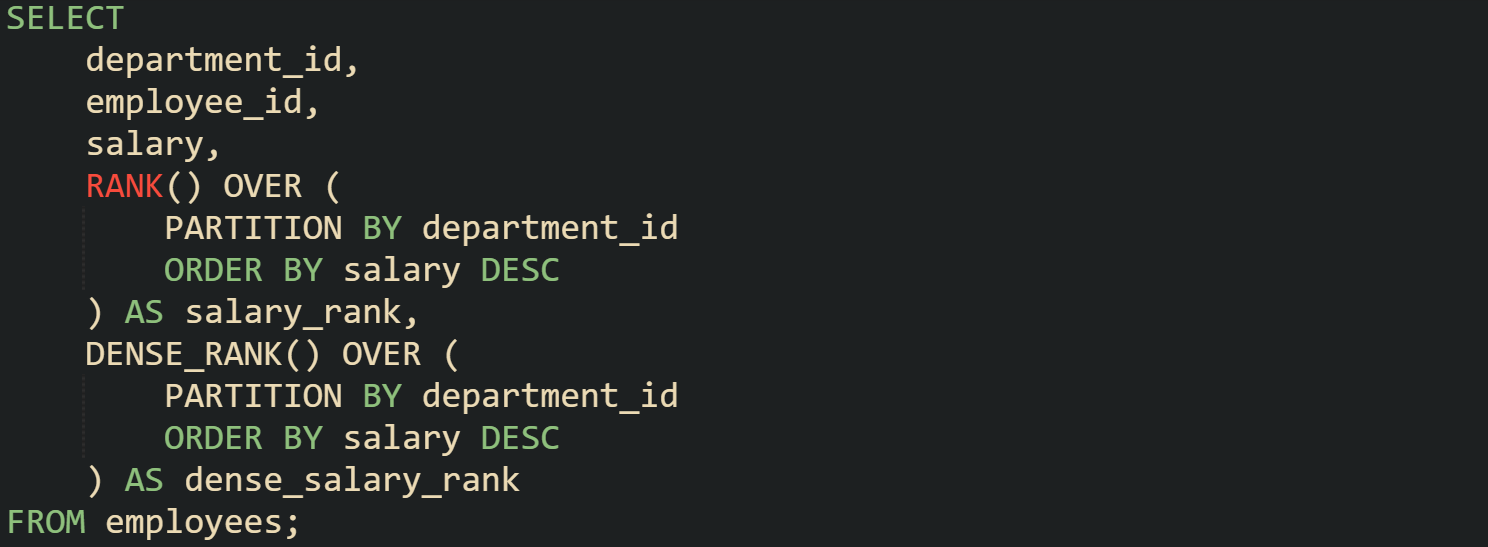
Result sets from this query keep the original row detail while adding two numeric columns, so downstream queries or client code can filter on rank without recomputing window logic. Analysts can focus on rows where salary_rank equals one to see top earners per department, or include every row where dense_salary_rank falls under a threshold to study broader groups of high earners.
Most engines implement this plan with a partition aware sort step followed by a window aggregate step. Storage layout on disk does not have to match PARTITION BY or ORDER BY clauses, because the execution phase builds the ordered stream needed for the window operation. That separation between storage and execution lets RANK and DENSE_RANK work consistently across indexes, table scans, and more complex joins that feed rows into the window.
Order Direction and Tie Stability
Order clauses inside window definitions control how ranking functions walk through rows. Direction choices such as ascending or descending decide which values appear first in each partition. Tie behavior then rests on how the engine arranges rows that share identical ordered values, backed by the list of expressions in the ORDER BY clause. When those expressions form a deterministic combination, runs on the same data with the same plan produce stable rank values for RANK and DENSE_RANK.
Sorting Direction Effects
Sorting direction flips the priority of values inside the window frame. A descending order places larger values at the front of the stream given to RANK or DENSE_RANK, while ascending order does the reverse and sends smaller values first. Ranking functions themselves do not inspect numeric size in a special way; they simply walk through rows in the sequence already created by the ORDER BY clause and apply their numbering rules to that stream.
This query compares descending and ascending ranking on a single numeric column:
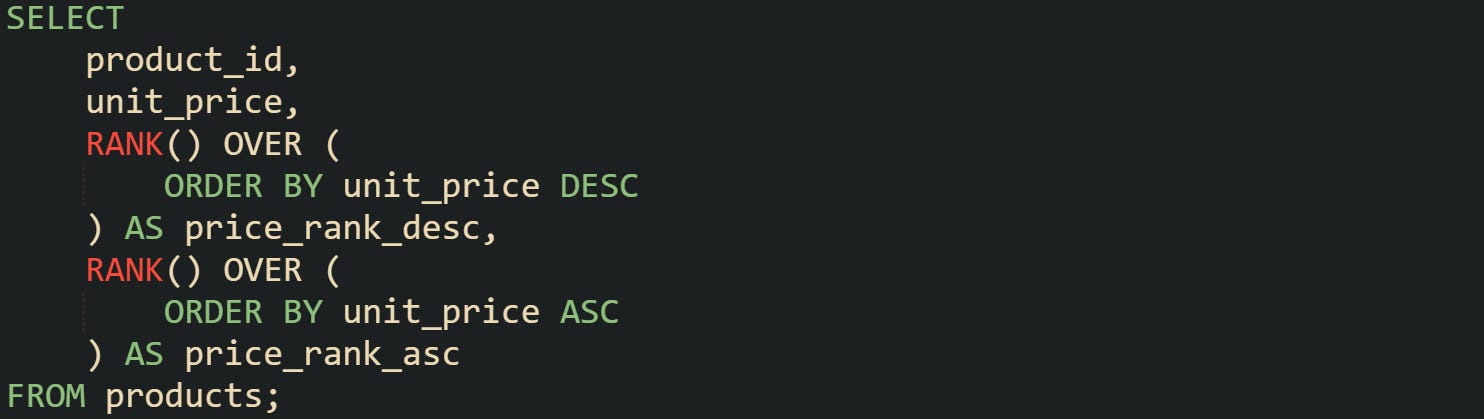
Two rank columns in that query describe two different ways to read the same data. Column price_rank_desc treats higher prices as more important and places them toward the head of the ranking. Column price_rank_asc does the opposite and treats lower prices as leading positions. No change in the base table is required, because the engine only rearranges rows logically for the window frame.
Direction choices also combine with partitions. Many reports care about relative ranking inside a group such as a region or store, not across the entire table.
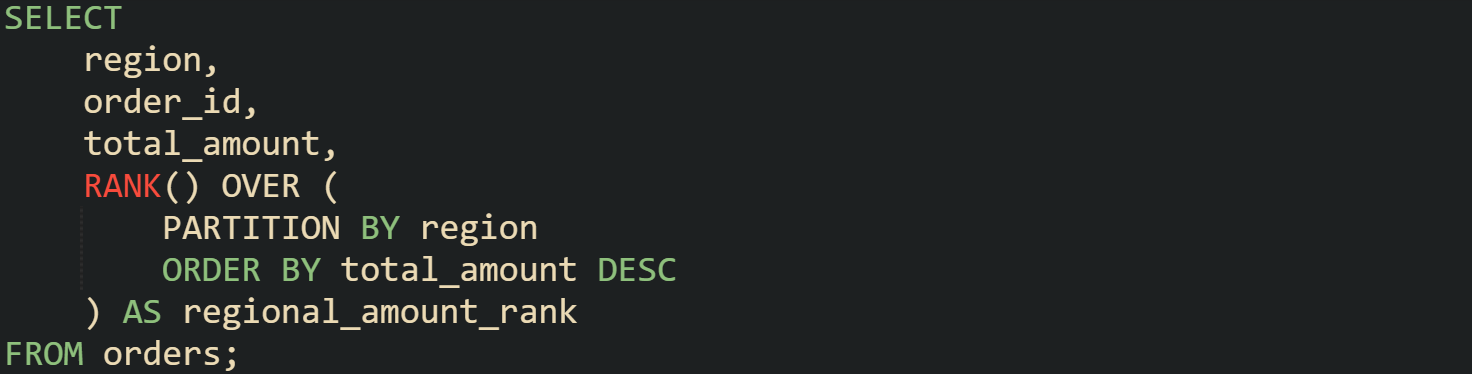
Rows for each region form a separate ordered frame in that query. Higher totals receive smaller rank values, and direction decides that placement. Sorting ascending on total_amount would keep the partition logic the same while flipping the interpretation of the ranks, with low totals then appearing at the front of each regional list. Window plans for these queries contain a sort step aligned with the ORDER BY definition and then a window evaluation step. Frame direction guides how the sort step orders records before the ranks are computed, which means small direction changes in the window definition can shift rank values without any change in the physical layout of the table.
Compound Sort Expressions
Compound ORDER BY expressions bring more columns into play when ordering rows. Engines evaluate expressions from left to right, applying the second expression only when values in the first one are equal, and moving to a third expression when the first two match. This chain produces a detailed ordering rule that removes uncertainty when many rows share the same primary value.
Ranking tied scores with a timestamp is a common example. Scores could match for several rows, but insert time or event time can act as a secondary field to break ties.
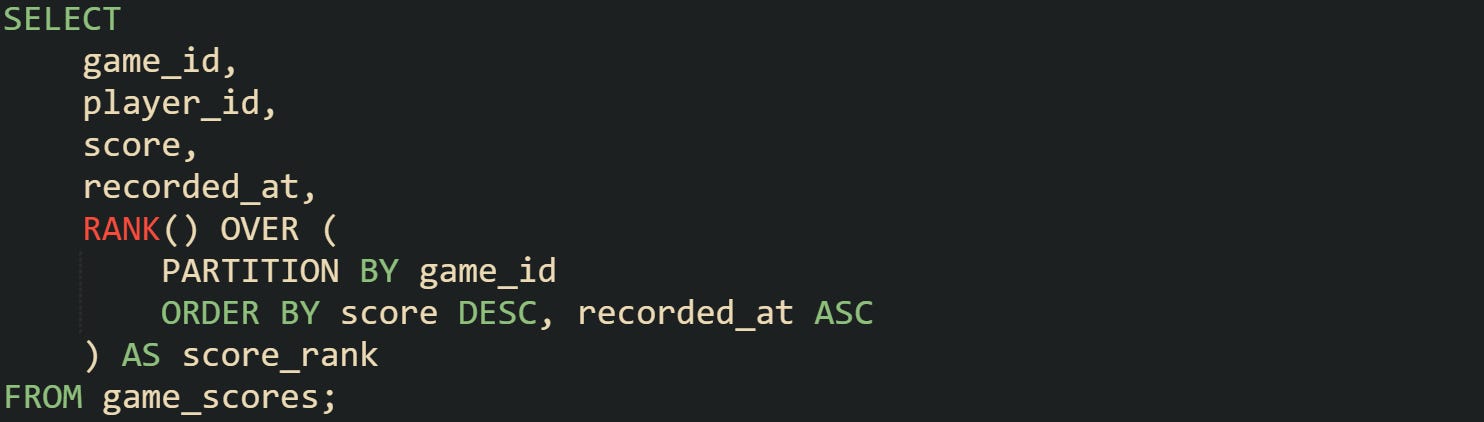
Score values guide the first stage of ordering in that query. Higher scores appear first inside each game_id. When two players share the same score in a given game, the recorded_at column orders those tied rows so that earlier timestamps appear ahead of later ones. Function RANK then walks through that combined order and assigns numbers that reflect both the score and the ordering rule for ties.
Compound expressions do not need to be limited to numeric and time fields. Text columns or identifiers also work as secondary and tertiary sort fields. This query uses a secondary text column to keep an alphabetical order among tied values:
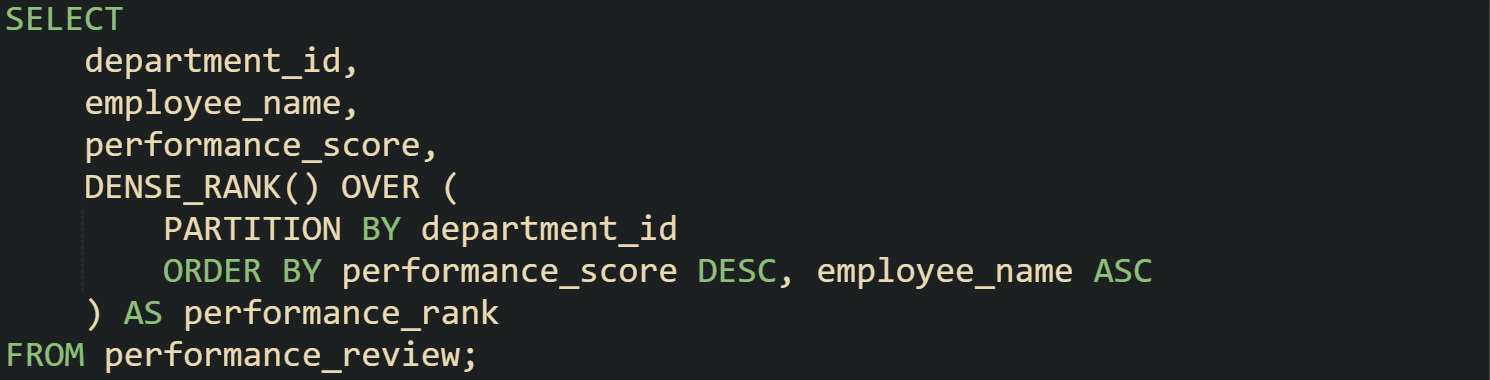
Scores still drive the main ranking in that query, yet employee_name controls the local order inside tie groups, which makes the result easier to scan in a report or grid. Function DENSE_RANK produces consecutive rank values for each distinct score, while the tie sequence inside that score relies on the secondary column. Combined expressions like these give window functions a clear rule for where each row sits in the ordered frame and keep that rule stable across repeated executions.
Order Direction Mechanics
Order direction also interacts with how analysts define top segments, such as top N per group or bottom N per group. Window functions pair well with outer filters on rank columns, and the choice between ascending and descending direction directly controls which end of the value range those filters pick up.
Take this query that ranks items inside each category from highest score to lowest score, with a timestamp as a tiebreaker:
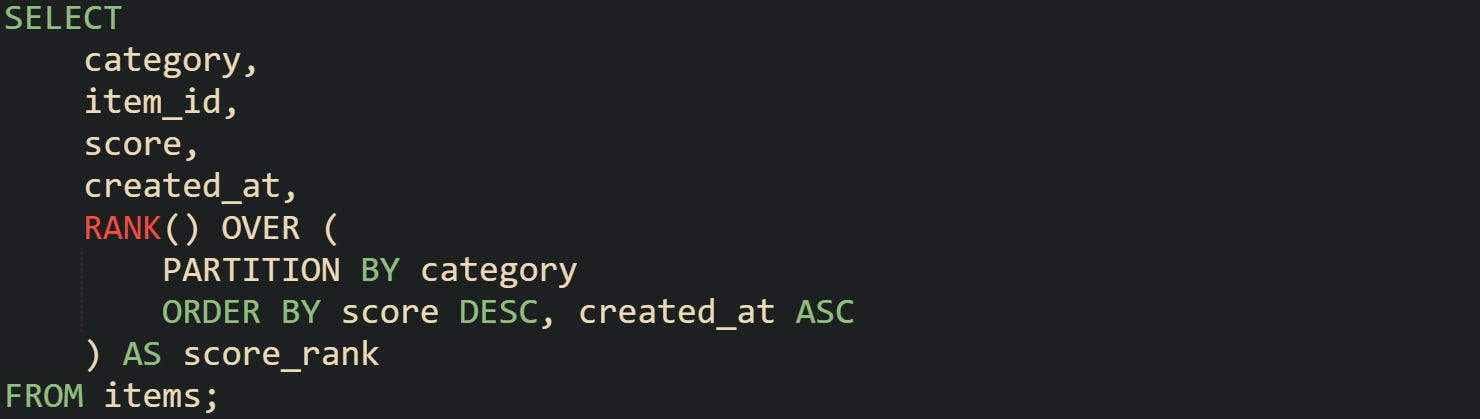
Ranks from that query can be wrapped in an outer query to keep only rows where score_rank falls under a specific cutoff, which produces a top list per category with a stable order among ties. Direction on score guarantees that higher values sit at the front of every category partition, while the ascending created_at rule leaves earlier records ahead of later ones for the same score.
Bottom lists follow the same idea with reversed direction. Ranking from lowest to highest cost, for example, lets a query pick the cheapest rows by filtering on low rank values.
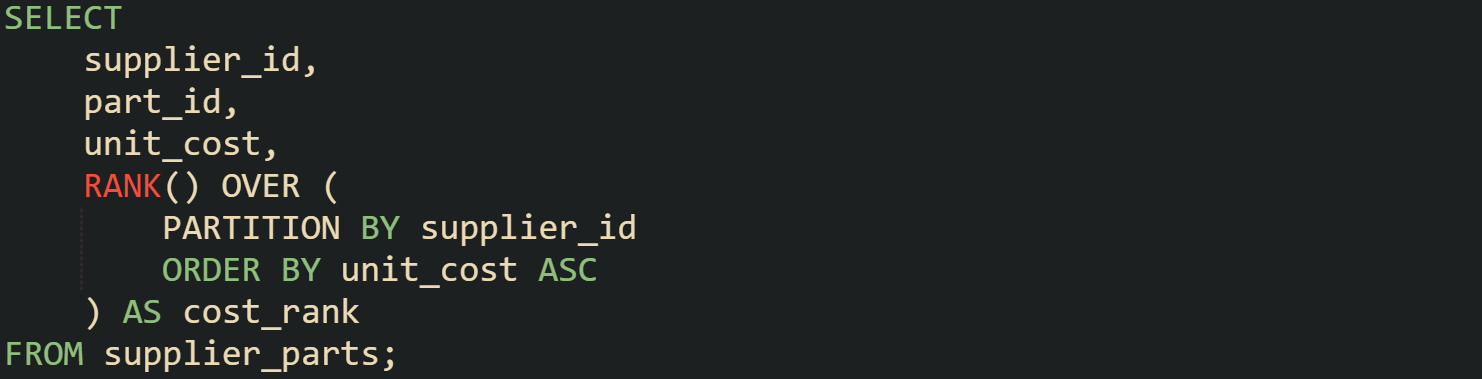
Result sets from that query place the least expensive parts for each supplier at the lowest rank values. Direction choices in the ORDER BY clause inside the window definition decide which end of the numeric range appears at rank one and how ties align around that anchor, which ties the meaning of rank directly to the ordering rule.
Conclusion
Window functions such as RANK and DENSE_RANK give a mechanical way to assign positions to rows inside ordered partitions without reshaping base tables. Ranking flows from three pieces working in combination, the partition definition, the order clause, and the tie rules that decide when ranks repeat or jump. Order direction controls which values sit at rank one, compound sort expressions control how ties line up inside that frame, and partition boundaries keep ranks local to a group. With those elements in place, queries can attach stable, repeatable rank numbers to large result sets while keeping every row of detail available for later filters and joins.