
Reports work best when numbers are easy to scan. Raw measurements, prices, and ratios can carry a long trail of decimals, while dashboards and exports usually read better with two decimals for currency or whole numbers for counts. SQL gives you functions to round those values right inside the query, so you don’t have to handle all the formatting later in app code or spreadsheets.
Numeric Values For Reporting Precision
Data in reports comes from integer types, exact decimal types, and approximate floating types, and that combination changes how values look on screen. Integer columns store only whole numbers, so any fractional part is dropped before rounding functions run. Decimal types such as DECIMAL or NUMERIC keep exact fractional digits up to a fixed scale, which gives predictable decimal places for currency and rates. Floating types such as FLOAT or REAL hold binary approximations of decimal values, and that storage can lead to slightly surprising digits when values are printed. Rounding functions sit on top of these storage rules and turn raw numeric values into results that match what a report or dashboard needs.
Scale Versus Precision Basics
Numeric columns in SQL carry two related limits that matter for rounding. Precision counts the total number of digits a value may hold, while scale counts digits to the right of the decimal point. Declaration DECIMAL(10, 2) means the column carries up to ten digits in total and two digits after the decimal, which supports values such as 12345678.90 without any approximation. That definition can round to the declared scale, or reject values that fall outside the declared precision, depending on the database and its settings.
ROUND, FLOOR, and CEIL work on the numeric value that arrives from an expression or column, not on raw text from input. A DECIMAL(10, 2) column keeps two decimal places even before a rounding function is applied, so calling ROUND(price, 2) on that column simply reaffirms the scale that is already present. Floating types carry binary representations, so ROUND and related functions first see the binary value, then return a numeric result that the client prints with its own default formatting. That difference explains why two queries that look similar on paper can show slightly different tails of digits when one uses DECIMAL and the other uses FLOAT.
Seeing a definition of a table for currency can make that connection more make a bit more sense.
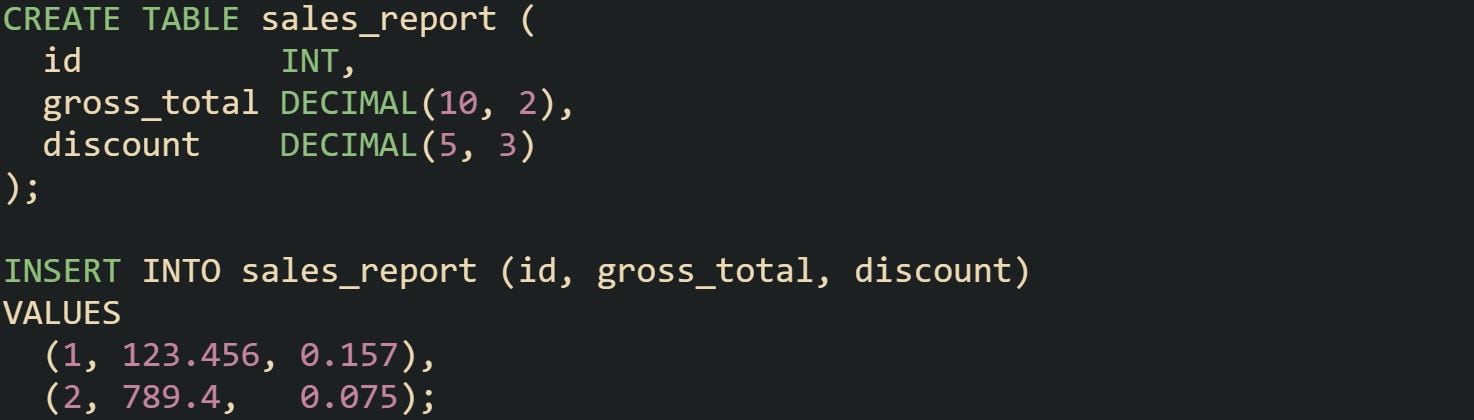
This table keeps two decimal places for gross_total and three for discount. Values are stored at that scale, with rounding or an error depending on the database and its settings, so later reporting queries already work with consistent decimal places.
Contrast that with a table that uses floating types for the same values.
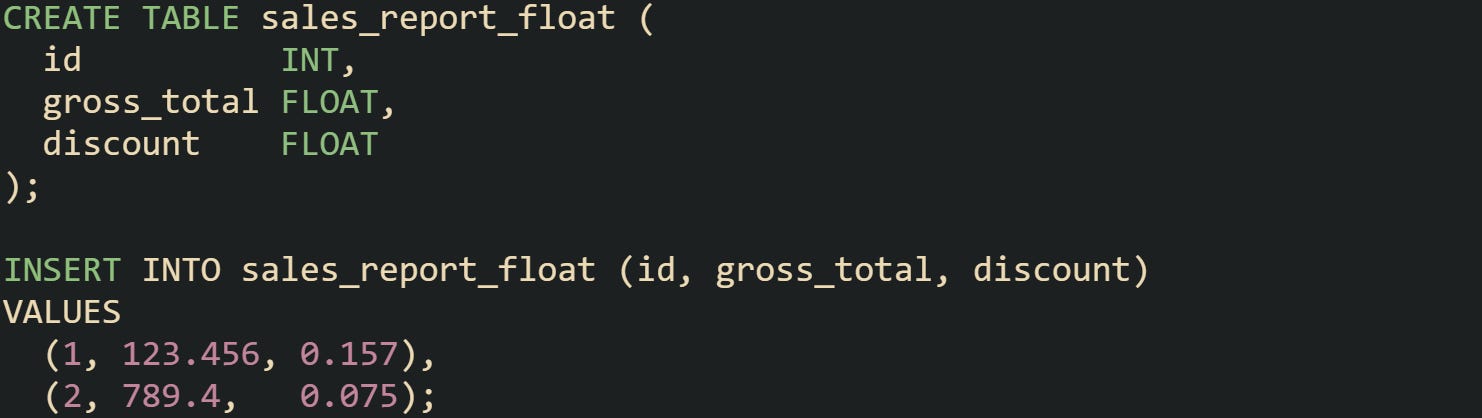
Querying these rows can reveal fractions such as 123.456000000001 or 0.156999999999 depending on database and client formatting rules. Decimal types restrict that behavior by storing exact values that respect the declared precision and scale.
Many reporting queries build expressions that divide, multiply, or aggregate numeric columns, then pass those expressions into rounding functions. Aggregate terms such as SUM(sales_amount) / SUM(order_count) produce averages with many digits, and those values then travel into ROUND, FLOOR, or CEIL to match the scale and range expected in a report. Precision and scale on the original columns, combined with function arguments, set bounds for what ends up in the final result set.
Reporting Scenarios For Rounding Functions
Reports bring together numeric values from different sources and compress them into summary tables, charts, and exports. Grouped totals, averages, and ratios appear side by side, and rounding functions help those values line up in a way that is easy to scan. Currency columns rarely need more than two decimal places, while many percentage displays limit themselves to one or two decimal digits. Rounding functions control those digits inside the query, so the database sends out values that already look like report fields rather than raw measurements.
Time-based reports form one common case. Daily or monthly totals for sales, active users, or traffic often come from queries that group by a date column and aggregate metrics. A query that computes a daily average order value can use ROUND in the select list so that the dashboard always receives currency formatted to two decimal places.

This query produces a daily average that already has two decimal places, which lines up naturally with currency formatting in charts and tables.
Percentages also benefit from careful rounding in the query. Ratios such as conversion rate, defect rate, or completion percentage usually appear with a small number of decimal places and a trailing percent sign in the front end. The numeric part comes from expressions that divide one aggregate by another and then scale the result.

For this query, it returns a percentage rounded to one decimal place so dashboards can show conversion rates in a compact format.
Exports to CSV, spreadsheets, or PDF give one more reason to control rounding in SQL. Finance people pulling monthly statements or product folks exporting KPI tables usually expect every numeric column to use a consistent number of decimal places. Applying ROUND(column, 2) or similar expressions in the query lets those exports come out with aligned formats instead of pushing that work into spreadsheet formulas or report templates. That consistency helps avoid cases where one row shows 10 and another shows 10.0000001 just because a different numeric type was used upstream.
ROUND FLOOR CEIL Function Mechanics
SQL rounding functions sit between stored numeric types and the numbers that end up in reports. ROUND, FLOOR, CEIL, and CEILING all accept a numeric expression and return another numeric value that follows a specific rounding rule. That rule stays the same across aggregates, joins, and filters, which makes these functions reliable tools for adjusting values before they leave the database. Dialects such as PostgreSQL, MySQL, SQL Server, and Oracle share the same ideas, with small naming and argument differences in a few places.
ROUND Behavior In Common SQL Dialects
ROUND adjusts the number of digits while staying close to the original value. When only one argument is passed in, most systems round to the nearest whole number. When a second argument is given, that value represents the number of decimal places that should remain. Halfway cases are vendor-specific, so check behavior for negative values in the database you run.

This query takes one source value and returns three variations, which helps make the behavior of the function concrete during testing.
Different SQL dialects handle the return type of ROUND in slightly different ways, but they all accept both integer and fractional values as input. PostgreSQL has round(double precision) and round(numeric, integer), so queries that need ROUND(value, decimals) typically cast floating values to numeric first. MySQL keeps the argument type for many cases and applies the requested precision. SQL Server adds another wrinkle by offering an optional third argument that turns ROUND into a truncation function.

In this example, it shows how SQL Server specifically keeps two decimals in both cases while changing the rule for values that would usually round upward.
Negative precision values give a way to round digits on the left side of the decimal point. That option helps reports that group numbers into bands of tens, hundreds, or thousands.

These expressions push values toward nearby anchor points that work well for summary rows and charts that group large quantities. Many reporting queries use that style of rounding in intermediate steps that build bucket labels or thresholds.
One practical habit is to combine ROUND with arithmetic that rescales values. Ratios converted to percentages make a common case. Query text that tracks click through rate or completion rate can multiply a ratio by one hundred and pass that result into ROUND to control how many decimals appear in the final numeric column sent to a dashboard. That way the SQL layer already delivers a value like 37.5 rather than a long floating quantity.
FLOOR Behavior
FLOOR always moves values down to the nearest integer that does not exceed the original value. For positive inputs that means trimming off fractional digits and leaving the whole number portion. For negative inputs that means moving away from zero. That single rule gives a consistent way to talk about FLOOR across all numeric ranges.

Positive inputs return 9 in both cases, and the negative input returns −10 under the same flooring rule.
Reports that focus on conservative estimates tend to rely on FLOOR. Capacity dashboards that crave a lower bound on utilization, discount displays that must not exaggerate savings, and safety metrics that must not overstate results are all candidates for this function. For currency reported as an integer count of units, FLOOR provides a way to avoid accidental rounding up in intermediate calculations.
Aggregation queries pair well with FLOOR when the goal is to present integer summaries. Suppose a table stores minute-level usage readings for a service and the report needs hourly usage rounded down to the nearest whole unit.

This type of query keeps the aggregate logic in the database while making sure the value delivered to charts never exceeds the true total for that time period.
FLOOR also plays a part in grouping values into integer buckets without rounding up. Query text that groups customer ages into ranges can use FLOOR(age / 10) * 10 as a derived column and then group on that expression, which keeps each person in a bucket defined by a lower bound that does not overshoot their age.
CEIL Or CEILING Behavior With Examples
CEIL and CEILING move values in the opposite direction from FLOOR. Both return the smallest integer that is greater than or equal to the input. MySQL and PostgreSQL support both CEIL and CEILING as names for this function, while SQL Server uses CEILING and Oracle uses CEIL.

Here, the query provides a quick view into the rule. Positive numbers move up to the next integer when any fractional part exists, and negative values move toward zero.
Billing calculations and capacity planning tend to lean on CEIL or CEILING. A common scenario appears in pricing models that bill by units such as hours, days, or seats. When a plan charges by the hour but stores usage in minutes, queries can convert minutes to hours with a division and then rely on CEIL to round up any partial hour.

This result set aligns with real invoices where any started hour counts as a full billable unit.
Stock planning offers a frequent use case. A warehouse that packs items into boxes with a fixed capacity can use CEIL to compute how many boxes are needed for each order without risking under allocation.

This query turns an exact count of units into a box count that always covers the full order, even when the division leaves a remainder.
CEIL and FLOOR match up neatly as a pair, with ROUND sitting between them as a tool that moves values to the nearest choice rather than always up or always down. Reports that call for bounds, such as minimum guaranteed capacity or maximum guaranteed load, tend to use one of the directional functions, while summary tables that need values centered on familiar points rely on ROUND.
Conclusion
Reports that rely on SQL rounding functions lean on precise rules, with ROUND setting how many decimal digits remain, FLOOR pushing values down to the nearest integer that does not exceed the input, and CEIL or CEILING pushing values up to the nearest integer that meets or exceeds it. Combined with column precision and scale, those rules turn raw integers, decimals, and floats into numbers that match currency formats, percentage outputs, capacity estimates, and billing units without surprises in the last few digits.