


Dart’s Zone API gives developers more control over how asynchronous code behaves. Zones let parts of an app run inside controlled environments that can catch errors, adjust timing, and influence how async events are handled. They act as a layer that keeps track of what’s happening without changing the main logic of futures or streams. This setup is what lets runZonedGuarded catch uncaught errors, helps test frameworks keep track of async behavior, and gives debuggers the context they need to trace callbacks back to where they began.
How Zones Work in Dart
Zones sit underneath Dart’s asynchronous system as invisible containers that track and adjust behavior for the code running inside them. Every Dart app starts out in a root zone, and new zones can be created on top of it. Each zone can customize how async operations behave, from changing how print statements are logged to catching errors that normal try-catch blocks would miss. This layer of separation gives developers a way to run asynchronous work inside its own environment without rewriting how the work itself functions.
When an async operation like a Future, Timer, or Stream is scheduled, it remembers the zone that created it. Any callback that runs later, no matter how far down the chain, executes inside that same zone unless it’s moved into a different one. This keeps behavior predictable even across long async chains that jump between multiple callbacks.
The Root Zone
Every Dart program starts in what’s known as the root zone. It acts as the foundation for all other zones that get created later. Unless a developer explicitly creates a new zone, all asynchronous work happens within this default one.
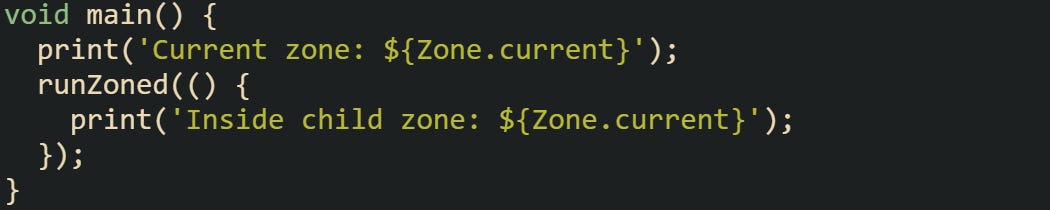
The print statements make it clear that Zone.current changes once code enters a new zone. A root zone acts as the default zone for an isolate, and any child zones can override how certain operations behave for that isolate.
Zones form a hierarchy where each child inherits behavior from its parent unless that behavior is replaced. For example, a parent zone could define how to log errors, while a child zone might replace only how it prints messages. This layered structure is what allows Dart to keep context across asynchronous chains while still offering flexibility. Some applications use nested zones to manage different responsibilities. A logging zone could sit inside a broader metrics zone so that the first captures logs while the second tracks performance. This nesting doesn’t interfere with the async operations themselves, it just changes how the system reacts when those operations complete or fail.
Intercepting Asynchronous Operations
A zone can intercept certain built-in operations such as print, scheduleMicrotask, and uncaught error handling. This happens through a ZoneSpecification object, which defines how those functions behave within that zone.
![void main() { runZoned( () { print('Running inside a customized zone'); Future(() => throw Exception('Something went wrong')); }, zoneSpecification: ZoneSpecification( print: (self, parent, zone, message) { parent.print(zone, '[LOG] $message'); }, handleUncaughtError: (self, parent, zone, error, stack) { parent.print(zone, 'Handled by zone: $error'); }, ), ); }](https://substackcdn.com/image/fetch/$s_!g93w!,f_auto,q_auto:good,fl_progressive:steep/https%3A%2F%2Fsubstack-post-media.s3.amazonaws.com%2Fpublic%2Fimages%2Fd42714b3-6973-4c70-b13c-b5a7af6eb909_1044x557.png "void main() { runZoned( () { print('Running inside a customized zone'); Future(() => throw Exception('Something went wrong')); }, zoneSpecification: ZoneSpecification( print: (self, parent, zone, message) { parent.print(zone, '[LOG] $message'); }, handleUncaughtError: (self, parent, zone, error, stack) { parent.print(zone, 'Handled by zone: $error'); }, ), ); }")
This code redefines how printing and error handling work within that zone. The new print handler prefixes messages with [LOG], while uncaught errors are handled locally rather than passed to the root zone.
Another interception case involves timers or microtasks. Zones can decide how and when a microtask should be scheduled. That ability can be valuable when building testing frameworks or performance profilers.
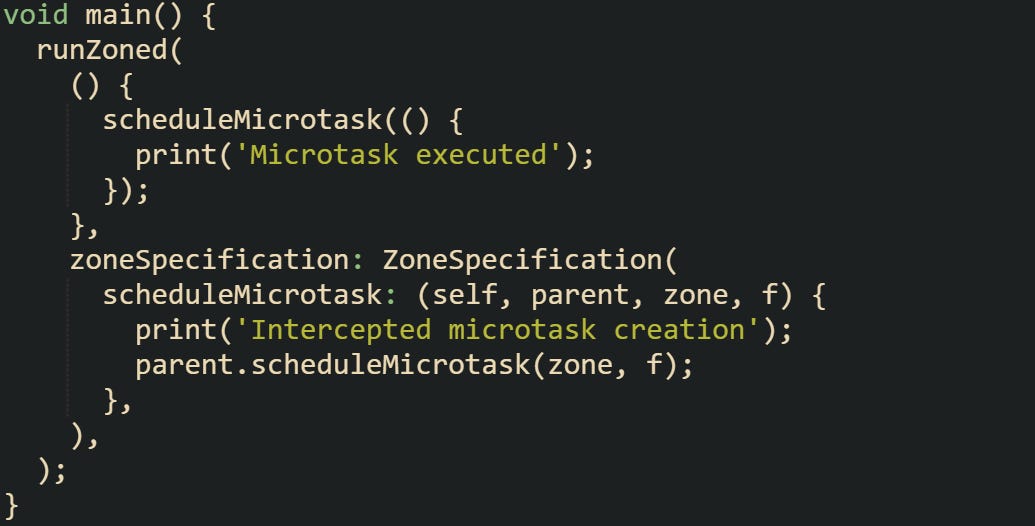
The zone in this code prints a message every time a microtask is scheduled, which can be useful for diagnosing unexpected async scheduling behavior. It’s not changing how the microtask works, just observing it.
Zones can also override how asynchronous callbacks are run. That means it’s possible to record timestamps, trace execution paths, or apply performance measurements each time an async callback executes. This makes the Zone API useful for diagnostics, error tracking, and fine-grained monitoring of asynchronous work.
Interaction with Futures
Futures are a major part of Dart’s async system, and zones are tightly linked with how they behave. When a future is created, it records the current zone, and all of its callbacks such as then, catchError, and whenComplete run within that same zone. This keeps error propagation and timing consistent even when multiple futures are chained together.
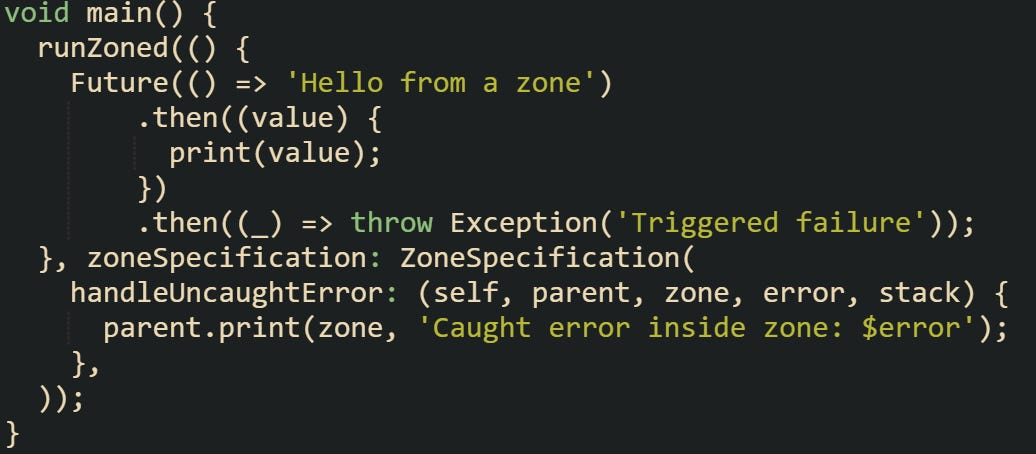
The exception thrown inside the future is caught by the zone’s error handler. This happens because the future was created within that zone, and its async callbacks stay bound to it.
Streams behave in a similar way. When a stream is listened to, it also keeps track of the zone in which the listener was registered. That’s what allows stream errors to flow into the same custom handler that caught future-based exceptions.
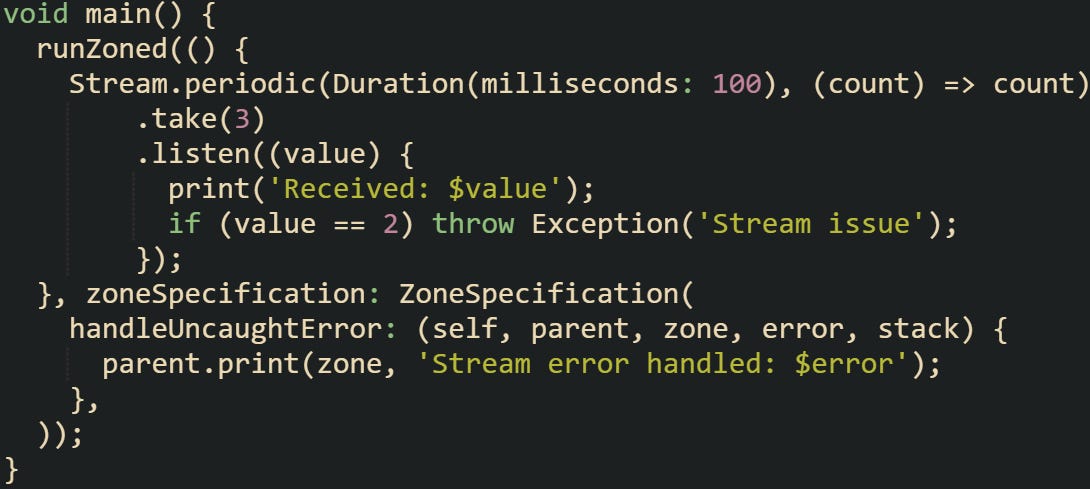
When the stream emits its third value, the exception is captured by the same zone that created the listener. It’s this consistent context that keeps async code predictable across futures, timers, and streams.
Zones don’t change how async primitives like futures or streams work at a technical level. They sit beside them, giving developers a structured way to observe, modify, and handle async activity while keeping the code itself focused on business logic.
Zones and Error Management
Asynchronous code in Dart can make error handling unpredictable if it’s spread across many futures, timers, or streams. Zones give developers a way to catch and handle those errors in a controlled way, even when they occur long after the original call. Instead of relying solely on try-catch blocks that lose scope once asynchronous code is scheduled, zones preserve the context of where that async operation began. They can intercept exceptions, log them, and recover gracefully without bringing down the entire application.
Uncaught Error Handling
One of the most practical uses of zones is catching asynchronous errors that slip past try-catch blocks. Dart provides a function named runZonedGuarded that runs code within a protected zone. Any uncaught errors inside that zone, whether thrown synchronously or asynchronously, are sent to the error handler provided.
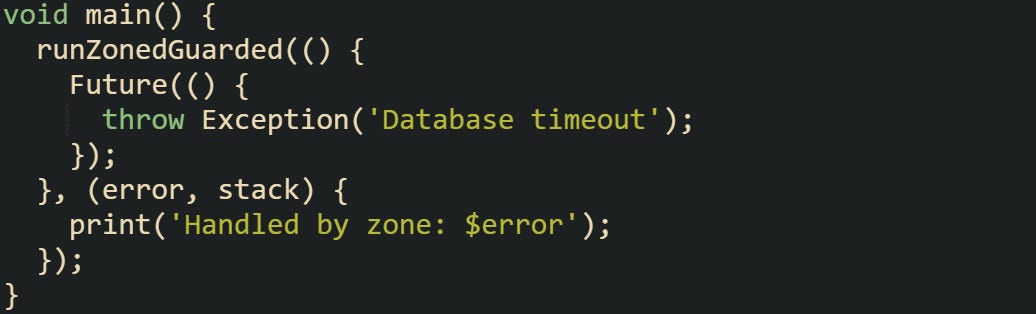
The zone catches the error that would otherwise terminate the program. This gives developers a safer way to isolate asynchronous sections of their code and handle failures without breaking unrelated processes.
Sometimes it’s useful to combine multiple async operations and still keep them under one zone. That way, errors from any of those operations are caught consistently.
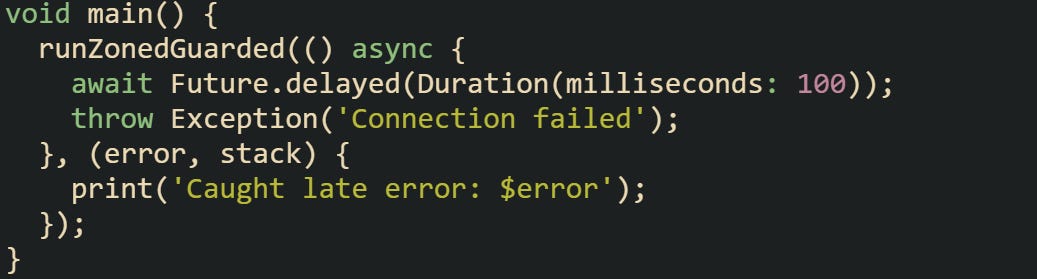
Even with the delay, the error is still caught by the same handler because the future chain stays inside the zone. This behavior is particularly helpful for background tasks, long-running operations, or user interactions where delays are common.
Zones also allow the creation of custom error handling rules. Developers can decide to log errors differently depending on their source or choose to suppress certain exceptions during testing. This flexibility makes zones more than an error-catching mechanism. They can also become a tool for error classification and diagnostics.
Linking Zones with Event Loops
Dart’s event loop is the system that schedules and runs asynchronous operations such as futures, microtasks, and timers. Every async event picked up by the event loop carries the zone context that existed when it was created. When the event is executed, Dart temporarily switches back into that zone before running the callback. This connection between zones and the event loop makes sure that context stays intact across all asynchronous boundaries. Without zones, tracing where an async event started or keeping error handling consistent across different async operations in separate areas of an app would be much harder.
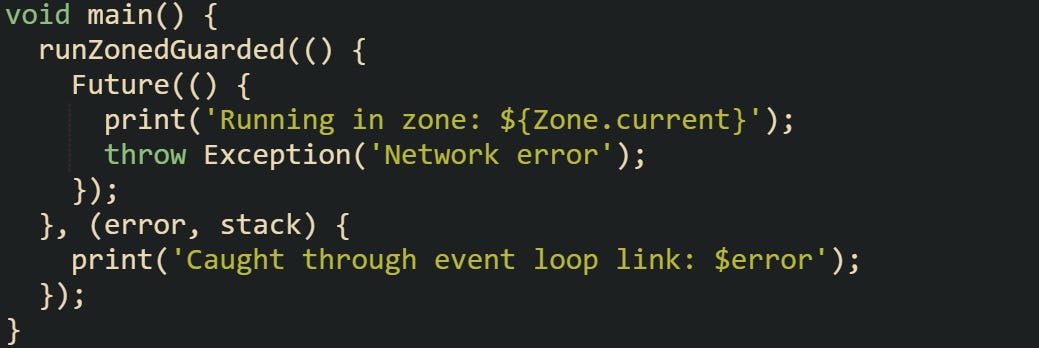
Even though the event loop schedules the future separately, it still remembers the zone it came from. That’s what allows the exception to be intercepted correctly.
This behavior is also critical for maintaining stack trace accuracy. When an async callback runs, the event loop restores the correct zone before executing it, so the error handler receives a trace that accurately points to where the operation began. Tools like Flutter’s async error reporting rely on this mechanism to present meaningful stack traces to developers.
There are also cases where developers intentionally switch zones to isolate parts of their async logic. For example, one zone could handle user interface events, while another deals with data synchronization or caching. This separation allows better control over how timing and error handling behave across different parts of an application.
Real-World Error Tracing
Tracing asynchronous errors without zones can be difficult because async calls break the normal call stack. Zones fix that by keeping context alive across the entire async chain. This means that when an exception occurs several callbacks deep, the stack trace can still show the origin zone and the path the error took.
Consider a chain of async calls that involve reading from a file and making a web request. Without zones, if an error occurs during the web request, it can be difficult to know which operation started it.
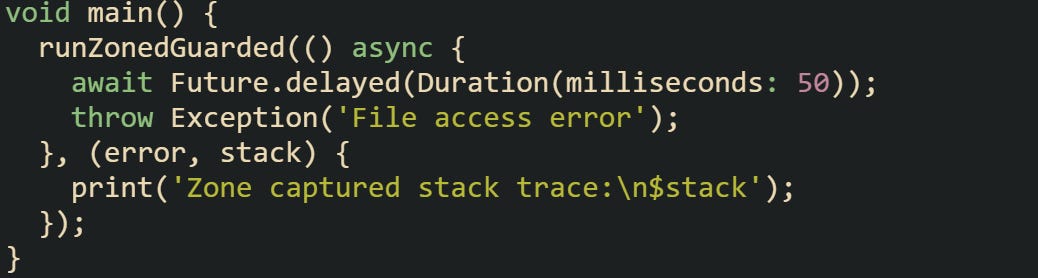
The captured stack trace includes zone context, which helps narrow down where the failure started. When multiple async functions run in sequence or spawn further async tasks, this context preservation becomes invaluable.
Some applications also use zones to record contextual information about ongoing operations. For instance, a server might tag each request with a zone that carries metadata like user ID or request ID. When an error happens, that zone context can include the metadata, allowing logs to show which user or request caused the issue.
![void main() { var requestZone = Zone.current.fork(zoneValues: {'user': 'Alex'}); requestZone.run(() { Future.delayed(Duration(milliseconds: 20), () { var user = Zone.current['user']; throw Exception('Error for user: $user'); }); }); }](https://substackcdn.com/image/fetch/$s_!n3tU!,f_auto,q_auto:good,fl_progressive:steep/https%3A%2F%2Fsubstack-post-media.s3.amazonaws.com%2Fpublic%2Fimages%2F7edf6c6f-97aa-49a4-94b5-704bc319dfcd_1126x314.png "void main() { var requestZone = Zone.current.fork(zoneValues: {'user': 'Alex'}); requestZone.run(() { Future.delayed(Duration(milliseconds: 20), () { var user = Zone.current['user']; throw Exception('Error for user: $user'); }); }); }")
This method gives more meaningful logs by associating asynchronous behavior with runtime data. It turns the Zone API into a practical diagnostic tool rather than a theoretical concept.
Zone-Aware Debugging Tools
Modern Dart and Flutter debugging tools rely heavily on zones to track asynchronous state. Flutter apps are commonly started inside a guarded zone created with runZonedGuarded, which helps capture uncaught errors from the widget tree and asynchronous callbacks. That arrangement prevents many silent failures and lets apps log or report errors and still show Flutter’s error screens instead of crashing outright.
Testing frameworks also benefit from zones. The Dart test package runs every test case inside its own zone, so an unhandled async error in one test doesn’t affect others. This isolation improves stability and makes debugging failed tests much easier.
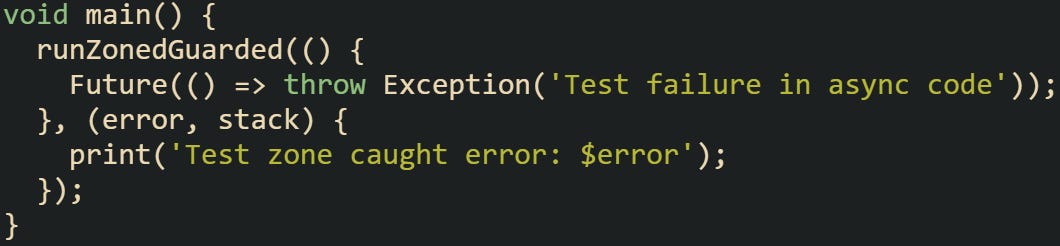
In this case, the error is caught by the test zone, allowing the framework to report it properly without terminating the full suite.
Performance profiling tools also make use of zones. They attach metadata to zones to track execution time and identify which async operations consume the most resources. When combined with event loop tracing, this provides developers with detailed insight into how async work behaves across an entire app. A zone-aware debugger can reconstruct async stack traces that cross multiple futures and timers, revealing how a sequence of asynchronous calls actually played out. Without that linkage, developers would only see partial traces, making diagnosis difficult.
Overall, zones act as the glue that keeps async diagnostics, testing, and error handling unified. They allow Dart’s async system to remain both fast and predictable while giving developers visibility into how errors and timing interact behind the scenes.
Conclusion
Zones give Dart a structured way to manage the flow of asynchronous work. They link the execution of futures, streams, and timers with a context that stays consistent from start to finish. Each async operation carries its zone reference so that errors, print calls, and timing behavior stay tied to the same environment where they began. That connection allows zones to intercept exceptions, coordinate with the event loop, and keep stack traces accurate across asynchronous chains. In practice, this system turns what could be a scattered set of async calls into an organized sequence that can be traced, measured, and managed with precision.